Cloud Integration
1. Introduction
There is a need to integrate billing application on tablet/smartphone/any other device without using local connectivity interface/interfaces. The local interfaces are serial cable, USB cable, Bluetooth, NFC etc. These interfaces may not commonly be available on all devices hence one will have to bring in the support for all possible interfaces. To solve this, one can use cloud-based integration. Cloud based integration defines
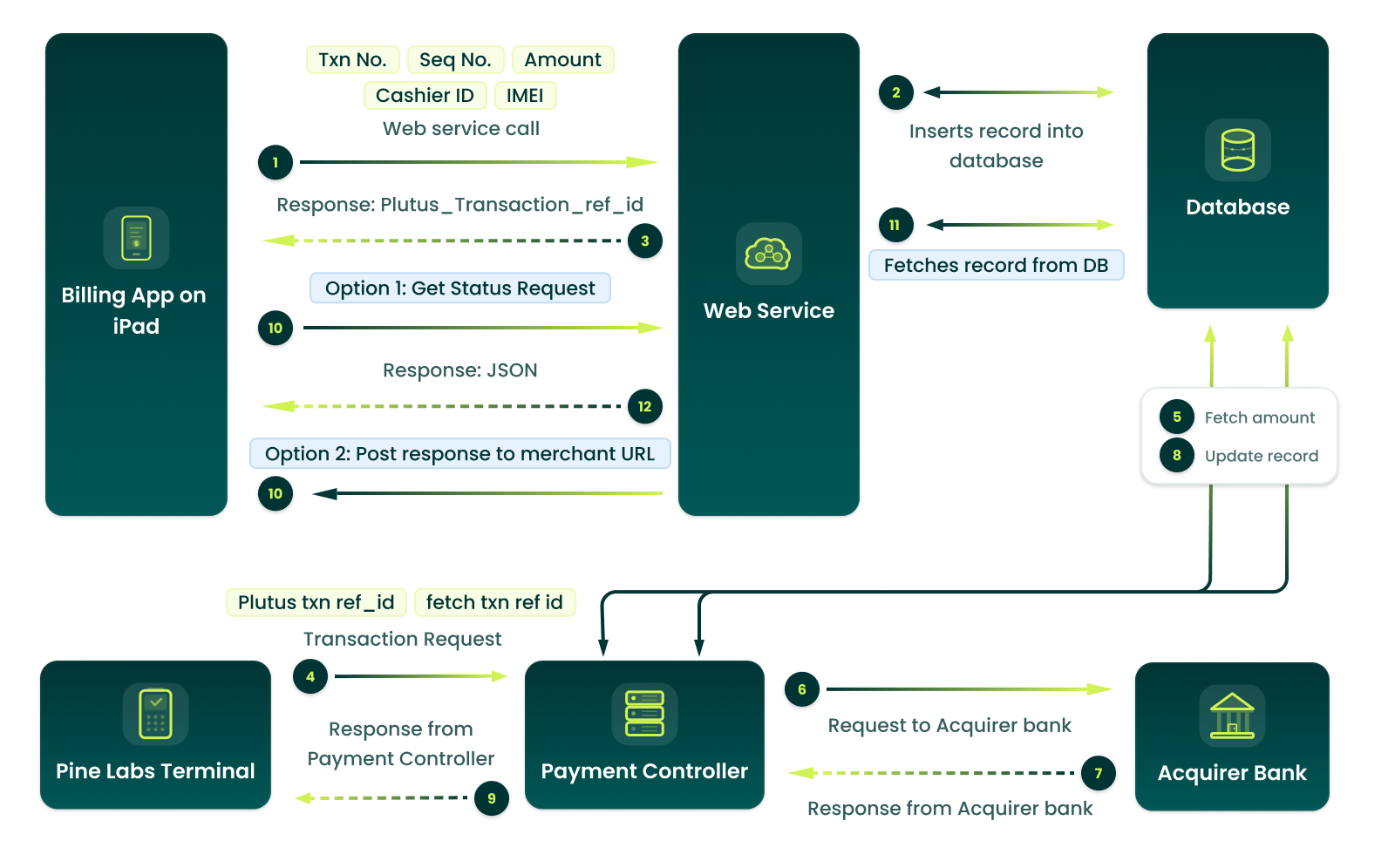
a transaction mapper on the cloud. This mapper is nothing but a hosted service by Pine Labs. Merchant’s Billing application on any device can consume this web-based API to post the transaction data into the mapper. In return a Unique plutus transaction reference ID (PTRID, referred here after) gets generated and sent back to the merchant’s billing application. This PTRID is used on Plutus terminal to accept payment against the transaction in subject. Once payment has been accepted on the Plutus terminal, charge slip gets generated. Merchant’s billing application can use another web API to fetch the transaction status along with relevant details using PTRID.
2. Who can use this document?
This document can be used by developers, architects, product manager who want to carry out integration or understand how cloud-based Plutus integration works.
3. Transaction Flow
This section provides the transaction lifecycle/workflow.
3.1 Capturing bill information
Pine Labs will host RESTful JSON web service and will expose it for integration with merchant POS on tablet/smart phone-based billing application. A given bill can be paid by one payment instrument/tender or can undergo split tendering.
In case if it is split tendering, billing application will send each split line item for that transaction separately with a different sequence number.
UAT URL : https://www.plutuscloudserviceuat.in:8201
METHOD : POST
In response, Payment controller will send a numeric Plutus transaction reference ID to
the billing application corresponding to each transaction number and sequence number
pair. For each split tender of a given transaction Plutus will return a different Plutus
transaction reference ID.
The cashier will proceed for payment using Pine Labs terminal. Details of this are
mentioned in the section below.
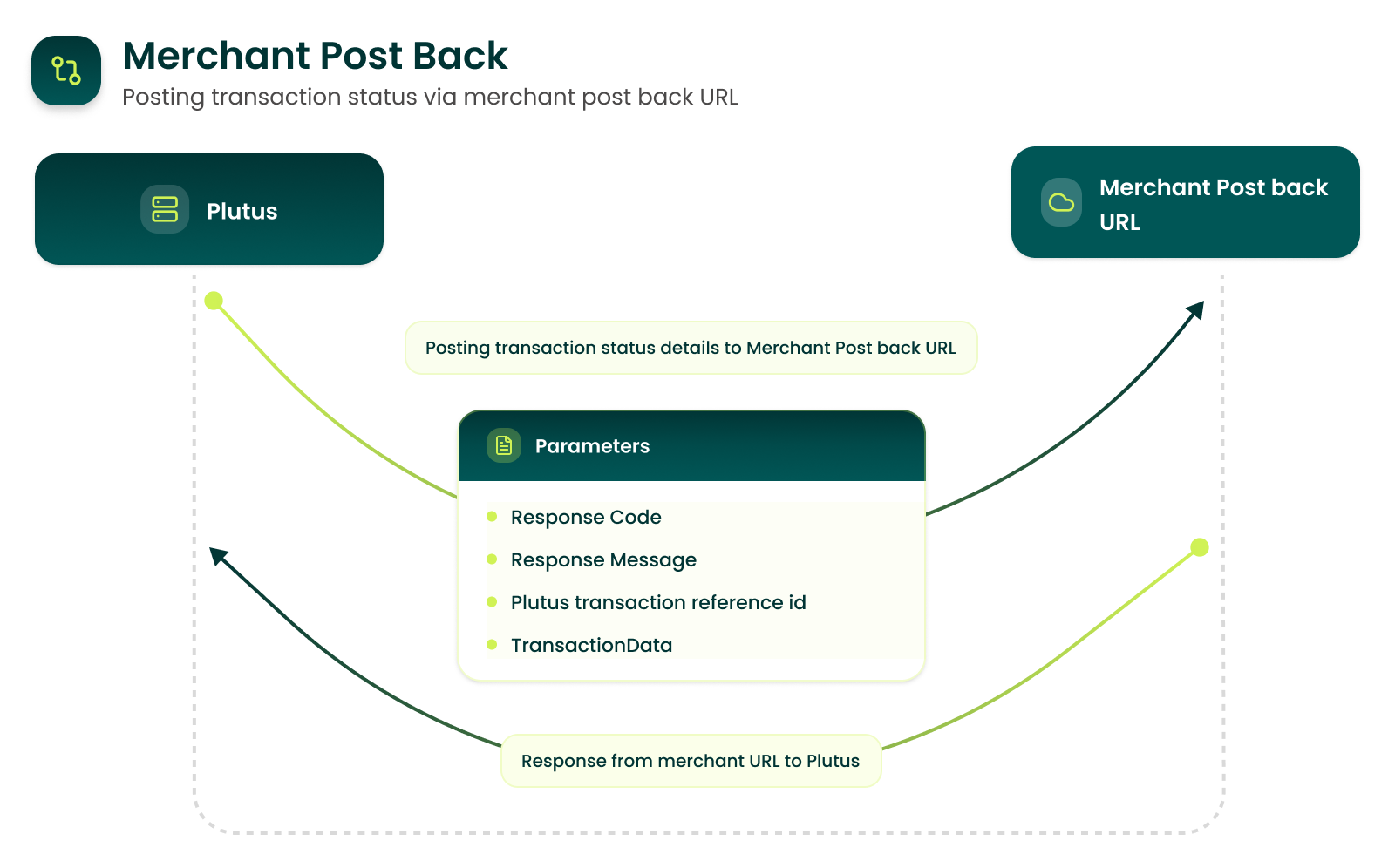
Post payment the transaction status should be fetched by billing application or can optionally be pushed to the Merchant’s server if Merchant wants to expose the hosted service for it. Details of post payment status fetching/update are given below.
3.2 Payment at Pine Labs terminal
- For payment on Pine Labs terminal, there will be two options on Pine
Labs terminal:
- Cashier can enter Plutus transaction reference ID on Pine Labs terminal. Plutus will fetch the amount and pay modes information and prompt on terminal to select payment mode. Transaction will proceed based on selected pay mode. If only one payment mode is there then it will not prompt for Payment mode selection.
- Cashier can fetch all open transaction reference ID for all valid ClientId attached to the POS. He will select the appropriate transaction reference ID and proceed with transaction. If there is only one transaction open then Plutus terminal will prompt “Confirm Amount? xxxxxx.xx”, on confirmation Payment mode will be shown. If Payment mode is fixed to one type, then this screen for payment mode selection will not be shown.
- On receiving response from the acquiring host, transaction status and response will be updated at Pine Labs server. This is the data which will be sent back to billing POS or Merchant site when payment status is inquired. Details of final payment status are given in the next section.
3.3 Update final status to billing application
- Pine Labs will give two options to Merchant Billing Application to update
transaction status:
- Fetch status via API call:
- Input: Plutus transaction reference id.
- Output: Response JSON packet containing transaction details
- Merchant will share a URL for posting back the transaction data. Pine Labs will post transaction data to this URL for given Plutus transaction reference id.
- Fetch status via API call:
- Pine Labs Plutus Terminal will also have a menu option for getting the transaction status based on the Plutus transaction reference ID.
4. Security
- Merchant ID & Security Token Purpose
- Merchant ID and Security Token together form the primary authentication credentials used to validate the merchant during API calls and transaction processing.
- These two values are required for secure communication between the merchant’s billing application and Pine Labs’ backend systems.
- They ensure that only authorized merchants can initiate billing transactions, query payment status, or process settlement-related operations.
- Every API request from the billing system must include these fields for security-level validation.
- Usage Scenario Store ID is used when one billing system is connected to multiple Pine Labs EDC terminals within the same store.
- Usage Scenario Client ID is required when a single billing system connects to a single EDC terminal at a particular store.
5.UploadBilledTransaction API:
5.1 Request Parameters:
| S.No. | Parameter Name | Description | Type | Sample Value | Mandatory(M) Optional(O) |
|---|---|---|---|---|---|
| 1 | TransactionNumber | This field is unique transaction identifier generated by billing Application. | AN | MP234120315123 1234 | M |
| 2 | SequenceNumber | If a single bill is split in multiple transactions, then each transaction will be allotted a sequence number starting with 1. | N | 1 | M |
| 3 | AllowedPaymentMode | 0-Allow all modes enabled on the Plutus terminal. 1-Card 2-Cash 3-Points 4- Wallets 6- Brand EMI 7-Sodexo 8-PhonePe 10- UPI Sale 11-UPI Bharat QR 12-Airtel Bank 20-Bank EMI 21-Amazon Pay via Mobile No., QR and Barcode 22- Sale with/Without Instant Discount 23- Void Cardless Bank EMI (Federal Bank) 24- Void Cardless Brand EMI (Federal Bank) 25- Twid Pay 26- HDFC Flexipay - POS (Pay Later) 27- Pre-Auth 28- Sale Complete 29- Gifticon 30- Magic PIN 35 – NBFC Product Sale 37 - myEMI 39- Epaylater 40 – NTB(New To Business) 40- Void of NTB(New To Business) 42- Zomato Pay 43- QC Redeem 44 - STELLR POR 45 - STELLR POSA 47 - Swiggy Any one of these or combination. (Only these modes will be able to close the transaction provided these are enabled on the POS) |
AN | 1|2 | M |
| 4 | Amount | Amount to be processed in paisa | N | 100000 | M |
| 5 | UserID | Cashier ID | AN | RAVI | C |
| 6 | MerchantID | Will be allotted by Pine Labs to the Merchant. | N | 1234 | M |
| 7 | SecurityToken | Will be allotted by Pine Labs to the Merchant | AN | 70D7509C-0A90-4938-A7F9-DB99B9B841D9 | M |
| 8 | ClientId | Client Id of terminal | N | 318462 | O |
| 9 | StoreId | Store Id of terminal | N | 61607 | C |
| 10 | TotalInvoiceAmount | Total invoice amount in paisa. | N | 500000 | O |
| 11 | AdditionalInfo | Reserved for Future Use. It will be array of JSON objects with Tag and Value pair. | AN | O | |
| 12 | AutoCancelDurationInMinutes | Request canceled automatically if not success on Swipe mechine | N | 5 | O |
| 13 | PaperPOSID | Pine Labs machine client id | N | 12365 | M |
| 14 | PaperPOSTxnOptionToDisplay | N | 2 | M | |
| 15 | PaperPOSTxnIdentifier | N | 2 | M | |
| 16 | OEM ID | Manufacturer Identification for Pinelabs | N | 139 | O for Brand EMI |
| 17 | ProductCode | Product Identification for Pinelabs. ProductCode is the code which uniquely identifies the por to be activated, each product code is a unique identifier for a por | N | 888501310893 | O for Brand EMI MANDATORY for payment mode 44 and 45 |
| 18 | Customer Mobile Number | N | 9643999539 | O | |
| 19 | Customer Email ID | AN | abc@pinelabs.com | O | |
| 20 | OriginalPlutusTransactionReferenceID | Contains PTRN in case of dependent transactions (like Void, sale complete) | N | 12345678 | OriginalPlutusTransactionReferenceID field is mandatory when payment mode is 28. It should contain PTRN of Pre-Auth. |
| 21 | TransactionId | Contains transaction Id of dependent card sale transaction which you want to refund | N | 4295207237 | TransactionId field is mandatory when Transaction type is refund i.e.: 3, It should contain Transaction ID of original sale. |
| 22 | BankCode | UPI Bank Code needs to pass if required acquirer code | N | 2 for hdfc upi, 4 for icici upi, 17 for amazon pay | 1 HDFC BHARAT QR 2 HDFC UPI 3 AXIS UPI 4 ICICI UPI 5 AXIS BHARAT QR 6 HSBC UPI 7 AMEX BHARAT QR 8 ICICI BHARAT QR 9 IDFC UPI 11 AIRTEL BANK 12 AIRTEL UPI 13 SBI BHARAT QR 14 INDUSIND BHARAT QR 15 FEDERAL BHARAT QR 16 PayPal QR 17 AmazonPay UPI 18 ATMONEY 20 YES BANK QR 21 twid 22 CITI UPI 23 RBL UPI 24 KOTAK BANK QR 25 SIB UPI BHARAT QR 26 INDIAN BANK UPI BHARAT QR 27 AMAZON SMART STORE 28 CRED pay 29 IDFC FIRST UPI 30 BOB BANK QR 31 Zomato Pay 52 PHONEPE QR |
| 23 | PBLAutoCancelDurationInMinutes | This will be used only for Pay by Link transaction. PBL Request will automatically cancel after this duration in minutes. Mandatory in case of PBL. | N | 20 | O |
| 24 | EanNumber | EAN number is European Article number used for Brand EMI. | AN | 123456AB | O |
| 25 | NBFCAcquirer | Contains Entity ID of NBFC Issuers | N | 7 | O (Only applicable for NBFC Product and Invoice Finance txns) |
| 26 | ForceCancelOnBack | if a transaction is uploaded with ForceCancelOnBack as true then if back button is pressed on terminal then terminal will force cancel that transaction during execution | B | True/false | O |
| 27 | IsMQTTDisabled | If a transaction is sent with IsMQTTDisabled as true then the notification for that particular transaction will be skipped even if the merchant is enabled for notification. | B | True/false | O |
5.2 Additional Request Parameters for UPI Sale (GST Details)
Below is mandatory parameter for UPI GST QR:
| S.No. | Parameter Name | Description | Type | Sample Value | Mandatory(M) Optional(O) |
|---|---|---|---|---|---|
| 1 | InvoiceDate | This field is used to capture the bill invoice date. | GMT format | 2019-06-11T13:21:50+05:30 | Mandatory for GST QR |
| 2 | Invoicenumber (existing field) | This field is used to capture the bill/ invoice no. | AN | TXN123456 | Mandatory For GST QR |
| 3 | GstIn | The merchant populate GSTIN value under this tag. | String | 09AABCU9603R112 | Mandatory For GST QR |
| 4 | GstBrkUp | It will contain the break-up of GST amount. Break up of GST amount GST:amount| CGST:amount| SGST:amount| IGST:amount| CESS:amount| GSTIncentive:amount| GSTPCT:percentage |
String | CGST:08.45|SGST:08.45 | Mandatory For GST QR |
5.3 Additional Request Parameters for PhonePe (GST Details)
Below is mandatory parameter for PhonePe GST QR:
| S.No. | Parameter Name | Description | Type | Sample Value | Mandatory(M)/Optional(O) |
|---|---|---|---|---|---|
| 1 | InvoiceDate | This field is used to capture the bill invoice date. | GMT format | 2019-06-11T13:21:50+05:30 | Mandatory for GST QR |
| 2 | Invoicenumber (existing field) | This field is used to capture the bill/ invoice no. | AN | TXN123456 | Mandatory for GST QR |
| 3 | GstIn | The merchant populate GSTIN value under this tag. | String | 09AABCU9603R112 | Mandatory for GST QR |
| 4 | GstBrkUp | It will contain the break-up of GST amount. Break up of GST amount GST:amount| CGST:amount| SGST:amount| IGST:amount| CESS:amount| GSTIncentive:amount| GSTPCT:percentage |
String | GST:16.90|CGST:08.45|SGST:08.45 | Mandatory for GST QR |
5.4 Request JSON
5.4.1 Example Request Packet with CLIENTID and STOREID parameters
| S No. | Parameter Name | Description | Type | Sample Value | Mandatory(M) Optional(O) |
|---|---|---|---|---|---|
| 1 | ClientId | Client Id of terminal. This will be provided by PineLabs. | N | 318462 | O – Mandatory for zero click |
| 2 | StoreId | Store Id of terminal. This will be provided by PineLabs. | N | 61607 | C – Mandatory |
JSON packet for success response
JSON
{
“TransactionNumber”: “MP2341203151231234”,
“SequenceNumber”: 1,
“AllowedPaymentMode”: "1 ",
“Amount”: 100000,
“UserID”: “RAVI”,
“MerchantID”: 1234,
“SecurityToken”: “70D7509C-0A90-4938-A7F9-DB99B9B841D9”,
“ClientId”: 1234567890,
"StoreId": 60588,
"AutoCancelDurationInMinutes" : 5,
"TotalInvoiceAmount":500000,
"AdditinalInfo": [
{
"Tag": "1001",
"Value": "XYZ"
},
{
"Tag": "1002",
"Value": "ABC"
}
]
}
5.4.2 Example JSON Request for Brand EMI
JSON
{
"TransactionNumber": "17022002",
"SequenceNumber": "1",
"AllowedPaymentMode": "6",
"StoreId": 04155462,
"Amount": "1500000",
"UserID": "Skava store",
"MerchantID": "2093",
"SecurityToken": "85b93e2c-372b-4b40-95a8-4ead39310bde",
"ClientId": 9910757360,
"oemid": "139",
"ProductCode": "999113972",
"CustomerMobileNumber": "9643999539",
"CustomerEmailID": "farhan.jafri@pinelabs.com",
"SchemeInfo": [
{
"Tag": "RuleID",
"Value": "1048"
},
{
"Tag": "SchemeCode",
"Value": "1629"
},
{
"Tag": "TenureID",
"Value": "06"
} ]
}
5.4.3 Example JSON Request for Paper POS
JSON
{
"TransactionNumber": "MP23412-0400000-007",
"SequenceNumber": "478",
"AllowedPaymentMode": "19",
"StoreId": "61823000",
"Amount": "500",
"MerchantID": "7539",
"SecurityToken": "0ab4a438-4c03-4adb-88e5-aaa949260c8f",
"ClientId": 1845555552,
"AutoCancelDurationInMinutes" : 5,
"PaperPOSID":217306,
"PaperPOSTxnOptionToDisplay":2,
"PaperPOSTxnIdentifier":2
}
5.4.4 Example JSON Request for Bank EMI
JSON
{
"TransactionNumber": "Test-1039",
"SequenceNumber": "144",
"AllowedPaymentMode": "20",
"TotalInvoiceAmount": "600000",
"StoreId": 061607000,
"Amount": "600000",
"UserID": "krish",
"MerchantID": "7263",
"SecurityToken": "19fb1540-6021-4193-9eb2-71ec602ccde5",
"ClientId": 2791182,
"SchemeInfo" : [
{
"Tag" : "SchemeCode",
"Value" : "6296"
},
{
"Tag" : "RuleID",
"Value" : "4570"
},
{
"Tag" : "TenureID",
"Value" : "6"
}
]
}
5.4.5 Example JSON Request for Amazon Pay UPI
JSON
{
"TransactionNumber": "MP23412-0400000-007",
"SequenceNumber": "478",
"AllowedPaymentMode": "19",
"StoreId": "61823000",
"Amount": "500",
"MerchantID": "7539",
"SecurityToken": "0ab4a438-4c03-4adb-88e5-aaa949260c8f",
"ClientId": 1845555552,
"AutoCancelDurationInMinutes" : 5,
"PaperPOSID":217306,
"PaperPOSTxnOptionToDisplay":2,
"PaperPOSTxnIdentifier":2
}
5.4.6 Example JSON Request For UPI Sale (with GST)
JSON
{
"TransactionNumber": "SEQ-539",
"SequenceNumber": 1,
"AllowedPaymentMode": "10",
"GstIn":"09AABCU9603R112",
"GstBrkUp":" CGST:08.45|SGST:08.45",
"InvoiceDate":"2019-06-11T13:21:50+05:30",
"invoicenumber": " TXN123456",
"TotalInvoiceAmount": "100",
"Amount": "100",
"AutoCancelDurationInMinutes" : 120,
"UserID": "RAVI",
"MerchantID": 11866,
"SecurityToken": "1b162a3a-7412-4fdd-8564-7d58c6d91b79",
"StoreId": 1201056000,
"ClientId": 2791182,
}
5.4.7 Example JSON Request For (ICICI, HDFC, Federal Bank) Cardless Bank EMI Sale
JSON
{
"TransactionNumber": "Test-1039",
"SequenceNumber": "146",
"AllowedPaymentMode": "23",
"TotalInvoiceAmount": "600000",
"StoreId": 159640000,
"Amount": "600000",
"UserID": "krish",
"MerchantID": "40605",
"SecurityToken": "8c5d3f44-0a8a-4a3e-a530-f97cba15af48",
"ClientId": "2791182"
}
5.4.8 Example JSON Request For (ICICI, HDFC, Federal Bank) Cardless Brand EMI Sale
JSON
{
"TransactionNumber": "6451000662",
"SequenceNumber": 32364,
"AllowedPaymentMode": "24",
"invoicenumber": "KK45613",
"TotalInvoiceAmount": "17000",
"StoreId": 159640000,
"Amount": "17000",
"UserID": "RAVI",
"MerchantID": "40605",
"SecurityToken": "8c5d3f44-0a8a-4a3e-a530-f97cba15af48",
"ClientId": 2791182,
"oemid" :"235",
"productcode":"151214",
"SerialNumberofProductSold" : "2791182",
"CustomerMobileNumber" : "7507036654",
"CustomerEmailID" : "krishna.kant@pinelabs.com"
}
5.4.9 Example JSON Request For Federal Bank – Void Cardless Bank EMI
JSON
{
"TransactionNumber": "Test-10560",
"SequenceNumber": "44",
"AllowedPaymentMode": "23",
"TotalInvoiceAmount": "200000",
"StoreId": 06160700,
"CustomerMobileNumber" : "9560312525",
"Amount": "200000",
"UserID": "krish",
"MerchantID": "7263",
"SecurityToken": "19fb1540-6021-4193-9eb2-71ec602ccde5",
"TxnType" : 1,
"OriginalPlutusTransactionReferenceID" : 6103,
"ClientId": 2791182
}
5.4.10 Example JSON Request For Federal Bank – Void Cardless Brand EMI
JSON
{
"TransactionNumber": "Test-10560",
"SequenceNumber": "44",
"AllowedPaymentMode": "24",
"TotalInvoiceAmount": "120000",
"StoreId": 061607000,
"CustomerMobileNumber" : "9560312525",
"Amount": "120000",
"UserID": "krish",
"MerchantID": "7263",
"SecurityToken": "19fb1540-6021-4193-9eb2-71ec602ccde5",
"TxnType" : 1,
"OriginalPlutusTransactionReferenceID" : 237967,
"ClientId": 2791182
}
5.4.11 Example JSON Request For HDFC Flexipay - POS (Pay Later)
JSON
{
"TransactionNumber": "Test-10560",
"SequenceNumber": "44",
"AllowedPaymentMode": "26",
"TotalInvoiceAmount": "300000",
"StoreId": 061607000,
"CustomerMobileNumber" : "9560312525",
"Amount": "300000",
"UserID": "krish",
"MerchantID": "7263",
"SecurityToken": "19fb1540-6021-4193-9eb2-71ec602ccde5",
"ClientId": "2791182"
}
5.4.12 Example JSON Request for linked refund of card sale transaction
JSON
{
"TransactionNumber": "MP2341203151231234",
"SequenceNumber": 1,
"AllowedPaymentMode": "1",
"Amount": 100000, "UserID": "RAVI",
"MerchantID": 1234,
"SecurityToken": "70D7509C - 0A90 - 4938 - A7F9 - DB99B9B841D9",
"ClientId": 1234567890,
"StoreId": 60588,
"AutoCancelDurationInMinutes": 5,
"TotalInvoiceAmount": 500000, "AdditionalInfo": [{
"Tag": "1001",
"Value": "XYZ"
}, {
"Tag": "1002",
"Value": "ABC"
}
],
"TxnType": 3,
"TransactionId":"4295207237"
}
5.4.13 Example JSON request for myEMI transaction
JSON
{
"TransactionNumber": "SEQ-AJAY_MAR_0025",
"SequenceNumber": 1,
"AllowedPaymentMode": "37",
"ClientId": 1111255513,
"UserID": "RAVI",
"MerchantID": "30090",
"SecurityToken": "52dd0401-2db0-4f2f-8c0e-d71171688182",
"TotalInvoiceAmount": "1000",
"StoreId": 225598000,
"Amount": "250000",
"TxnType": 0,
"CustomerMobileNumber": "9886899363",
"CustomerEmailID": "aman.shukla@pinelabs.com",
"invoicenumber": "Abc4569"
}
| S. No. | Parameter Name | Description | Type | Sample Value | Mandatory(M) Optional(O) |
|---|---|---|---|---|---|
| 1 | IsTipExpected | This field indicates where Tip will be asked on terminal or not | Bit | 1 - Yes 0 - No |
O |
| 2 | TipAmount | This field indicates the tip amount | N | 5000 | O |
5.4.14 Example JSON request for Card/UPI Sale With Tip transaction
Request
{
"TransactionNumber": "KamalUPI_0111",
"SequenceNumber": 1,
"AllowedPaymentMode": "10",
"GstIn":"",
"InvoiceDate":"2019-06-11T13:21:50+05:30",
"invoicenumber": "CLOUD152",
"TotalInvoiceAmount": "18000",
"Amount": "18000",
"ItemCategoryCodeForInstantDiscount": "1",
"AutoCancelDurationInMinutes" : 5,
"TxnType" : 0,
"OriginalPlutusTransactionReferenceID" : "247549",
"UserID": "RAVI",
"MerchantID": 7263,
"SecurityToken": "a7b1d870-8d62-42be-ab1f-6dc22d1c0bd0",
"StoreId": 61607000,
“ClientId”: 11116125551,
"ItemCategoryCode": "1",
"oemid" :"79",
"productcode":"114182",
"SerialNumberofProductSold" : "9020271T",
"CustomerMobileNumber" : "8826897840",
"CustomerEmailID" : "aman.shukla@pinelabs.com",
"IsTipExpected" : "1/0",
"TipAmount" : "5000"
}
5.4.15 Example JSON request for Pay By Link transaction
JSON
{
"TransactionNumber": "Brand_EMI_280988235235236262",
"SequenceNumber": 411,
"AllowedPaymentMode": "6",
"MerchantID": "6727",
"SecurityToken": "f14c99e5-149c-44c6-9046-224026a871b5",
"ClientId": 111000155890,
"StoreId": 61078001,
"Amount": "990000",
"AutoCancelDurationInMinutes": 10,
"PBLAutoCancelDurationInMinutes": 20,
"TxnType": 0 , "UserID": "test",
"TotalInvoiceAmount": "100",
"ItemCategoryCodeForInstantDiscount": "0",
"oemid": "244",
"productcode": "45347845",
"SerialNumberofProductSold" :"1234567890",
"CustomerMobileNumber": "8789967057",
"CustomerEmailID": "test@pinelabs.com",
"invoicenumber": "TEST244561"
}
5.4.16 Example JSON request for Rewards transaction
JSON
{
"TransactionNumber": "SM-CBIS-2024-001",
"SequenceNumber": "1",
"AllowedPaymentMode": "3",
"invoicenumber": "87654321",
"TotalInvoiceAmount": "10000",
"StoreId": 122178300,
"ClientId": 12984636,
"Amount": "10000",
"MerchantID": "29946",
"SecurityToken": "a12f588c-3158-4527-b6fa-ebaf1fbcbfa1",
"TxnType": 0
}
5.4.17 Example JSON request for NTB (New To Business) Cardless Brand EMI Sale transaction
JSON
{
"TransactionNumber": "6451000662",
"SequenceNumber": 32364,
"AllowedPaymentMode": "40",
"invoicenumber": "KK45613",
"TotalInvoiceAmount": "17000",
"StoreId": 159640000,
"Amount": "17000",
"UserID": "RAVI",
"MerchantID": "40605",
"SecurityToken": "8c5d3f44-0a8a-4a3e-a530-f97cba15af48",
"ClientId": 2791182,
"oemid" :"235",
"productcode":"151214",
"SerialNumberofProductSold" : "2791182",
"CustomerMobileNumber" : "7507036654",
"CustomerEmailID" : "krishna.kant@pinelabs.com"
}
5.4.18 Example JSON request for EPaylater transaction
JSON
{
"TransactionNumber": "Test-1039",
"SequenceNumber": "146",
"AllowedPaymentMode": "39",
"TotalInvoiceAmount": "600000",
"StoreId": 159640000,
"Amount": "600000",
"UserID": "krish",
"MerchantID": "40605",
"SecurityToken": "8c5d3f44-0a8a-4a3e-a530-f97cba15af48",
"ClientId": 2791182
}
Note : for void , request and response structure is same like cardless brand emi just use payment mode = 40 for NTB Void and Epaylater does not support void txn.
5.4.19 Example JSON request for Void NTB Cardless Brand EMI Sale transaction
JSON
{
"TransactionNumber": "Test-10560",
"SequenceNumber": "44",
"AllowedPaymentMode": "40",
"TotalInvoiceAmount": "120000",
"StoreId": 61607000,
"CustomerMobileNumber" : "9560312525",
"Amount": "120000",
"UserID": "krish",
"MerchantID": "7263",
"SecurityToken": "19fb1540-6021-4193-9eb2-71ec602ccde5",
"TxnType" : 1,
"OriginalPlutusTransactionReferenceID" : 237967,
"ClientId": 2791182
}
5.4.20 Example JSON request for Stellr POR transaction
JSON
{
"TransactionNumber":"transaction2ab1",
"SequenceNumber":1,
"AllowedPaymentMode":44,
"StoreId":9804149,
"Amount":139900,
"MerchantID":15029,
"SecurityToken":"d4549608-3443-4a40-8d6b-6da89f65aa0c",
"ClientId": 2791182,
"TxnType":0,
"OriginalPlutusTransactionReferenceID":null,
"ProductCode":"888501310893",
"invoicenumber": "87654321"
}
5.4.21 Example JSON request for Stellr POSA transaction
JSON
{
"TransactionNumber":"transaction2ab1",
"SequenceNumber":1,
"AllowedPaymentMode":45,
"StoreId":9804149,
"Amount":139900,
"MerchantID":15029,
"SecurityToken":"d4549608-3443-4a40-8d6b-6da89f65aa0c",
"ClientId": 2791182,
"TxnType":0,
"OriginalPlutusTransactionReferenceID":null,
"ProductCode":"888501310893", // Optional
"invoicenumber": "87654321" // Optional
}
5.4.22 Example JSON request for Stellr POSA/POR Void transaction
JSON
{
"TransactionNumber":"transaction2ab1",
"SequenceNumber":1,
"AllowedPaymentMode":45,
"StoreId":9804149,
"Amount":139900,
"MerchantID":15029,
"SecurityToken":"d4549608-3443-4a40-8d6b-6da89f65aa0c",
"ClientId": 2791182,
"TxnType":1,
"OriginalPlutusTransactionReferenceID":339757,
"ProductCode":"888501310893", // Optional
"invoicenumber": "87654321" //Optional
}
5.4.23 Example JSON request for Zomato Pay transaction
Zomato, a leading Food delivery company in India wants to integrate with PineLabs for their Restaurant Dining Payment experience. Objective of this integration is to solve the transaction reconciliation once the transaction is completed on Zomato app.
Non-QR Product Flow:Integrated Journey:
- Merchant creates the bill in a restaurant post the dining experience.
- Cashier brings the bill receipt to customer.
- Customer opens the merchant store page on Zomato.
- Customer completes the payment on Zomato app with some discount applied.
- There is a 4 digit auth code which gets generated on Zomato app. This code is unique for that store on a given date.
- Merchant selects the Zomato Gold tender on Billing machine.
- PL backend will open up the Zomato GOLD on PL POS with amount and bill invoice number pre-filled.
- Cashier takes the 4 digit code from customer and enters on the PL POS device on the Zomato PAY tender already opened up.
- PL POS sends this code to Zomato for verification.
- Zomato verifies the transaction details and sends back the response saying the transaction is present at their end.
- PL POS will display a message saying Transaction Verified on POS.
- PL POS will display the charge slip.
- PL POS will send the response with amount, bill number and 4-digit auth code back to the billing software to be mapped.
- Transaction gets completed on billing POS.
JSON
{
"TransactionNumber": "Z_00002",
"SequenceNumber": 1,
"AllowedPaymentMode": "42",
"GstIn":"",
"InvoiceDate":"2019-06-11T13:21:50+05:30",
"invoicenumber": "Sunil152",
"TotalInvoiceAmount": "201450",
"Amount": "201450",
"ItemCategoryCodeForInstantDiscount": "1",
"TxnType" : 0,
"OriginalPlutusTransactionReferenceID" : "247549",
"UserID": "RAVI",
"MerchantID": 7263,
"SecurityToken": "a7b1d870-8d62-42be-ab1f-6dc22d1c0bd0",
"StoreId": 61607000,
"ClientId": 111161255512,
"CustomerMobileNumber" : "8826897840",
"CustomerEmailID" : "aman.shukla@pinelabs.com" ,
"AuthCode" : "6291"
}
Integrated Journey:
- Merchant creates the bill in a restaurant post the dining experience.
- Cashier brings the bill receipt to customer.
- Merchant selects the Zomato Gold tender on Billing machine.
- PL backend will open up the Zomato GOLD on PL POS with amount.
- QR code will be displayed on terminal.
- Customer scans the QR code and will be routed to Zomato Pay app.
- Customer completes the payment on Zomato app with some discount applied.
- Zomato sends a callback to Pinelabs saying the transaction is present at their end.
- PL POS will display the charge slip.
- PL POS will send the response with amount, bill number and 4-digit auth code back to the billing software to be mapped.
- Transaction gets completed on billing POS.
If Pay_Mode is 5, then Auth_Code flow will work, and Auth_Code passed in request will be considered. If Pay_Mode is 2, then QR flow will work, if Auth_Code is passed in request, transaction will be declined.
Request JSON
{
"TransactionNumber": "Z_00002",
"SequenceNumber": 1,
"AllowedPaymentMode": "42",
"GstIn":"",
"InvoiceDate":"2019-06-11T13:21:50+05:30",
"invoicenumber": "Sunil152",
"TotalInvoiceAmount": "201450",
"Amount": "201450",
"ItemCategoryCodeForInstantDiscount": "1",
"TxnType" : 0,
"OriginalPlutusTransactionReferenceID" : "247549",
"UserID": "RAVI",
"MerchantID": 7263,
"SecurityToken": "a7b1d870-8d62-42be-ab1f-6dc22d1c0bd0",
"StoreId": 61607000,
"ClientId": 11116125551212,
"CustomerMobileNumber" : "8826897840",
"CustomerEmailID" : "aman.shukla@pinelabs.com" ,
"AuthCode" : "6291"
}
5.4.24 Example JSON request for Brand EMI with EAN number transaction
JSON
{
"TransactionNumber": "MP23412-0400000-107",
"SequenceNumber": "6",
"AllowedPaymentMode": "6",
"TotalInvoiceAmount": "650000",
"StoreId": 1234165000,
"Amount": "650000",
"UserID": "cloudAas",
"MerchantID": "35200",
"SecurityToken": "19c26bf5-b595-44f1-bf9b-bdc304defb7a",
"TxnType":"0",
"ClientId":12345456,
"CustomerMobileNumber":"7876846517",
"EanNumber":"123456"
}
NBFC Integration – IDFC, Zest Money, TVS ETC
| S.No. | Parameter Name | Description | Type | Sample Value | Mandatory(M) Optional(O) Denotes details provided by merchant (C) |
|---|---|---|---|---|---|
| 21 | NBFCAcquirer | Contains Entity ID of NBFC Issuers | N | 7 | O (Only applicable for NBFC Product and Invoice Finance txns) |
5.4.25 Example JSON request for NBFC transaction
| ENTITY_ID | NAME |
|---|---|
| 1 | BAJAJ FINANCE LIMITED |
| 3 | IDFC FIRST BANK |
| 5 | MONEYTAP |
| 6 | INDIABULLS |
| 7 | ZESTMONEY |
| 8 | MAHINDRA FINANCE |
| 11 | HOME_CREDIT |
| 12 | KREDIT_BEE |
| 13 | TVS Credit |
| 16 | LIQUILOANS |
JSON
{
"AllowedPaymentMode": "35",
"Amount": "5000000",
"AutoCancelDurationInMinutes": 100,
"CustomerEmailID": "ashish.kumar04@pinelabs.com",
"CustomerMobileNumber": "9124322480",
"GstBrkUp": "GST:19000.00|CGST:08000.45|SGST:08000.45|CESS:01000.00|IGST:1000.00",
"GstIn": "",
"ClientId": 123456789,
"InvoiceDate": "2019-06-11T13:21:50+05:30",
"ItemCategoryCodeForInstantDiscount": "1",
"MerchantID": 35243,
"StoreId": 1234290001,
"NBFCAcquirer": "13",
"OriginalPlutusTransactionReferenceID": "247068",
"SecurityToken": "80384e84-dbdc-44f8-97ea-e176cb76273c",
"SequenceNumber": 1,
"SerialNumberofProductSold": "43FIZ-R1#21H04#006078",
"TotalInvoiceAmount": "800000",
"TransactionNumber": "Ashish_34_56",
"TxnType": 0,
"UserID": "Ashish",
"invoicenumber": "51158432832",
"productcode": "45348932"
}
5.4.26 Example JSON request for Insurance and CCF transaction
JSON
{
"TransactionNumber": "17022002",
"SequenceNumber": "1",
"AllowedPaymentMode": "6",
"StoreId": 04155462,
"Amount": "1500000",
"UserID": "Skava store",
"MerchantID": "2093",
"SecurityToken": "85b93e2c-372b-4b40-95a8-4ead39310bde",
"ClientId": 9910757360,
"oemid": "139",
"ProductCode": "999113972",
"CustomerMobileNumber": "9643999539",
"CustomerEmailID": "farhan.jafri@pinelabs.com",
"SchemeInfo": [
{
"Tag": "RuleID",
"Value": "1048"
},
{
"Tag": "SchemeCode",
"Value": "1629"
},
{
"Tag": "TenureID",
"Value": "06"
} ]
}
5.4.27 Example JSON request for ICB on UPI transaction
JSON
{
"transactionNumber": "Brand_EMI_Cloud_994005",
"sequenceNumber": 1,
"allowedPaymentMode": "6",
"merchantID": "22899",
"securityToken": "19eea131-ddf4-41c0-9344-f3bdf18f1bc0",
"ClientId": 480000000559,
"StoreId": 1213034000,
"amount": "700000",
"autoCancelDurationInMinutes": 10,
"txnType": 0,
"oemid": "1130517115101865",
"productcode": "27305",
"serialNumberofProductSold": "brandEmi123",
"customerMobileNumber": "9999999999",
"invoicenumber": "invoice123",
"additionalProperties": {}
}
5.4.28 Example JSON request for Void of ICB on UPI transaction
JSON
{
"transactionNumber": "CBI_Brand_EMI_765996",
"sequenceNumber": 1,
"allowedPaymentMode": "6",
"merchantID": "22899",
"securityToken": "19eea131-ddf4-41c0-9344-f3bdf18f1bc0",
"ClientId": 480000000559,
"StoreId": 1213034000,
"amount": "900000",
"autoCancelDurationInMinutes": 10,
"txnType": 1,
"originalPlutusTransactionReferenceID": "248675",
"productcode": "45347845",
"additionalProperties": {}
}
5.4.29 Example JSON request for QC Redeem transaction
JSON
{
"TransactionNumber":"transaction2ab1",
"SequenceNumber":1,
"AllowedPaymentMode":43,
"StoreId":9804149,
"Amount":139900,
"MerchantID":15029,
"SecurityToken":"d4549608-3443-4a40-8d6b-6da89f65aa0c",
"ClientId": 2791182,
"TxnType":0,
"invoicenumber": "87654321"
}
5.4.30 Example JSON request for CARD transaction
JSON
{
"TransactionNumber":"123456",
"SequenceNumber":1,
"AllowedPaymentMode":"1",
"StoreId":1298028196,
"Amount":"100",
"UserID":"Pinelab",
"MerchantID":220580,
"SecurityToken":"0a15f5a1-230d-45d1-b5f0-fb5d80928c32",
"ClientId":2791182,
"AutoCancelDurationInMinutes":2
}
5.4.31 Example JSON request for Bharat QR (BQR) transaction
JSON
{
"TransactionNumber":"14253638",
"SequenceNumber":1,
"AllowedPaymentMode":"11",
"StoreId":1298028196,
"Amount":"100",
"UserID":"Pinelab",
"MerchantID":220580,
"SecurityToken":"0a15f5a1-230d-45d1-b5f0-fb5d80928c32",
"ClientId":2791182,
"AutoCancelDurationInMinutes":2
}
5.4.32 Example JSON request for Void of Brand transaction
JSON
{
"TransactionNumber": "MP23412-0500000-019",
"SequenceNumber": "67",
"AllowedPaymentMode": "6",
"TotalInvoiceAmount": "650000",
"StoreId": 1234165000,
"Amount": "650000",
"UserID": "cloudAas",
"MerchantID": "35200",
"SecurityToken": "19c26bf5-b595-44f1-bf9b-bdc304defb7a",
"TxnType":"1",
"ClientId":123454,
"OriginalPlutusTransactionReferenceID":"343049",
"CustomerMobileNumber":"7876846517",
"OemId":"79",
"EanNumber":"asdf"
}
5.5 Response Parameters:
| S. No. | Parameter Name | Description | Type |
|---|---|---|---|
| 1 | ResponseCode | 0 in case of Success Non 0 means failure | N |
| 2 | ResponseMessage | Description of error in case of Declined otherwise “APPROVED” | AN |
| 3 | PlutusTransactionReferenceID | Unique numeric Value linked with the transaction. | N |
| 4 | AdditionalInfo | Reserved for Future Use. It will be array of JSON objects with Tag and Value pair. | AN |
5.5.1 Response Example
JSON packet for Success Response
JSON
{
"ResponseCode": 0,
"ResponseMessage": "APPROVED",
"PlutusTransactionReferenceID": 501
}
5.5.2 JSON response packet for declined transaction
JSON
{ "ResponseCode": 1, "ResponseMessage": "INVALID SOURCE IMEI/DEVICE", "PlutusTransactionReferenceID": 0 }
6. GetStatus API:
Merchant billing Application will be able to get the status of performed transaction by using this API.
6.1 Request Parameters:
| S. No. | Parameter | Description | Type | Sample Value | Mandatory(M)/Optional(O) |
|---|---|---|---|---|---|
| 1 | MerchantID | Will be allotted by Pine Labs to Merchant. | N | 1234 | M |
| 2 | SecurityToken | Will be allotted by Pine Labs to Merchant. | AN | 70D7509C-0A90-4938- A7F9-DB99B9B841D9 | M |
| 3 | ClientId | ClientId of devices from where the request has originated. | AN | 123456789009876 | C |
| 4 | UserID | Cashier ID. | AN | RAVI | C |
| 5 | StoreId | Merchant store code registration ID | AN | 123015 | M |
| 6 | PlutusTransactionReferenceID | Unique numeric Value linked with the transaction received from Pine Labs in original request. | N | 123456 | M |
| 7 | TransactionNumber | Unique transaction identifier generated by billing Application for original transaction. This is an optional field, if sent will be validated against original transaction. | AN | MP2341203151231234 | O |
| 8 | AdditionalInfo | Reserved for Future Use. It will be array of JSON objects with Tag and Value pair. | AN | O |
Request JSON Example
6.1.1 Request JSON For Retail Stores
JSON
{
“MerchantID”: "1234",
“SecurityToken”: “70D7509C-0A90-4938-A7F9-DB99B9B841D9”,
"ClientID": “123456789012345”,
“UserID”: “RAVI”,
"StoreID": "12301001",
"PlutusTransactionReferenceID": 501
}
6.2 Response Parameter:
| S No. | Parameter | Description | Type |
|---|---|---|---|
| 1 | ResponseCode | 0 in case of Success Non 0 means failure. | N |
| 2 | ResponseMessage | Description of error in case of Declined otherwise “APPROVED”. | AN |
| 3 | PlutusTransactionReferenceID | Unique numeric Value linked with the transaction. | N |
| 4 | TransactionData | It will be array of JSON objects with Tag and Value pair. | AN |
Response JSON Example
6.2.1 JSON packet for Success Response
JSON
{
"ResponseCode": 0,
"ResponseMessage": "TXN APPROVED",
"PlutusTransactionReferenceID": 20179066,
"TransactionData":[
{
"Tag": "TID",
"Value": "f7874878"
},
{
"Tag": "MID",
"Value": "120000123123123"
},
{
"Tag": "PaymentMode",
"Value": "CARD"
},
{
"Tag": "Amount",
"Value": "351"
},
{
"Tag": "BatchNumber",
"Value": "19"
},
{
"Tag": "RRN",
"Value": "000792514130"
},
{
"Tag": "ApprovalCode",
"Value": "849035"
},
{
"Tag": "Invoice Number",
"Value": "46"
"Tag": "Card Number",
"Value": "************5664"
},
{
},
{
"Tag": "IsPartialPayByPointsTxn",
"Value": "True"
},
{
"Tag": "PartialAmountByCard",
"Value": "0"
},
{
"Tag": "PartialAmountByReward",
"Value": "30000"
}
{
"Tag": "Expiry Date",
"Value": "XXXX"
},
{
"Tag": "Card Type",
"Value": "VISA"
},
{
"Tag": "Acquirer Id",
"Value": "20"
},
{
"Tag": "Acquirer Name",
"Value": "FEDERAL"
},
{
"Tag": "Transaction Date",
"Value": "26022020"
},
{
"Tag": "Transaction Time",
"Value": "135456"
},
{
"Tag": "AmountInPaisa",
"Value": "35100"
},
{
"Tag": "OriginalAmount",
"Value": "35100"
},
{
"Tag": "FinalAmount",
"Value": "35100"
} ]
}
6.2.2 Response Example of PhonePe
JSON
{
"ResponseCode": 0,
"ResponseMessage": "TXN APPROVED",
"PlutusTransactionReferenceID": 28757,
"TransactionData":[
{
"Tag": "TID",
"Value": "0"
},
{
"Tag": "MID",
"Value": "0"
},
{
"Tag": "PaymentMode",
"Value": "PHONEPE"
},
{
"Tag": "Amount",
"Value": "1"
},
{
"Tag": "BatchNumber",
"Value": "9162"
},
{
"Tag": "RRN",
"Value": ""
},
{
"Tag": "ApprovalCode",
"Value": ""
},
{
"Tag": "Invoice Number",
"Value": "105"
},
{
"Tag": "Card Number",
},
{
"Value": ""
},
{
"Tag": "Expiry Date",
"Value": ""
},
{
"Tag": "Card Type",
"Value": ""
},
{
"Tag": "Acquirer Id",
"Value": "00"
},
{
"Tag": "Acquirer Name",
"Value": "WALLET"
},
{
"Tag": "Transaction Date",
"Value": "10092018"
},
{
"Tag": "Transaction Time",
"Value": "172407"
},
{
"Tag": "AmountInPaisa",
"Value": "100"
},
{
"Tag": "OriginalAmount",
"Value": "100"
},
{
"Tag": "FinalAmount",
"Value": "0"
}
] }
6.2.3 Response Example of UPI Airtel Bank
JSON
{
"ResponseCode": 0,
"ResponseMessage": "TXN APPROVED",
"PlutusTransactionReferenceID": 234480,
"TransactionData": [
{
"Tag": "TID",
"Value": "110000005"
},
{
"Tag": "MID",
"Value": "180704"
},
{
"Tag": "PaymentMode",
"Value": "UPI AIRTEL BANK"
},
{
"Tag": "Amount",
"Value": "1"
},
{
"Tag": "BatchNumber",
"Value": "9127"
},
{
"Tag": "RRN",
"Value": "511634"
},
{
"Tag": "ApprovalCode",
"Value": "000015"
},
{
"Tag": "Invoice Number",
"Value": "107"
},
{
"Tag": "Card Number",
"Value": ""
},
{
"Tag": "Expiry Date",
"Value": ""
},
{
"Tag": "Card Type",
"Value": ""
},
{
"Tag": "Acquirer Id",
"Value": "11"
},
{
"Tag": "Acquirer Name",
"Value": "AIRTEL BANK"
},
{
"Tag": "Transaction Date",
"Value": "10102018"
},
{
"Tag": "Transaction Time",
"Value": "175914"
},
{
"Tag": "AmountInPaisa",
"Value": "100"
},
{
"Tag": "Masked Moblie Number",
"Value": "110000005000015"
},
{
"Tag": "OriginalAmount",
"Value": "100"
},
{
"Tag": "FinalAmount",
"Value": "0"
}
]
}
6.2.5 Response Example of Brand EMI
Sample Get Status Response
JSON
{
"ResponseCode": 0,
"ResponseMessage": "TXN APPROVED",
"PlutusTransactionReferenceID": 56106,
"TransactionData":[
{
"Tag": "TID",
"Value": "39784111"
},
{
"Tag": "MID",
"Value": ""
},
{
"Tag": "PaymentMode",
"Value": "BRAND EMI" },
{
"Tag": "Amount",
"Value": "15000"
},
{
"Tag": "BatchNumber",
"Value": "9020"
},
{
"Tag": "RRN",
"Value": "000020"
},
{
"Tag": "ApprovalCode",
"Value": "00"
},
{
"Tag": "Invoice Number",
"Value": "89"
},
{
"Tag": "Card Number",
"Value": "************0056"
},
{
"Tag": "Expiry Date",
"Value": "XXXX"
},
{
"Tag": "Card Type",
"Value": "VISA"
},
{
"Tag": "Acquirer Id",
"Value": "02"
},
{
"Tag": "Acquirer Name",
"Value": "ICICI"
},
{
"Tag": "Transaction Date",
"Value": "17022020"
},
{
"Tag": "Transaction Time",
"Value": "184739"
},
{
"Tag": "AmountInPaisa",
"Value": "1500000"
},
{
"Tag": "EmiTenureMonths",
"Value": "6"
},
{
"Tag": "EmiInterestRatePerc",
"Value": "120000"
},
{
"Tag": "EmiAmountInPaise",
"Value": "258822"
},
{
"Tag": "EmiTotalDiscountCashbackAmountInPaise",
"Value": "0"
},
{
"Tag": "EmiTotalDiscountCashbackPerc",
"Value": "0"
},
{
"Tag": "EmiProductCode",
"Value": "999113972"
},
{
"Tag": "EmiProductName",
"Value": "All Dental Services"
},
{
"Tag": "EmiProductSerial",
"Value": ""
},
{
"Tag": "EmiManufacturerId",
"Value": "139"
}
]
}
6.2.6 Response Example of Paper POS
JSON
{
"ResponseCode": 0,
"ResponseMessage": "TXN APPROVED",
"PlutusTransactionReferenceID": 20224960,
"TransactionData": [
{
"Tag": "TID",
"Value": "41303201"
},
{
"Tag": "MID",
"Value": "HDFC000000174318"
},
{
"Tag": "PaymentMode",
"Value": "PAPER POS"
},
{
"Tag": "Amount",
"Value": "1"
},
{
"Tag": "BatchNumber",
"Value": "9075"
},
{
"Tag": "RRN",
"Value": "005822103166"
},
{
"Tag": "ApprovalCode",
"Value": "803378"
},
{
"Tag": "Invoice Number",
"Value": "116"
},
{
"Tag": "Card Number",
"Value": ""
},
{
"Tag": "Expiry Date",
"Value": ""
},
{
"Tag": "Card Type",
"Value": ""
},
{
"Tag": "Customer VPA",
"Value": "test@ybl"
},
{
"Tag": "Acquirer Id",
"Value": "19"
},
{
"Tag": "Acquirer Name",
"Value": "HDFC UPI"
},
{
"Tag": "Transaction Date",
"Value": "27022020"
},
{
"Tag": "Transaction Time",
"Value": "115935"
},
{
"Tag": "AmountInPaisa",
"Value": "100"
},
{
"Tag": "OriginalAmount",
"Value": "100"
},
{
"Tag": "FinalAmount",
"Value": "0"
}
]
}
6.2.7 Response Example of Bank EMI
JSON
{
"ResponseCode": 0,
"ResponseMessage": "TXN APPROVED",
"PlutusTransactionReferenceID": 5246,
"TransactionData": [
{
"Tag": "TID",
"Value": "17777700"
},
{
"Tag": "MID",
"Value": " "
},
{
"Tag": "PaymentMode",
"Value": "BANK EMI"
},
{
"Tag": "Amount",
"Value": "6000"
},
{
"Tag": "BatchNumber",
"Value": "6"
},
{
"Tag": "RRN",
"Value": "000020"
},
{
"Tag": "ApprovalCode",
"Value": "00"
},
{
"Tag": "Invoice Number",
"Value": "7"
},
{
"Tag": "Card Number",
"Value": "************6001"
},
{
"Tag": "Expiry Date",
"Value": "XXXX"
},
{
"Tag": "Card Type",
"Value": "MAESTRO"
},
{
"Tag": "Acquirer Id",
"Value": "01"
},
{
"Tag": "Acquirer Name",
"Value": "HDFC"
},
{
"Tag": "Transaction Date",
"Value": "06052020"
},
{
"Tag": "Transaction Time",
"Value": "145523"
},
{
"Tag": "AmountInPaisa",
"Value": "600000"
},
{
"Tag": "BankEmiTenureMonths",
"Value": "3"
},
{
"Tag": "BankEmiInterestRatePerc", "Value": "100000"
},
{
"Tag": "BankEmiAmountInPaise",
"Value": "172163"
},
{
"Tag": "BankEmiTotalDiscountCashbackAmountInPaise",
"Value": "20000"
},
{
"Tag": "BankEmiTotalDiscountCashbackPerc",
"Value": "120000"
}
]
}
6.2.8 Response Example of Amazon Pay
JSON
{
"ResponseCode": 0,
"ResponseMessage": "TXN APPROVED",
"PlutusTransactionReferenceID": 5259,
"TransactionData": [
{
"Tag": "TID",
"Value": "17000172"
},
{
"Tag": "MID",
"Value": "A3JMHLGG3U4521"
},
{
"Tag": "PaymentMode", "Value":
"AMAZON PAY"
},
{
"Tag": "Amount",
"Value": "9"
},
{
"Tag": "BatchNumber",
"Value": "9016"
},
{
"Tag": "RRN",
"Value": "8123139
-6050"
},
{
"Tag": "ApprovalCode",
"Value": "000018"
},
{
"Tag": "Invoice Number",
"Value": "110"
},
{
"Tag": "Card Number",
"Value": ""
},
{
"Tag": "Expiry Date",
"Value": ""
},
{
"Tag": "Card Type",
"Value": ""
},
{
"Tag": "Acquirer Id",
"Value": "17"
},
{
"Tag": "Acquirer Name",
"Value": "AmazonPay"
},
{
"Tag": "Transaction Date",
"Value": "08052020"
},
{
"Tag": "Transaction Time",
"Value": "161209"
},
{
"Tag": "AmountInPaisa",
"Value": "900"
},
{
"Tag": "OriginalAmount",
"Value": "900"
},
{
"Tag": "FinalAmount",
"Value": "0"
}
]
}
6.2.9 Response Example of Amazon Pay with Barcode
Response JSON
{
Response:
{
"ResponseCode": 0,
"ResponseMessage": "TXN APPROVED",
"PlutusTransactionReferenceID": 5872,
"TransactionData": [
{
"Tag": "TID",
"Value": "17000172"
},
{
"Tag": "MID",
"Value": "A2GI92ROAM509H"
},
{
"Tag": "PaymentMode", "Value":
"AMAZON PAY"
},
{
"Tag": "Amount",
"Value": "1"
},
{
"Tag": "BatchNumber",
"Value": "9169"
},
{
"Tag": "RRN",
"Value": "4189285
-8908245"
},
{
"Tag": "ApprovalCode",
"Value": "000169"
},
{
"Tag": "Invoice Number",
"Value": "102"
},
{
"Tag": "Card Number",
"Value": ""
},
{
"Tag": "Acquirer Id",
"Value": "17"
},
{
"Tag": "Acquirer Name",
"Value": "AmazonPay"
},
{
"Tag": "Transaction Date",
"Value": "05022021"
},
{
"Tag": "Transaction Time",
"Value": "154049"
},
{
"Tag": "AmountInPaisa",
"Value": "100"
},
{
"Tag": "OriginalAmount",
"Value": "100"
},
{
"Tag": "FinalAmount",
"Value": "0"
}
] }
}
6.2.10 Response Example of Sale With Instant Discount
Response JSON
{
"ResponseCode"=0,
"ResponseMessage"=APPROVED,
"PlutusTransactionReferenceID"=237355,
"TransactionNumber“=SEQ-234,
"BankTID“=56567568,
"BankMID“= ,
"PaymenMode“=CARD,
"Amount“=500000,
"ApprovalCode“=00,
"RRN“=000020,
"Invoice“=217,
"BatchNumber“=25,
"CardNumber“= ************4976,
"ExpiryDate“=XXXX,
"AcquirerCode“=1,
"AcquirerName“=HDFC,
"TransactionDate"=21092020,
"TransactionTime“=115715,
"CardType“=MAESTRO,
"InstantDiscount“=50000
"ResponseCode": 0,
"ResponseMessage": "TXN APPROVED",
}
6.2.11 Response Example of Sale Without Instant Discount
Response JSON
{
"ResponseCode"=0,
"ResponseMessage“=APPROVED,
"PlutusTransactionReferenceID“=237354,
"TransactionNumber“=SEQ-233,
"BankTID“=56567568,
"BankMID“= ,
"PaymenMode“=CARD,
"Amount“=500000,
"ApprovalCode“=00,
"RRN“=000020,
"Invoice“=218,
"BatchNumber“=25,
"CardNumber“= ************4976,
"ExpiryDate“=XXXX,
"AcquirerCode“=1,
"AcquirerName“=HDFC,
"TransactionDate“=21092020,
"TransactionTime“=115842,
"CardType“=MAESTRO
}
6.2.12 Response Example (ICICI, HDFC & Federal Bank) – Sale Cardless Bank EMI
Request JSON
{
Request:
{
"TransactionNumber": "Test-1039",
"SequenceNumber": "146",
"AllowedPaymentMode": "23",
"TotalInvoiceAmount": "600000",
"StoreID": "159640000",
"Amount": "600000",
"UserID": "krish",
"MerchantID": "40605",
"SecurityToken": "8c5d3f44-0a8a-4a3e-a530-f97cba15af48",
"ClientID": "307639"
}
}
Response JSON
{
Response:
{
"ResponseCode": 0,
"ResponseMessage": "TXN APPROVED",
"PlutusTransactionReferenceID": 5731,
"TransactionData": [ {
"Tag": "TID",
"Value": "0"
},
{
"Tag": "MID",
"Value": "40605"
},
{
"Tag": "PaymentMode",
"Value": "CARDLESS BANK EMI"
},
{
"Tag": "Amount",
"Value": "17000"
},
{
"Tag": "BatchNumber",
"Value": "9150"
},
{
"Tag": "RRN",
"Value": ""
},
{
"Tag": "ApprovalCode",
"Value": ""
},
{
"Tag": "Invoice Number",
"Value": "125"
},
{
"Tag": "Masked Mobile Number",
"Value": "******6654"
},
{
"Tag": "Acquirer Id",
"Value": "00"
},
{
"Tag": "Acquirer Name",
"Value": ""
},
{
"Tag": "Transaction Date",
"Value": "23012021"
},
{
"Tag": "Transaction Time",
"Value": "141645"
},
{
"Tag": "AmountInPaisa",
"Value": "1700000"
},
{
"Tag": "BankEmiTenureMonths",
"Value": "9"
},
{
"Tag": "BankEmiInterestRatePerc",
"Value": "160000"
},
{
"Tag": "BankEmiAmountInPaise",
"Value": "201703"
},
{
"Tag": "BankEmiTotalDiscountCashbackAmountInPaise",
"Value": "0"
},
{
"Tag": "BankEmiTotalDiscountCashbackPerc",
"Value": "0"
},
{
"Tag": "Card Less Issuer Name",
"Value": "ICICI CARDLESS"
},
{
"Tag": "Card Less Host Txn Id",
"Value": "CDL-000000007984-PRO"
} ]
}
}
6.2.13 Response Example (ICICI, HDFC & Federal Bank) – Sale Cardless Brand EMI
Request JSON
{
Request:
{
"TransactionNumber": "6451000662",
"SequenceNumber": 32364,
"AllowedPaymentMode": "24",
"invoicenumber": "KK45613",
"TotalInvoiceAmount": "17000",
"StoreID": "159640000",
"Amount": "17000",
"UserID": "RAVI",
"MerchantID": "40605",
"SecurityToken": "8c5d3f44-0a8a-4a3e-a530-f97cba15af48",
"ClientID": "307639",
"oemid" :"235",
"productcode":"151214",
"SerialNumberofProductSold" : "livepl1",
"CustomerMobileNumber" : "7507036654",
"CustomerEmailID" : "krishna.kant@pinelabs.com"
}
}
Response JSON
{
Response:
{
"ResponseCode": 0,
"ResponseMessage": "TXN APPROVED",
"PlutusTransactionReferenceID": 5739,
"TransactionData": [
{
"Tag": "TID",
"Value": "0"
},
{
"Tag": "MID",
"Value": "40605"
},
{
"Tag": "PaymentMode",
"Value": "CARDLESS BRAND EMI"
},
{
"Tag": "Amount",
"Value": "17000"
},
{
"Tag": "BatchNumber",
"Value": "9157"
},
{
"Tag": "RRN",
"Value": ""
},
{
"Tag": "ApprovalCode",
"Value": ""
},
{
"Tag": "Invoice Number",
"Value": "105"
},
{
"Tag": "Masked Mobile Number",
"Value": "******6654"
},
{
"Tag": "Acquirer Id",
"Value": "00"
},
{
"Tag": "Acquirer Name",
"Value": ""
},
{
"Tag": "Transaction Date",
"Value": "01022021"
},
{
"Tag": "Transaction Time",
"Value": "151604"
},
{
"Tag": "AmountInPaisa",
"Value": "1700000"
},
{
"Tag": "EmiTenureMonths",
"Value": "9"
},
{
"Tag": "EmiInterestRatePerc",
"Value": "160000"
},
{
},
{
"Tag": "EmiAmountInPaise",
"Value": "188027",
"Tag": "EmiTotalDiscountCashbackAmountInPaise",
"Value": "0"
},
{
"Tag": "EmiTotalDiscountCashbackPerc",
"Value": "67800"
},
{
"Tag": "EmiProductCode",
"Value": "151214"
},
{
"Tag": "EmiProductName",
"Value": "LCD"
},
{
"Tag": "EmiProductSerial",
"Value": "livepl1"
},
{
"Tag": "EmiManufacturerId",
"Value": "235"
},
{
"Tag": "Card Less Issuer Name",
"Value": "ICICI CARDLESS"
},
{
"Tag": "Card Less Host Txn Id",
"Value": "CDL-000000008019-PRO"
}
]
}}
6.2.14 Response Example of Federal Bank – Void Cardless Bank EMI
Response JSON
{
Request:
{
"TransactionNumber": "Test-10560",
"SequenceNumber": "44",
"AllowedPaymentMode": "23",
"TotalInvoiceAmount": "200000",
"StoreID": "061607000",
"CustomerMobileNumber" : "9560312525",
"Amount": "200000",
"UserID": "krish",
"MerchantID": "7263",
"SecurityToken": "19fb1540-6021-4193-9eb2-71ec602ccde5",
"TxnType" : 1,
"OriginalPlutusTransactionReferenceID" : 6103,
"ClientID": "307639"
}
}
Response JSON
{
Response:
{
"ResponseCode": 1008,
"ResponseMessage": "TXN VOIDED",
"PlutusTransactionReferenceID": 6103,
"TransactionData": [
{
"Tag": "TID",
"Value": "0"
},
{
"Tag": "MID",
"Value": "40605"
},
{
"Tag": "PaymentMode",
"Value": "CARDLESS BANK EMI"
},
{
"Tag": "Amount",
},
{
},
{
"Value": "2000"
},
{
"Tag": "BatchNumber",
"Value": "9224"
},
{
"Tag": "RRN",
"Value": ""
},
{
"Tag": "ApprovalCode",
"Value": ""
},
{
"Tag": "Invoice Number",
"Value": "159"
},
{
"Tag": "Masked Mobile Number",
"Value": "******6654",
"Tag": "Acquirer Id",
"Value": "00"
},
{
"Tag": "Acquirer Name",
"Value": ""
},
{
"Tag": "Transaction Date",
"Value": "14072021"
},
{
"Tag": "Transaction Time",
"Value": "195315"
},
{
"Tag": "AmountInPaisa",
"Value": "200000"
},
{
"Tag": "BankEmiTenureMonths",
"Value": "9"
},
{
},
{
},
{
},
{
"Tag": "BankEmiInterestRatePerc",
"Value": "135000"
},
{
"Tag": "BankEmiAmountInPaise",
"Value": "23490"
},
{
"Tag": "BankEmiTotalDiscountCashbackAmountInPaise",
"Value": "0"
},
{
"Tag": "BankEmiTotalDiscountCashbackPerc",
"Value": "0",
"Tag": "Card Less Issuer Name",
"Value": "FEDERAL CARDLESS"
},
{
},
{
},
{
"Tag": "Card Less Host Txn Id",
"Value": "27368888PLABS_0120210714195235"
"Tag": "TransactionLogId",
"Value": "0"
}
]
}
}
6.2.15 Response Example of Federal Bank – Void Cardless Brand EMI
Request JSON
{
Request:
{
"TransactionNumber": "Test-10560",
"SequenceNumber": "44",
"AllowedPaymentMode": "24",
"TotalInvoiceAmount": "120000",
"StoreID": "061607000",
"CustomerMobileNumber" : "9560312525",
"Amount": "120000",
"UserID": "krish",
"MerchantID": "7263",
"SecurityToken": "19fb1540-6021-4193-9eb2-71ec602ccde5",
"TxnType" : 1,
"OriginalPlutusTransactionReferenceID" : 237967,
"ClientID": "307639"
}
}
Response JSON
{
Response:
{
"ResponseCode": 1008,
"ResponseMessage": "TXN VOIDED",
"PlutusTransactionReferenceID": 237967,
"TransactionData": [
{
"Tag": "TID",
"Value": "0"
},
{
},
{
},
{
},
{
"Tag": "MID",
"Value": "7263"
},
{
"Tag": "PaymentMode",
"Value": "CARDLESS BRAND EMI"
},
{
"Tag": "Amount", "Value":
"1200"
"Tag": "BatchNumber",
"Value": "9524"
},
{
"Tag": "RRN",
"Value": ""
},
{
"Tag": "ApprovalCode",
"Value": ""
},
{
"Tag": "Invoice Number",
"Value": "121"
},
{
"Tag": "Masked Mobile Number",
"Value": "******6654"
},
{
"Tag": "Acquirer Id",
"Value": "00"
},
{
},
{
}, {
},
},
{
"Tag": "Acquirer Name",
"Value": ""
},
{
"Tag": "Transaction Date",
"Value": "01072021"
},
{
"Tag": "Transaction Time",
"Value": "122815"
},
{
"Tag": "AmountInPaisa",
"Value": "120000"
"Tag": "EmiTenureMonths",
"Value": "3"
"Tag": "EmiInterestRatePerc", "Value":
"135000"
"Tag": "EmiAmountInPaise",
"Value": "38858"
{
"Tag": "EmiTotalDiscountCashbackAmountInPaise",
"Value": "0"
},
{
"Tag": "EmiTotalDiscountCashbackPerc",
"Value": "50000"
},
{
"Tag": "EmiProductCode",
"Value": "45347845"
},
{
"Tag": "EmiProductName",
},
{
},
{
},
{
"Value": "LCD"
},
{
"Tag": "EmiProductSerial",
"Value": "170303D00019"
},
{
"Tag": "EmiManufacturerId",
"Value": "244"
},
{
"Tag": "Card Less Issuer Name",
"Value": "FEDERAL CARDLESS"
},
{
"Tag": "Card Less Host Txn Id",
"Value": "27368888PLABS_0120210701122736"
},
{
"Tag": "TransactionLogId",
"Value": "0"
}
]
}
}
6.2.16 Response Example of Twid Pay
Request JSON
{
Request:
{
"TransactionNumber": "Test-1039",
"SequenceNumber": "2029",
"AllowedPaymentMode": "25",
"TotalInvoiceAmount": "100",
"StoreID": "159640000",
"Amount": "100"
},
{
},
{
},
{
},
"UserID": "krish",
"MerchantID": "40605",
"SecurityToken": "8c5d3f44-0a8a-4a3e-a530-f97cba15af48",
"ClientID": "307639"
}
}
Response JSON
{
Response:
{
"ResponseCode": 0,
"ResponseMessage": "TXN APPROVED",
"PlutusTransactionReferenceID": 237599,
"TransactionData": [
{
"Tag": "TID",
"Value": "15042020"
},
{
"Tag": "MID",
"Value": "12842"
},
{
"Tag": "PaymentMode",
"Value": "TWID PAY"
},
{
"Tag": "Amount",
"Value": "1"
},
{
"Tag": "BatchNumber",
"Value": "9351"
},
{
"Tag": "RRN",
"Value": "39807"
"Tag": "ApprovalCode", "Value":
"000672" "Tag": "Invoice
Number", "Value":
"151"
"Tag": "Card Number",
"Value": ""
{
"Tag": "Acquirer Id",
"Value": "21"
},
{
"Tag": "Acquirer Name",
"Value": "twid"
},
{
"Tag": "Transaction Date",
"Value": "23122020"
},
{
"Tag": "Transaction Time",
"Value": "201427"
},
{
"Tag": "AmountInPaisa",
"Value": "100"
},
{
"Tag": "OriginalAmount",
"Value": "100"
},
{
"Tag": "FinalAmount",
"Value": "0"
}
},
{
},
{
},
{
},
]
}
}
6.2.17 Response Example of HDFC Flexipay - PoS (Pay Later)
Request JSON
{
Request:
{
"TransactionNumber": "Test-10560",
"SequenceNumber": "44",
"AllowedPaymentMode": "26",
"TotalInvoiceAmount": "300000",
"StoreID": "061607000",
"CustomerMobileNumber" : "9560312525",
"Amount": "300000",
"UserID": "krish",
"MerchantID": "7263",
"SecurityToken": "19fb1540-6021-4193-9eb2-71ec602ccde5",
"ClientID": "307639"
}
}
Response JSON
{
Response:
{
"ResponseCode": 0,
"ResponseMessage": "TXN APPROVED",
"PlutusTransactionReferenceID": 6182,
"TransactionData": [
{
"Tag": "TID",
"Value": "92133300"
},
{
"Tag": "MID",
"Value": " "
},
{
"Tag": "PaymentMode",
"Value": "PAYLATER EMI"
},
{
"Tag": "Amount",
"Value": "3000"
,
{
"Tag": "BatchNumber",
"Value": "11"
},
{
"Tag": "RRN",
"Value": "000020"
},
{
"Tag": "ApprovalCode",
"Value": "00"
},
{
"Tag": "Invoice Number",
"Value": "26"
"Tag": "Card Number",
"Value": "************3647"
"Tag": "Expiry Date",
"Value": "XXXX",
"Tag": "Card Type",
"Value": "MAESTRO"
{
"Tag": "Acquirer Id",
"Value": "02"
},
{
"Tag": "Acquirer Name",
"Value": "ICICI"
},
{
"Tag": "Transaction Date",
"Value": "21072021"
},
{
},
{
},
{
}, {
},
"Tag": "Transaction Time",
"Value": "132513"
},
{
"Tag": "AmountInPaisa",
"Value": "300000"
},
{
"Tag": "PaylaterEmiTenureDays",
"Value": "15"
},
{
"Tag": "PaylaterEmiInterestRatePerc",
"Value": "280000"
},
{
"Tag": "PaylaterEmiAmountInPaise",
"Value": "300009"
},
{
"Tag": "PaylaterEmiTotalDiscountCashbackAmountInPaise",
"Value": "0"
},
{
"Tag": "PaylaterEmiTotalDiscountCashbackPerc",
"Value": "11500"
},
{
"Tag": "FinalAmount",
"Value": "100"
},
{
"Tag": "TransactionLogId",
"Value": "2148678864"
}
]
}
}
6.2.18 Response Example of Gifticon
Request JSON
{
Request:
{
"TransactionNumber": "SEQ-SJ_SJ60",
"SequenceNumber": 96,
"AllowedPaymentMode": "29",
"UserID": "SHUBHAM",
"MerchantID": 29607,
"SecurityToken": "ccce6673-d0cb-4cc5-a42d-08ec127e891e",
"StoreID": "1221255000",
"ClientID": "307639",
"TotalInvoiceAmount": "50000",
"Amount": "50000",
"AutoCancelD1rationInMinutes" : 20,
"TxnType" : 0,
"OriginalPlutusTransactionReferenceID" : "238589",
"CustomerMobileNumber" : "8305808684",
"CustomerEmailID" : "shubham.jain01@pinelabs.com",
"invoicenumber": "Abh4561",
"BarcodeId": "6SXV-GRUQ-FRB8"
}
}
Response JSON
{
Response:
{
"ResponseCode": 0,
"ResponseMessage": "APPROVED",
"PlutusTransactionReferenceID": 238592,
"AdditionalInfo": null
}
}
6.2.19 Response Example of Gifticon - Get Status
Request JSON
{
Request
{
"MerchantID": "29607",
"SecurityToken": "ccce6673-d0cb-4cc5-a42d-08ec127e891e",
"ClientID": "307639",
"StoreID": "1221255000",
"PlutusTransactionReferenceID": "238592"
}
}
Response JSON
{
Response
{
"ResponseCode": 0,
"ResponseMessage": "TXN APPROVED",
"PlutusTransactionReferenceID": 238592,
"TransactionData": [
{
"Tag": "PaymentMode",
"Value": "GIFTIICON"
},
{
"Tag": "Amount",
"Value": "500"
},
{
"Tag": "BatchNumber",
"Value": "41"
},
{
"Tag": "InvoiceNumber",
"Value": "216"
},
{
"Tag": "Transaction Date",
"Value": "22032022"
},
{
"Tag": "Transaction Time",
"Value": "141405"
},
{
"Tag": "TransactionNumber",
"Value": "SEQ-SJ_SJ60"
},
{
"Tag": "HOST_TID",
"Value": "ICICI041"
},
{
"Tag": "HOST_MID",
"Value": " "
},
{
"Tag": "RRN",
"Value": "000020"
},
{
"Tag": "ApprovalCode",
"Value": "00"
},
{
"Tag": "Acquirer Id",
"Value": "01"
},
{
"Tag": "Acquirer Name",
"Value": "ICICI"
},
{
"Tag": "TransactionLogId", "Value": "4295161638"
},
{
"Tag": "BarcodeId",
"Value": "6SXV-GRUQ-FRB8"
},
{
"Tag": "Masked Moblie Number",
"Value": ""
},
{
"Tag": "Wallet Txn Id New",
"Value": "GC_92P1T6FXBKXA"
},
{
"Tag": "Voucher ID",
"Value": "92P1T6FXBKXA"
},
{
"Tag": "Voucher Amount",
"Value": "29800"
}
]
}
}
6.2.20 Response Example of Magi PIN
Request JSON
{
Request
{
"TransactionNumber": "SEQ-SJ_25",
"SequenceNumber": 96,
"AllowedPaymentMode": "30",
"UserID": "SHUBHAM",
"MerchantID": 29607,
"SecurityToken": "ccce6673-d0cb-4cc5-a42d-08ec127e891e",
"StoreID": "1221255000",
"ClientID": "307639",
"TotalInvoiceAmount": "40000",
"Amount": "40000",
"AutoCancelD1rationInMinutes" : 20,
"TxnType" : 0,
"OriginalPlutusTransactionReferenceID" : "236539",
"CustomerMobileNumber" : "8305808684",
"CustomerEmailID" : "shubham.jain01@pinelabs.com",
"invoicenumber": "Abh4561",
}
}
Response JSON
{
Response:
{
"ResponseCode": 0,
"ResponseMessage": "TXN APPROVED",
"PlutusTransactionReferenceID": 238492, "TransactionData": [
{
"Tag": "TID",
"Value": "ICICI041"
},
{
"Tag": "MID",
"Value": " "
},
{
"Tag": "PaymentMode",
"Value": "MAGICPIN"
},
{
"Tag": "Amount",
"Value": "400"
},
{
"Tag": "BatchNumber",
"Value": "27"
},
{
"Tag": "RRN",
"Value": "000020"
},
{
"Tag": "ApprovalCode",
"Value": "00"
},
{
"Tag": "Invoice Number",
"Value": "111"
},
{
"Tag": "Card Number",
"Value": "************0110"
},
{
"Tag": "Expiry Date",
"Value": "XXXX"
},
{
"Tag": "Card Type",
"Value": "VISA"
},
{
"Tag": "Acquirer Id",
"Value": "02"
},
{
"Tag": "Acquirer Name",
"Value": "ICICI"
},
{
"Tag": "Transaction Date",
"Value": "10032022"
},
{
"Tag": "Transaction Time",
"Value": "121301"
},
{
"Tag": "AmountInPaisa",
"Value": "40000"
},
{
"Tag": "OriginalAmount",
"Value": "40000"
},
{
"Tag": "FinalAmount",
"Value": "40000"
},
{
"Tag": "IsPartialPayByPointsTxn",
"Value": "True"
},
{
"Tag": "PartialAmountByCard",
"Value": "36000"
},
{
"Tag": "PartialAmountByReward",
"Value": "4000"
},
{
"Tag": "TransactionLogId",
"Value": "4295161402"
}
]
}
}
6.2.21 Respone Example of myEMI transactions
Request JSON
{
Request
{
"TransactionNumber": "SEQ-AJAY_MAR_0025",
"SequenceNumber": 1,
"AllowedPaymentMode": "37",
"ClientID": "307639",
"UserID": "RAVI",
"MerchantID": "30090",
"SecurityToken": "52dd0401-2db0-4f2f-8c0e-d71171688182",
"TotalInvoiceAmount": "1000",
"StoreID": "1225598000",
"Amount": "250000",
"TxnType": 0,
"CustomerMobileNumber": "9886899363",
"CustomerEmailID": "aman.shukla@pinelabs.com",
"invoicenumber": "Abc4569"
}
}
Response JSON
{
Response
{
"ResponseCode": 0,
"ResponseMessage": "TXN APPROVED",
"PlutusTransactionReferenceID": 381659,
"TransactionData": [ {
"Tag": "TID",
"Value": "10012411"
},
{
"Tag": "MID",
"Value": ""
},
{
"Tag": "PaymentMode",
"Value": "MY EMI"
},
{
"Tag": "Amount",
"Value": "10000.00"
},
{
"Tag": "BatchNumber",
"Value": "12"
},
{
"Tag": "RRN",
"Value": "000020"
},
{
"Tag": "ApprovalCode",
"Value": "00"
},
{
"Tag": "Invoice Number",
"Value": "21"
},
{
"Tag": "Card Number",
"Value": "************1925"
},
{
"Tag": "Expiry Date",
"Value": "XXXX"
},
{
"Tag": "Card Type",
"Value": "VISA"
},
{
"Tag": "Acquirer Id",
"Value": "02"
},
{
"Tag": "Acquirer Name",
"Value": "ICICI"
},
{
"Tag": "Transaction Date",
"Value": "05122023"
},
{
"Tag": "Transaction Time",
"Value": "165530"
},
{
"Tag": "AmountInPaisa",
"Value": "1000000"
},
{
"Tag": "BankEmiTenureMonths",
"Value": "3"
},
{
"Tag": "BankEmiInterestRatePerc",
"Value": "140000"
},
{
"Tag": "BankEmiAmountInPaise",
"Value": "324083"
},
{
"Tag": "BankEmiTotalDiscountCashbackAmountInPaise",
"Value": "0"
},
{
"Tag": "BankEmiTotalDiscountCashbackPerc",
"Value": "0"
},
{
"Tag": "EmiLoanAmountInPaise",
"Value": "950000"
},
{
"Tag": "InstantDiscountAmountInPaise",
"Value": "50000"
},
{
"Tag": "FinalAmount",
"Value": "950000"
},
{
"Tag": "CardType",
"Value": "Credit Card"
},
{
"Tag": "TransactionLogId",
"Value": "4295278093"
},
{
"Tag": "Card Holder Name",
"Value": "VIKASH KUMAR"
},
{
"Tag": "Currency Type",
"Value": "INR"
}
]
}}
6.2.22 Response Example of Sale with Tip transactions
JSON
{
"ResponseCode": 0,
"ResponseMessage": "TXN APPROVED",
"PlutusTransactionReferenceID": 251678,
"TransactionData": [
{
"Tag": "TID",
"Value": "28060098"
},
{
"Tag": "MID",
"Value": " "
},
{
"Tag": "PaymentMode",
"Value": ""
},
{
"Tag": "Amount",
"Value": "100.00"
},
{
"Tag": "BatchNumber",
"Value": "4"
},
{
"Tag": "RRN",
"Value": "000020"
},
{
"Tag": "ApprovalCode",
"Value": "00"
},
{
"Tag": "Invoice Number",
"Value": "15"
},
{
"Tag": "Card Number",
"Value": "************6753"
},
{
"Tag": "Expiry Date",
"Value": "XXXX"
},
{
"Tag": "Card Type",
"Value": "MASTERCARD"
},
{
"Tag": "Acquirer Id",
"Value": "01"
},
{
"Tag": "Acquirer Name",
"Value": "HDFC"
},
{
"Tag": "Transaction Date",
"Value": "10012024"
},
{
"Tag": "Transaction Time",
"Value": "165059"
},
{
"Tag": "AmountInPaisa",
"Value": "10000"
},
{
"Tag": "OriginalAmount",
"Value": "10000"
},
{
"Tag": "FinalAmount",
"Value": "11000"
},
{
"Tag": "TransactionLogId",
"Value": "4295208072"
},
{
"Tag": "Card Holder Name",
"Value": "SURABHI MAHAWAR "
},
{
"Tag": "Currency Type",
"Value": "INR"
},
{
"Tag": "Amends",
"Value":"[{\"key\":\"TIP\",\"name\":\"SalePlusTIP\",\"amount\":\"1000\",\"crdr\":\"CR\",\"addInfo\":\"\"}]"
},
{
"Tag": "CurrencyMinorUnit",
"Value": "2"
}
]
}
6.2.23 Response Example of Pay By Link transactions
Please note that ‘TransactionLogId’ in response will be PayByLink reference ID.
JSON
{
"ResponseCode": 0,
"ResponseMessage": "TXN APPROVED",
"PlutusTransactionReferenceID": 339044,
"TransactionData": [
{
"Tag": "TID",
"Value": "36380612"
},
{
"Tag": "MID",
"Value": "120067"
},
{
"Tag": "PaymentMode",
"Value": "BRAND EMI"
},
{
"Tag": "Amount",
"Value": "9900.00"
},
{
"Tag": "BatchNumber",
"Value": "9103"
},
{
"Tag": "RRN",
"Value": "42587096720"
},
{
"Tag": "ApprovalCode",
"Value": "999999"
},
{
"Tag": "Invoice Number",
"Value": "112"
},
{
"Tag": "Card Number",
"Value": "************1234"
},
{
"Tag": "Expiry Date",
"Value": "XXXX"
}, {
"Tag": "Card Type",
"Value": "VISA"
},
{
"Tag": "Acquirer Id",
"Value": "03"
},
{
"Tag": "Acquirer Name",
"Value": "HDFC"
},
{
"Tag": "Transaction Date",
"Value": "24012024"
},
{
"Tag": "Transaction Time",
"Value": "185956"
},
{
"Tag": "AmountInPaisa",
"Value": "990000"
},
{
"Tag": "EmiTenureMonths",
"Value": "6"
},
{
"Tag": "EmiInterestRatePerc",
"Value": "40000"
},
{
"Tag": "EmiAmountInPaise",
"Value": "158888"
},
{
"Tag": "EmiTotalDiscountCashbackAmountInPaise",
"Value": "0"
},
{
"Tag": "EmiTotalDiscountCashbackPerc",
"Value": "40000"
},
{
"Tag": "EmiProductCode",
"Value": "45347845"
},
{
"Tag": "EmiProductName",
"Value": "LCD"
},
{
"Tag": "EmiProductSerial",
"Value": "1234567890"
},
{
"Tag": "EmiManufacturerId",
"Value": "244"
},
{
"Tag": "EmiProductAmountInPaise",
"Value": "990000"
},
{
"Tag": "EmiLoanAmountInPaise",
"Value": "943811"
},
{
"Tag": "InstantDiscountAmountInPaise",
"Value": "10000"
},
{
"Tag": "EmiTotalSubventionAmountInPaise",
"Value": "37692"
},
{
"Tag": "SubventionType",
"Value": "Instant"
},
{
"Tag": "FinalAmount",
"Value": "100"
},
{
"Tag": "BrandEmiConvenienceAmountInPaise",
"Value": "1503"
},
{
"Tag": "CardType",
"Value": "Debit Card"
},
{
"Tag": "TransactionLogId",
"Value": "37"
}, {
"Tag": "Card Holder Name",
"Value": "Amit kumar "
}, {
"Tag": "CurrencyMinorUnit",
"Value": "2"
}
]
}
6.2.24 Response Example Rewards
JSON
{
"ResponseCode": 0,
"ResponseMessage": "TXN APPROVED",
"PlutusTransactionReferenceID": 389504,
"TransactionData": [ {
"Tag": "TID",
"Value": "10010100"
},{
"Tag": "MID",
"Value": "7263"
},{
"Tag": "PaymentMode",
"Value": "POINTS REDEMPTION"
},{
"Tag": "Amount",
"Value": "100.00"
},{
"Tag": "BatchNumber",
"Value": "9026"
},{
"Tag": "RRN",
"Value": "0"
},{
"Tag": "ApprovalCode",
"Value": "00000000"
},{
"Tag": "Invoice Number",
"Value": "126"
},{
"Tag": "Card Number",
"Value": "************6753"
},{
"Tag": "Expiry Date",
"Value": "XXXX"
},{
"Tag": "Card Type",
"Value": "REWARD"
},{
"Tag": "Acquirer Id",
"Value": "81"
},{
"Tag": "Acquirer Name",
"Value": "State Bank Rewardz"
},{
"Tag": "Transaction Date",
"Value": "01022024"
},{
"Tag": "Transaction Time",
"Value": "172532"
},{
"Tag": "AmountInPaisa",
"Value": "10000"
},{
"Tag": "OriginalAmount",
"Value": "10000"
},{
"Tag": "FinalAmount",
"Value": "0"
},
{
"Tag": "TransactionLogId",
"Value": "0"
},{
"Tag": "Card Holder Name",
"Value": "SURABHI MAHAWAR "
},
{
"Tag": "Reward Txn ID",
"Value": "00000000"
}]
}
6.2.25 JSON Response for NTB Cardless Brand EMI Sale Example
JSON
{
"ResponseCode": 1077,
"ResponseMessage": "PAYLATER_TXN_INITIATED",
"PlutusTransactionReferenceID": 338483,
"TransactionData": null
}
NOTE: Second phase of txn must be placed via pos using, [i have approval code] node
6.2.26 JSON Response for EPaylater Example
JSON
{
"ResponseCode": 0,
"ResponseMessage": "TXN APPROVED",
"PlutusTransactionReferenceID": 338583,
"TransactionData": [
{
"Tag": "TID",
"Value": ""
},
{
"Tag": "MID",
"Value": ""
},
{
"Tag": "PaymentMode",
"Value": "BANK BNPL"
},
{
"Tag": "Amount",
"Value": "8500.00"
},
{
"Tag": "BatchNumber",
"Value": "9035"
},
{
"Tag": "RRN",
"Value": " "
},
{
"Tag": "ApprovalCode",
"Value": ""
},
{
"Tag": "Invoice Number",
"Value": "121"
},
{
"Tag": "Card Number",
"Value": ""
},
{
"Tag": "Expiry Date",
"Value": ""
},
{
"Tag": "Card Type",
"Value": ""
},
{
"Tag": "Acquirer Id",
"Value": "00"
},
{
"Tag": "Acquirer Name",
"Value": ""
},
{
"Tag": "Transaction Date",
"Value": "27122023"
},
{
"Tag": "Transaction Time",
"Value": "221113"
},
{
"Tag": "AmountInPaisa",
"Value": "850000"
},
{
"Tag": "TransactionLogId",
"Value": "0"
},
{
"Tag": "CurrencyMinorUnit",
"Value": "2"
}
]
}
6.2.27 JSON Response for UPI Sale Transactions
JSON
{
"ResponseCode":0,
"ResponseMessage":"TXNAPPROVED",
PlutusTransactionReferenceID":340638,
"TransactionData":[
{
"Tag":"TID",
"Value":"17001137"
},
{
"Tag":"MID",
"Value":"A1TCBYOGBPFSLS"
},
{
"Tag":"PaymentMode",
"Value":"UPISALE"
},
{
"Tag":"Amount",
"Value":"10.00"
},
{
"Tag":"BatchNumber",
"Value":"9004"
},
{
"Tag":"RRN",
"Value":"409426188065"
},
{
"Tag":"ApprovalCode",
"Value":"000095"
},
{
"Tag":"InvoiceNumber",
"Value":"120"
},
{
"Tag":"CustomerVPA",
"Value":"babitayadav30899-1@okicici"
},
{
"Tag":"AcquirerId",
"Value":"06"
},
{
"Tag":"AcquirerName",
"Value":"HSBCUPI"
},
{
"Tag":"TransactionDate",
"Value":"24042024"
},
{
"Tag":"Transaction Time",
"Value":"150226"
},
{
"Tag":"AmountInPaisa",
"Value":"1000"
},
{
"Tag":"OriginalAmount",
"Value":"1000"
},
{
"Tag":"FinalAmount",
"Value":"1000"
},
{
"Tag":"TransactionLogId",
"Value":"19042024000095"
},
{
"Tag":"CurrencyMinorUnit",
"Value":"2"
},
{
"Tag":"HostTxnId",
"Value":"19042024000095"
}
]
}
PostBack CSV for UPI Sale Transactions
CSV
ResponseCode=0,ResponseMessage=APPROVED,PlutusTransactionReferenceID=340638,TransactionNumber=21234623489,BankTID=17001137,BankMID=A1TCBYOGBPFSLS,PaymenMode=UPI,Amount=1000,ApprovalCode=000095,RRN=409426188065,Invoice=121,BatchNumber=0,CustomerVPA=,AcquirerCode=6,AcquirerName=HSBC UPI,TransactionDate=24042024,TransactionTime=150225,TransactionLogId=19042024000095,HostTxnId=19042024000095
6.2.28 JSON Response for Stellr POR Transactions
JSON
{
"ResponseCode": 0,
"ResponseMessage": "TXN APPROVED",
"PlutusTransactionReferenceID": 394862,
"TransactionData": [
{
"Tag": "TID",
"Value": "69798929"
},
{
"Tag": "MID",
"Value": " "
},
{
"Tag": "PaymentMode",
"Value": "STELLR POR"
},
{
"Tag": "Amount",
"Value": "1399.00"
},
{
"Tag": "BatchNumber",
"Value": "5"
},
{
"Tag": "RRN",
"Value": "000020"
},
{
"Tag": "ApprovalCode",
"Value": "00"
},
{
"Tag": "Invoice Number",
"Value": "87654321"
},
{
"Tag": "TransactionLogId",
"Value": "4295288880"
},
{
"Tag": "Transaction Date",
"Value": "28022024"
},
{
"Tag": "Transaction Time",
"Value": "130007"
},
{
"Tag": "AmountInPaisa",
"Value": "139900"
},
{
"Tag": "IsPartialPayByPointsTxn",
"Value": "False"
},
{
"Tag": "ProductCode",
"Value": "888501310893"
},
]
}
6.2.29 JSON Response for Stellr POSA Transactions
JSON
{
"ResponseCode": 0,
"ResponseMessage": "TXN APPROVED",
"PlutusTransactionReferenceID": 339757,
"TransactionData": [
{
"Tag": "TID",
"Value": "69798929"
},
{
"Tag": "MID",
"Value": " "
},
{
"Tag": "PaymentMode",
"Value": "STELLR POSA"
},
{
"Tag": "Amount",
"Value": "1399.00"
},
{
"Tag": "BatchNumber",
"Value": "5"
},
{
"Tag": "RRN",
"Value": "000020"
},
{
"Tag": "ApprovalCode",
"Value": "00"
},
{
"Tag": "Invoice Number",
"Value": "87654321"
},
{
"Tag": "TransactionLogId",
"Value": "4295288880"
},
{
"Tag": "Transaction Date",
"Value": "28022024"
},
{
"Tag": "Transaction Time",
"Value": "130007"
},
{
"Tag": "AmountInPaisa",
"Value": "139900"
},
{
"Tag": "IsPartialPayByPointsTxn",
"Value": "False"
},
{
"Tag": "ProductCode",
"Value": "888501310893"
},
]
}
6.2.30 JSON Response for Stellr POSA Void Transactions
JSON
{
"ResponseCode": 1008,
"ResponseMessage": "TXN VOIDED",
"PlutusTransactionReferenceID": 339287,
"TransactionData": [
{
"Tag": "TID",
"Value": "02162025"
},
{
"Tag": "MID",
"Value": " "
},
{
"Tag": "PaymentMode",
"Value": "STELLR POSA"
},
{
"Tag": "Amount",
"Value": "10.00"
},
{
"Tag": "BatchNumber",
"Value": "4"
},
{
"Tag": "RRN",
"Value": "000020"
},
{
"Tag": "ApprovalCode",
"Value": "00"
},
{
"Tag": "Invoice Number",
"Value": "2433545"
},
{
"Tag": "Transaction Date",
"Value": "16022024"
},
{
"Tag": "Transaction Time",
"Value": "130657"
},
{
"Tag": "AmountInPaisa",
"Value": "1000"
},
{
"Tag": "FinalAmount",
"Value": "1000"
},
{
"Tag": "IsPartialPayByPointsTxn",
"Value": "False"
},
{
"Tag": "TransactionLogId",
"Value": "4295285328"
},
{
"Tag": "ProductCode",
"Value": "88884538"
},
]
}
6.2.31 JSON Response for Zomato Pay Transactions
JSON
{
"ResponseCode": 0,
"ResponseMessage": "TXN APPROVED",
"PlutusTransactionReferenceID": 251898,
"TransactionData": [
{
"Tag": "TID",
"Value": "10002010"
},
{
"Tag": "MID",
"Value": "A3W17FVIWXD25S"
},
{
"Tag": "Payment Mode",
"Value": "ZOMATO PAY"
},
{
"Tag": "Bill Amount",
"Value": "201450"
},
{
"Tag": "Discount Amount",
"Value": "40290"
},
{
"Tag": "Received Amount",
"Value": "161160"
},
{
"Tag": "Batch Number",
"Value": "9087"
},
{
"Tag": "Invoice Number",
"Value": "101"
},
{
"Tag": "Auth Code",
"Value": "6291" },
{
"Tag": "Zomato Txn ID",
"Value": "2986543445"
},
{
"Tag": "Acquirer Id",
"Value": "31"
},
{
"Tag": "Acquirer Name",
"Value": "Zomato Pay"
},
{
"Tag": "Trnasaction Log ID",
"Value": "10111120432538"
},
{
"Tag": "Transaction Date",
"Value": "02022024"
},
{
"Tag": "Transaction Time",
"Value": "233912"
},
{
"Tag": "CurrencyMinorUnit",
"Value": "2"
} ]
}
6.2.31(B) JSON Response for Swiggy Pay Transactions
JSON
{ "ResponseCode": 0, "ResponseMessage": "TXN APPROVED", "PlutusTransactionReferenceID": 336623, "TransactionData": [ { "Tag": "TID", "Value": "1000000038" }, { "Tag": "MID", "Value": "A3W17FVIWXD25S" }, { "Tag": "Payment Mode", "Value": "THIRD PARTY QR" }, { "Tag": "Bill Amount", "Value": "10000" }, { "Tag": "Discount Amount", "Value": "3000" }, { "Tag": "Received Amount", "Value": "7000" }, { "Tag": "Batch Number", "Value": "9213" }, { "Tag": "Invoice Number", "Value": "112" }, { "Tag": "Swiggy DineOut Txn ID", "Value": "307358323032441" }, { "Tag": "Acquirer Id", "Value": "33" }, { "Tag": "Acquirer Name", "Value": "Swiggy DineOut" }, { "Tag": "Transaction Log ID", "Value": "307358323032444" }, { "Tag": "Transaction Date", "Value": "14052025" }, { "Tag": "Transaction Time", "Value": "181924" }, { "Tag": "CurrencyMinorUnit", "Value": "2" } ] }
PostBack Response:
CSV
ResponseCode=0,
ResponseMessage=APPROVED,
PlutusTransactionReferenceID=251898,
TransactionNumber=Z_00001,
BankTID=10002010,
BankMID=A3W17FVIWXD25S,
PaymenMode=Zomato Pay,
Bill Amount=201450,
Discount Amount=40290,
Received Amount=161160,
AuthCode=6291,
Zomato Txn Id=2986543445,
Invoice=101,
BatchNumber=9087,
AcquirerCode=31,
AcquirerName=Zomato Pay,
TransactionLogId=10111120432538,
TransactionDate=02022024,
TransactionTime=233912
6.2.32 JSON Response for Brand EMI with EAN number Transactions
JSON
{
"ResponseCode": 0,
"ResponseMessage": "TXN APPROVED",
"PlutusTransactionReferenceID": 340883,
"TransactionData": [
{
"Tag": "TID",
"Value": "ICICI287"
},
{
"Tag": "MID",
"Value": " "
},
{
"Tag": "PaymentMode",
"Value": "BRAND EMI"
},
{
"Tag": "Amount",
"Value": "6500.00"
},
{
"Tag": "BatchNumber",
"Value": "14"
},
{
"Tag": "RRN",
"Value": "000000047040"
},
{
"Tag": "ApprovalCode",
"Value": "123456"
},
{
"Tag": "Invoice Number",
"Value": "199"
},
{
"Tag": "Paylater PaymentMode",
"Value": "0"
},
{
"Tag": "Card Number",
"Value": "************9279"
},
{
"Tag": "Expiry Date",
"Value": "XXXX"
},
{
"Talue": "VISA"
}, {
"Tag": "Acquirer Id",
"Value": "02"
},
{
"Tag": "Acquirer Name",
"Value": "ICICI"
},
{
"Tag": "Transaction Date",
"Value": "10052024"
},
{
"Tag": "Transaction Time",
"Value": "011023"
},
{
"Tag": "AmountInPaisa",
"Value": "650000"
},
{
"Tag": "EmiTenureMonths",
"Value": "3"
},
{
"Tag": "EmiInterestRatePerc",
"Value": "140000"
},
{
"Tag": "EmiAmountInPaise",
"Value": "210152"
},
{
"Tag": "EmiTotalDiscountCashbackAmountInPaise",
"Value": "0"
},
{
"Tag": "EmiTotalDiscountCashbackPerc",
"Value": "41200"
},
{
"Tag": "EmiProductCode",
"Value": "45347057"
},
{
"Tag": "EmiProductName",
"Value": "Sony Xperia A8"
},
{
"Tag": "EmiProductSerial",
"Value": "chfgfhhghh"
},
{
"Value": "79" },
{
"Tag": "EmiProductAmountInPaise",
"Value": "650000"
},
{
"Tag": "EmiLoanAmountInPaise",
"Value": "616029"
},
{
"Tag": "EmiTotalSubventionAmountInPaise",
"Value": "26471"
},
{
"Tag": "SubventionType",
"Value": "Instant"
},
{
"Tag": "FinalAmount",
"Value": "642500"
},
{
"Tag": "CardType",
"Value": "Credit Card"
},
{
"Tag": "EanNumber",
"Value": "123456"
},
{
"Tag": "TransactionLogId",
"Value": "4295291343"
},
{
"Tag": "Card Holder Name",
"Value": "ABHINAV TIWARI "
},
{
"Tag": "Currency Type",
"Value": "INR"
},
{
"Tag": "CurrencyMinorUnit",
"Value": "2"
}
]
}
6.2.33 JSON Response for Insurance and CCF Transactions
| S No. | Parameter | Description | Type | Sample Values | Mandatory/Optional |
|---|---|---|---|---|---|
| 1 | Insurer Name | It is used to provide the name of the insurer | String | Acko | Optional |
| 2 | Insurance Type | It is used to provide the type of the insurance opted | String | Acko_EW (Extended Warranty) | Optional |
| 3 | Insurance Tenure | It is used to provide the duration for which insurance opted | String | 3 Months | Optional |
| 4 | Insurance Amount | It is used to provide the cost of the Insurance | Integer | 50000 | Optional |
| 5 | CCF without GST | It is used to provide the customer convinience fee without GST | Integer | 5000 | Optional |
| 6 | GST on CCF | It is used to provide the GST calculated on convinience Fee | Integer | 80 | Optional |
| 7 | Total CCF | It is used to provide the amount after GST is added to CCF | Integer | 5080 | Optional |
JSON
{
// When Insurance is not applied and CCF is applied
"ResponseCode": 0,
"ResponseMessage": "TXN APPROVED",
"PlutusTransactionReferenceID": 339830,
"TransactionData": [
{
"Tag": "TID",
"Value": "36381430"
},
{
"Tag": "MID",
"Value": " "
},
{
"Tag": "PaymentMode",
"Value": "BRAND EMI"
},
{
"Tag": "Amount",
"Value": "7000.00"
},
{
"Tag": "BatchNumber",
"Value": "18"
},
{
"Tag": "RRN",
"Value": "000020"
},
{
"Tag": "ApprovalCode",
"Value": "00"
},
{
"Tag": "Invoice Number",
"Value": "48"
},
{
"Tag": "Card Number",
"Value": "************5742"
},
{
"Tag": "Expiry Date",
"Value": "XXXX"
},
{
"Tag": "Card Type",
"Value": "VISA"
},
{
"Tag": "Acquirer Id",
"Value": "02"
},
{
"Tag": "Acquirer Name",
"Value": "ICICI"
},
{
"Tag": "Transaction Date",
"Value": "18032024"
},
{
"Tag": "Transaction Time",
"Value": "164650"
},
{
"Tag": "AmountInPaisa",
"Value": "700000"
},
{
"Tag": "EmiTenureMonths",
"Value": "3"
},
{
"Tag": "EmiInterestRatePerc",
"Value": "100000"
},
{
"Tag": "EmiAmountInPaise",
"Value": "219761"
},
{
"Tag": "EmiTotalDiscountCashbackAmountInPaise",
"Value": "0"
},
{
"Tag": "EmiTotalDiscountCashbackPerc",
"Value": "26500"
},
{
"Tag": "EmiProductCode",
"Value": "95347691"
},
{
"Tag": "EmiProductName",
"Value": "MPR62HN/A"
},
{
"Tag": "EmiProductSerial",
"Value": "43FIZ-R1#21H04#006078"
},
{
"Tag": "EmiManufacturerId",
"Value": "7"
},
{
"Tag": "EmiProductAmountInPaise",
"Value": "700000"
},
{
"Tag": "EmiLoanAmountInPaise",
"Value": "648449"
},
{
"Tag": "InstantDiscountAmountInPaise",
"Value": "35000"
},
{
"Tag": "EmiTotalSubventionAmountInPaise",
"Value": "17167"
},
{
"Tag": "SubventionType",
"Value": "Instant"
},
{
"Tag": "FinalAmount",
"Value": "100"
},
{
"Tag": "CustomerConvenienceFeePaisaWithoutGst",
"Value": "522"
},
{
"Tag": "GstOnCustomerConvenienceFeePaisa",
"Value": "94"
},
{
"Tag": "BrandEmiConvenienceAmountInPaise",
"Value": "616"
},
{
"Tag": "CardType",
"Value": "Debit Card"
},
{
"Tag": "TransactionLogId",
"Value": "4295288318"
},
{
"Tag": "Card Holder Name",
"Value": "500766 VISA DEBITCARD "
},
{
"Tag": "Currency Type",
"Value": "INR"
},
{
"Tag": "CurrencyMinorUnit",
"Value": "2"
}
]
}
JSON
{
// When Insurance is applied and CCF is applied
"ResponseCode": 0,
"ResponseMessage": "TXN APPROVED",
"PlutusTransactionReferenceID": 339831,
"TransactionData": [
{
"Tag": "TID",
"Value": "36381430"
},
{
"Tag": "MID",
"Value": " "
},
{
"Tag": "PaymentMode",
"Value": "BRAND EMI"
},
{
"Tag": "Amount",
"Value": "7000.00"
},
{
"Tag": "BatchNumber",
"Value": "18"
},
{
"Tag": "RRN",
"Value": "000020"
},
{
"Tag": "ApprovalCode",
"Value": "00"
},
{
"Tag": "Invoice Number",
"Value": "49"
},
{
"Tag": "Card Number",
"Value": "************5742"
},
{
"Tag": "Expiry Date",
"Value": "XXXX"
},
{
"Tag": "Card Type",
"Value": "VISA"
},
{
"Tag": "Acquirer Id",
"Value": "02"
},
{
"Tag": "Acquirer Name",
"Value": "ICICI"
},
{
"Tag": "Transaction Date",
"Value": "18032024"
},
{
"Tag": "Transaction Time",
"Value": "170247"
},
{
"Tag": "AmountInPaisa",
"Value": "700000"
},
{
"Tag": "EmiTenureMonths",
"Value": "3"
},
{
"Tag": "EmiInterestRatePerc",
"Value": "100000"
},
{
"Tag": "EmiAmountInPaise",
"Value": "219764"
},
{
"Tag": "EmiTotalDiscountCashbackAmountInPaise",
"Value": "0"
},
{
"Tag": "EmiTotalDiscountCashbackPerc",
"Value": "26500"
},
{
"Tag": "EmiProductCode",
"Value": "95347691"
},
{
"Tag": "EmiProductName",
"Value": "MPR62HN/A"
},
{
"Tag": "EmiProductSerial",
"Value": "43FIZ-R1#21H04#006078"
},
{
"Tag": "EmiManufacturerId",
"Value": "7"
},
{
"Tag": "EmiProductAmountInPaise",
"Value": "700000"
},
{
"Tag": "EmiLoanAmountInPaise",
"Value": "648456"
},
{
"Tag": "BrandEmiInsuranceAmountInPaise",
"Value": "7"
},
{
"Tag": "InsurerName",
"Value": "Acko"
},
{
"Tag": "InsuranceType",
"Value": "EW_Acko"
},
{
"Tag": "InsuranceTenure",
"Value": "1 Months"
},
{
"Tag": "InstantDiscountAmountInPaise",
"Value": "35000"
},
{
"Tag": "EmiTotalSubventionAmountInPaise",
"Value": "17167"
},
{
"Tag": "SubventionType",
"Value": "Instant"
},
{
"Tag": "FinalAmount",
"Value": "100"
},
{
"Tag": "CustomerConvenienceFeePaisaWithoutGst",
"Value": "522"
},
{
"Tag": "GstOnCustomerConvenienceFeePaisa",
"Value": "94"
},
{
"Tag": "BrandEmiConvenienceAmountInPaise",
"Value": "616"
},
{
"Tag": "CardType",
"Value": "Debit Card"
},
{
"Tag": "TransactionLogId",
"Value": "4295288320"
},
{
"Tag": "Card Holder Name",
"Value": "500766 VISA DEBITCARD "
},
{
"Tag": "Currency Type",
"Value": "INR"
},
{
"Tag": "CurrencyMinorUnit",
"Value": "2"
}
]
}
JSON
{
// When Insurance and CCF both are not applied
"ResponseCode": 0,
"ResponseMessage": "TXN APPROVED",
"PlutusTransactionReferenceID": 339836,
"TransactionData": [
{
"Tag": "TID",
"Value": "36381430"
},
{
"Tag": "MID",
"Value": " "
},
{
"Tag": "PaymentMode",
"Value": "BRAND EMI"
},
{
"Tag": "Amount",
"Value": "7000.00"
},
{
"Tag": "BatchNumber",
"Value": "19"
},
{
"Tag": "RRN",
"Value": "000020"
},
{
"Tag": "ApprovalCode",
"Value": "00"
},
{
"Tag": "Invoice Number",
"Value": "52"
},
{
"Tag": "Card Number",
"Value": "************5742"
},
{
"Tag": "Expiry Date",
"Value": "XXXX"
},
{
"Tag": "Card Type",
"Value": "VISA"
},
{
"Tag": "Acquirer Id",
"Value": "02"
},
{
"Tag": "Acquirer Name",
"Value": "ICICI"
},
{
"Tag": "Transaction Date",
"Value": "18032024"
},
{
"Tag": "Transaction Time",
"Value": "184018"
},
{
"Tag": "AmountInPaisa",
"Value": "700000"
},
{
"Tag": "EmiTenureMonths",
"Value": "3"
},
{
"Tag": "EmiInterestRatePerc",
"Value": "100000"
},
{
"Tag": "EmiAmountInPaise",
"Value": "219553"
},
{
"Tag": "EmiTotalDiscountCashbackAmountInPaise",
"Value": "0"
},
{
"Tag": "EmiTotalDiscountCashbackPerc",
"Value": "26500"
},
{
"Tag": "EmiProductCode",
"Value": "95347691"
},
{
"Tag": "EmiProductName",
"Value": "MPR62HN/A"
},
{
"Tag": "EmiProductSerial",
"Value": "43FIZ-R1#21H04#006078"
},
{
"Tag": "EmiManufacturerId",
"Value": "7"
},
{
"Tag": "EmiProductAmountInPaise",
"Value": "700000"
},
{
"Tag": "EmiLoanAmountInPaise",
"Value": "647833"
},
{
"Tag": "InstantDiscountAmountInPaise",
"Value": "35000"
},
{
"Tag": "EmiTotalSubventionAmountInPaise",
"Value": "17167"
},
{
"Tag": "SubventionType",
"Value": "Instant"
},
{
"Tag": "FinalAmount",
"Value": "100"
},
{
"Tag": "CardType",
"Value": "Debit Card"
},
{
"Tag": "TransactionLogId",
"Value": "4295288328"
},
{
"Tag": "Card Holder Name",
"Value": "500766 VISA DEBITCARD "
},
{
"Tag": "Currency Type",
"Value": "INR"
},
{
"Tag": "CurrencyMinorUnit",
"Value": "2"
}
]
}
JSON
{
// When Insurance is applied and CCF is disabled
"ResponseCode": 0,
"ResponseMessage": "TXN APPROVED",
"PlutusTransactionReferenceID": 339837,
"TransactionData": [
{
"Tag": "TID",
"Value": "36381430"
},
{
"Tag": "MID",
"Value": " "
},
{
"Tag": "PaymentMode",
"Value": "BRAND EMI"
},
{
"Tag": "Amount",
"Value": "7000.00"
},
{
"Tag": "BatchNumber",
"Value": "19"
},
{
"Tag": "RRN",
"Value": "000020"
},
{
"Tag": "ApprovalCode",
"Value": "00"
},
{
"Tag": "Invoice Number",
"Value": "53"
},
{
"Tag": "Card Number",
"Value": "************5742"
},
{
"Tag": "Expiry Date",
"Value": "XXXX"
},
{
"Tag": "Card Type",
"Value": "VISA"
},
{
"Tag": "Acquirer Id",
"Value": "02"
},
{
"Tag": "Acquirer Name",
"Value": "ICICI"
},
{
"Tag": "Transaction Date",
"Value": "18032024"
},
{
"Tag": "Transaction Time",
"Value": "184326"
},
{
"Tag": "AmountInPaisa",
"Value": "700000"
},
{
"Tag": "EmiTenureMonths",
"Value": "3"
},
{
"Tag": "EmiInterestRatePerc",
"Value": "100000"
},
{
"Tag": "EmiAmountInPaise",
"Value": "219555"
},
{
"Tag": "EmiTotalDiscountCashbackAmountInPaise",
"Value": "0"
},
{
"Tag": "EmiTotalDiscountCashbackPerc",
"Value": "26500"
},
{
"Tag": "EmiProductCode",
"Value": "95347691"
},
{
"Tag": "EmiProductName",
"Value": "MPR62HN/A"
},
{
"Tag": "EmiProductSerial",
"Value": "43FIZ-R1#21H04#006078"
},
{
"Tag": "EmiManufacturerId",
"Value": "7"
},
{
"Tag": "EmiProductAmountInPaise",
"Value": "700000"
},
{
"Tag": "EmiLoanAmountInPaise",
"Value": "647840"
},
{
"Tag": "BrandEmiInsuranceAmountInPaise",
"Value": "7"
},
{
"Tag": "InsurerName",
"Value": "Acko"
},
{
"Tag": "InsuranceType",
"Value": "EW_Acko"
},
{
"Tag": "InsuranceTenure",
"Value": "1 Months"
},
{
"Tag": "InstantDiscountAmountInPaise",
"Value": "35000"
},
{
"Tag": "EmiTotalSubventionAmountInPaise",
"Value": "17167"
},
{
"Tag": "SubventionType",
"Value": "Instant"
},
{
"Tag": "FinalAmount",
"Value": "100"
},
{
"Tag": "CardType",
"Value": "Debit Card"
},
{
"Tag": "TransactionLogId",
"Value": "4295288329"
},
{
"Tag": "Card Holder Name",
"Value": "500766 VISA DEBITCARD "
},
{
"Tag": "Currency Type",
"Value": "INR"
},
{
"Tag": "CurrencyMinorUnit",
"Value": "2"
}
]
}
6.2.34 JSON Response for ICB on UPI Transactions
JSON
{
"ResponseCode": 0,
"ResponseMessage": "TXN APPROVED",
"PlutusTransactionReferenceID": 340764,
"TransactionData": [
{
"Tag": "TID",
"Value": "40152398"
},
{
"Tag": "MID",
"Value": "946630"
},
{
"Tag": "PaymentMode",
"Value": "UPI SALE"
},
{
"Tag": "Amount",
"Value": "7000.00"
},
{
"Tag": "BatchNumber",
"Value": "9289"
},
{
"Tag": "RRN",
"Value": ""
},
{
"Tag": "ApprovalCode",
"Value": "000212"
},
{
"Tag": "Invoice Number",
"Value": "134"
},
{
"Tag": "Customer VPA",
"Value": ""
},
{
"Tag": "Acquirer Id",
"Value": "04"
},
{
"Tag": "Acquirer Name",
"Value": "ICICI UPI"
},
{
"Tag": "Transaction Date",
"Value": "02052024"
},
{
"Tag": "Transaction Time",
"Value": "161308"
},
{
"Tag": "AmountInPaisa",
"Value": "700000"
},
{
"Tag": "OriginalAmount",
"Value": "700000"
},
{
"Tag": "FinalAmount",
"Value": "700000"
},
{
"Tag": "TransactionLogId",
"Value": "40152398000212"
},
{
"Tag": "CurrencyMinorUnit",
"Value": "2"
}
]
}
6.2.35 JSON Response for Bharat QR (BQR) Transactions
JSON
{
"ResponseCode": 0,
"ResponseMessage": "TXN APPROVED", "PlutusTransactionReferenceID": 270492886, "TransactionData": [
{
"Tag": "TID",
"Value": "21102883"
},
{
"Tag": "MID",
"Value": "02PLE0000012755"
},
{
"Tag": "PaymentMode", "Value": "UPI SALE"
},
{
"Tag": "Amount",
"Value": "1.00"
},
{
"Tag": "BatchNumber", "Value": "9011"
},
{
"Tag": "RRN",
"Value": "451056315675"
},
{
"Tag": "ApprovalCode", "Value": "000017"
},
{
"Tag": "Invoice Number", "Value": "105"
},
{
"Tag": "Customer VPA", "Value": ""
},
{
"Tag": "Acquirer Id",
"Value": "13"
},
{
"Tag": "Acquirer Name", "Value": "SBI BHARAT QR"
},
{
"Tag": "Transaction Date", "Value": "23052024"
},
{
"Tag": "Transaction Time", "Value": "161134"
},
{
"Tag": "AmountInPaisa", "Value": "100"
},
{
"Tag": "OriginalAmount", "Value": "100"
},
{
"Tag": "FinalAmount", "Value": "100"
},
{
"Tag": "TransactionLogId", "Value": "13150201000017"
}
]
}
6.2.36 JSON Response for Void of Brand EMI Transactions
JSON
{
"ResponseCode": 1008,
"ResponseMessage": "TXN VOIDED", "PlutusTransactionReferenceID": 343049, "TransactionData": [
{
"Tag": "TID",
"Value": "HDFC1171"
},
{
"Tag": "MID",
"Value": " "
},
{
"Tag": "PaymentMode", "Value": "BRAND EMI"
},
{
"Tag": "Amount",
"Value": "6500.00"
},
{
"Tag": "BatchNumber", "Value": "47"
},
{
"Tag": "RRN",
"Value": "000020"
},
{
"Tag": "ApprovalCode", "Value": "00"
},
{
"Tag": "Invoice Number", "Value": "255"
},
{
"Tag": "Card Number",
"Value": "************9279"
},
{
"Tag": "Expiry Date",
"Value": "XXXX"
},
{
"Tag": "Card Type",
"Value": "VISA"
},
{
"Tag": "Acquirer Id",
"Value": "01"
},
{
"Tag": "Acquirer Name", "Value": "HDFC"
},
{
"Tag": "Transaction Date", "Value": "21082024"
},
{
"Tag": "Transaction Time", "Value": "232741"
},
{
"Tag": "AmountInPaisa", "Value": "650000"
},
{
"Tag": "EmiTenureMonths", "Value": "3"
},
{
"Tag": "EmiInterestRatePerc", "Value": "172700"
},
{
"Tag": "EmiAmountInPaise", "Value": "149919"
},
{
"Tag": "EmiTotalDiscountCashbackAmountInPaise", "Value": "0"
},
{
"Tag": "EmiTotalDiscountCashbackPerc", "Value": "42000"
},
{
"Tag": "EmiProductCode", "Value": "101444"
},
{
"Tag": "EmiProductName", "Value": "BDV-E490"
},
{
"Tag": "EmiProductSerial", "Value": "fudghgh"
},
{
"Tag": "EmiManufacturerId", "Value": "79"
},
{
"Tag": "EmiProductAmountInPaise",
"Value": "650000"
},
{
"Tag": "EmiLoanAmountInPaise", "Value": "437117"
},
{
"Tag": "InstantDiscountAmountInPaise", "Value": "10000"
},
{
"Tag": "BrandDiscountAmountInPaise", "Value": "178000"
},
{
"Tag": "EmiTotalSubventionAmountInPaise", "Value": "19163"
},
{
"Tag": "SubventionType", "Value": "Instant"
},
{
"Tag": "FinalAmount", "Value": "100"
},
{
"Tag": "CardType", "Value": "Debit Card"
},
{
"Tag": "TransactionLogId", "Value": "4295306573"
},
{
"Tag": "Card Holder Name", "Value": "ABHINAV TIWARI "
},
{
"Tag": "Currency Type", "Value": "INR"
},
{
"Tag": "CurrencyMinorUnit", "Value": "2"
}
]
}
7. CancelTransaction API
Merchant billing Application will be able to cancel transaction if status of transaction is still open by using this API.
7.1 Request Parameters:
| S No. | Parameter | Description | Type | Sample Values | Mandatory(M)/ Optional(O) |
|---|---|---|---|---|---|
| 1 | MerchantID | Will be allotted by Pine Labs to Merchant. | N | 1234 | M |
| 2 | SecurityToken | Will be allotted | AN | 70D7509C-0A90-4938-A7F9-DB99B9B841D9 | M |
| 3 | StoreID | Merchant Store ID. | N | 61607 | M |
| 4 | ClientID | POS/Client ID. | N | 307639 | C |
| 5 | PlutusTransactionReferenceID | Unique numeric Value linked with the transaction received from Pine Labs in original request. | N | 123456 | M |
| 6 | Amount | Amount to be processed in paisa. | N | 100000 | M |
| 7 | AdditionalInfo | Reserved for Future Use. It will be array of JSON objects with Tag and Value pair. | AN | O |
Example JSON
JSON
{
“MerchantID”: 1234,
“SecurityToken”: “70D7509C-0A90-4938-A7F9-DB99B9B841D9”,
“ClientId”: “123456789012345”,
"StoreId": "12301001",
"PlutusTransactionReferenceID": 501,
"Amount": 100000
}
7.2 Response Parameters:
| S No. | Parameter | Description | Type |
|---|---|---|---|
| 1 | ResponseCode | 0 in case of Success Non 0 means failure | N |
| 2 | ResponseMessage | Description of error in case of Declined otherwise “APPROVED” | AN |
Response Example
JSON packet for success response
JSON
{"ResponseCode": 0,
"ResponseMessage": "APPROVED",
}
8. Force Cancel API with Terminal Notification
Merchant billing Application will be able to force cancel transaction and directly go to home screen on terminal and wants any notification on terminal.
MANDATORY PARAMETERS IN PAYLOAD FOR SENDING NOTIFICATION FOR FORCE CANCEL
For sending notification we would be using the ClientId/ StoreId parameters in payload for Force Cancel. Other fields which were previously mandatory would still need to be present in the payload like MerchantId, SecurityToken, Amount etc.
8.1 Request Parameters:
| S.No. | Parameter | Description | Type | Sample Value | Mandatory(M) / Optional(O) |
|---|---|---|---|---|---|
| 1 | MerchantID | Will be allotted by Pine Labs to Merchant. | N | 1234 | M |
| 2 | SecurityToken | Will be allotted by Pine Labs to Merchant | AN | 70D7509C-0A90-4938-A7F9-DB99B9B841D9 | M |
| 3 | ClientId | Client Id of terminal | N | 318462 | M – if terminal notification required, else Optional |
| 4 | StoreId | Store Id of terminal | N | 61607 | M |
| 5 | PlutusTransactionReferenceID | Unique numeric Value linked with the transaction received from Pine Labs in original request. Ptrn which needs to be forced cancelled | N | 2763779 | M |
| 6 | Amount | Amount to be processed in paisa | N | 100000 | M |
| 7 | TakeToHomeScreen | If merchant wants to receive notification on terminal when force cancel api is called. If this is true, then POS will receive notification. For force cancel API would be false by default. | B | true/false | O |
| 8 | ConfirmationRequired | This Boolean will tell if merchant who have opted for TakeToHomeScreen, directly wants to go to home screen or show message on terminal stating the transaction was cancelled. | B | true/false | O |
Sample Request
UAT Force Cancellation API:
https://www.plutuscloudserviceUAT.in:8201/API/CloudBasedIntegration/V1/CancelTransactionForced
Case 1: if merchant wants force cancel and directly go to home screen without any notification on terminal. this will be the default behaviour if notification needed and ConfirmationReq tag not provided in the payload
JSON
{
"StoreId": 1217807,
"ClientId": 318462,
"MerchantID": "26838",
"SecurityToken": "b08c5fde-f403-462d-890e-dea325caf763", "PlutusTransactionReferenceID": "335942",
"Amount": "139900",
"TakeToHomeScreen": true, "ConfirmationRequired": false
}
or
{
"StoreId": 1217807,
"ClientId": 318462,
"MerchantID": "26838",
"SecurityToken": "b08c5fde-f403-462d-890e-dea325caf763", "PlutusTransactionReferenceID": "335942",
"Amount": "139900",
"TakeToHomeScreen": true
}
Case 2: if merchant wants force cancel and go to home screen with notification on terminal
JSON
{
"StoreId": 1217807,
"ClientId": 318462,
"MerchantID": "26838",
"SecurityToken": "b08c5fde-f403-462d-890e-dea325caf763",
"PlutusTransactionReferenceID": "335942",
"Amount": "139900",
"TakeToHomeScreen": true,
"ConfirmationRequired": true
}
8.2 Response Parameters:
| S No. | Parameter | Description | Type |
|---|---|---|---|
| 1 | ResponseCode | 0 in case of Success Non 0 means failure | N |
| 2 | ResponseMessage | Description of error in case of Declined otherwise “APPROVED” | AN |
Response Example
JSON packet for success response { "ResponseCode": 0, "ResponseMessage": "APPROVED", } JSON packet for cancel transaction { "ResponseCode": 1, "ResponseMessage": "INVALID PLUTUS TXN REF ID", "PlutusTransactionReferenceID": 345098, "TransactionData": null }
NOTES:
- Sale transaction can only be cancelled till Pin Entry.
- Even if transaction is cancelled after Pin Entry, transaction will be automatically reversed.
- UPI: If transaction is completed through UPI app but cancelled on terminal, then transaction will be automatically reversed.
- Transaction already cancelled cannot be cancelled again.
- Transaction completed cannot be cancelled.
8.3 Upload API Changes
| Parameter | Description | Type | Sample | Mandatory(M) / Optional(O) |
|---|---|---|---|---|
| ForceCancelOnBack | If a transaction is uploaded with ForceCancelOnBack as true then if back button is pressed on terminal, then terminal will force cancel that transaction during execution. | B | True/false | O |
Sample Request
{
"TransactionNumber": "JUG-099", "SequenceNumber": "23",
"AllowedPaymentMode": "1|2|10", "invoicenumber": "87654321",
"TotalInvoiceAmount": "10000",
"StoreId": "60588001", "ClientId": "Rhythm2030",
"Amount": "10000",
"MerchantID": 2015,
"SecurityToken": "0c46107e-9c02-4ee8-9843-8f330cac608e", "oemid": "7",
"TxnType": 0,
"OriginalPlutusTransactionReferenceID": 344609,
"AutoCancelDurationInMinutes": 5, "ForceCancelOnBack": true
}
Sample Response
{
"ResponseCode": 0,
"ResponseMessage": "APPROVED", "PlutusTransactionReferenceID": 345021, "AdditionalInfo": null
}
NOTE: There are no changes in Get Status response.
9. Post Back URL:
In this approach Merchant will provide URL (IP/Port) to Pine Labs and Pine Labs will Post transaction data for real time update.
9.1 Sample Curl:
JSON
curl --location 'https://lapps-in21.leadsquared.com/executebylapptoken?name=da_70823_12b923fe&stage=Live&xapikey=9e3cc813c8714e4d9e2471f16d89d972' \
--header 'Content-Type: application/x-www-form-urlencoded' \
--data-binary 'ResponseCode=0,
ResponseMessage=APPROVED,
PlutusTransactionReferenceID=701409,
TransactionNumber=17447004055534893076,
BankTID=10130951,
BankMID=,
PaymenMode=CARD,
Amount=1000000,
ApprovalCode=00,
RRN=000020,
Invoice=4,
BatchNumber=9014,
CardNumber=************2428,
ExpiryDate=XXXX,
AcquirerCode=2,
AcquirerName=ICICI,
TransactionDate=15042025,
TransactionTime=123031,
CardType=VISA,
CardHolderName=RIZWAN MANSOORI,
TransactionLogId=4295508003,
AmexSENumber=,
CurrencyType=INR'
9.2 Updating Transaction Status to Merchant via post back URL: