Wired Integration Guide
Introduction
Pine Labs' Plutus, also referred as Plutus payments in this document is an electronic draft capture (EDC) software that provides a point-of-sale solution with various payment types like:
- Credit / debit EFT transaction processing
- Gift Voucher/Card redemption
- Mobile Wallet
- Other non-cash payment processing functions
It combines the security of an EDC terminal-based system with the feature-richness, power, flexibility, and ease-of-use. Plutus integrates with POS hardware available on PC such as a magnetic card reader and receipt printer.
It supports the full range of EDC transactions for retail, lodging, and restaurant scenarios in addition to standard EDC operations such as settlement and remote parameter download. Transactions are authorized on high-speed TCP/IP connectivity and transactions are secured through 3DES-based strong encryption.
Mode of Operations
Plutus application can be used in either of the 2 following modes of operation:
Standalone Mode
- Transactions initiated through card swipe or Insert Chip
- Transaction amount is manually entered
- On successful authorization, Plutus prints charge slip
Integrated Mode
- Transactions are initiated through programmatic method call from external POS/billing application with the transaction amount as a parameter sent to Plutus
- Card is entered (swipe or Insert Chip) in Plutus or the card details are passed to Plutus
- On transaction completion, Plutus passes response data to external application and prints charge slip for successful authorization
To use Plutus in an integrated mode, this document provides all the necessary details that can be used by ISVs to integrate their applications.
Integration Overview
In integrated mode, Plutus payments (credit / debit EFT transaction processing, Gift Voucher/Card redemption, and other such non-cash payments processing) transactions can be launched directly from external billing / retail applications - avoiding the need for dual amount input. Also the transaction response details are passed to the external application. Transaction completion can be used to automatically link the EFT payment transaction with the billing sale transaction for reconciliation.
For enabling Plutus to work in integration mode, external billing / retail applications need to integrate with Plutus for programmatically invoking Plutus authorization methods.
At time of application installation, the Plutus setup program installs and registers a COM-based bridging component on the PC.
What is COM?
COM (Component Object Model) is a Microsoft® standard for building reusable binary components to enable inter-process communication. Most programming languages provide a standard way of instantiating COM components and invoking COM methods from code.
For more information on COM, visit http://www.microsoft.com/com/
The bridging component can be invoked programmatically from an external application for launching a Plutus payment transaction authorization request and for exchanging information between the external application and Plutus. Post completion of transaction, Plutus passes transaction response back to the external application. For successfully authorized transactions, this response includes transaction approval code and other details. These details can be stored by the external application to link the EFT payment transaction with the billing sale transaction.
Plutus System Requirements
System requirements for using Plutus payment application:
Base System
- x86-based PC / POS system
- Supported Operating Systems:
- Windows 2000™
- Windows XP™
- Windows 2003 Server™
- Windows 7
- Windows 8
- Linux
- Any JAVA based platform
- 40 MB free hard disk space
Network Connectivity
- Connectivity to Pine Labs host
Note: Integration procedure for Linux and JAVA based POS application will be shared as needed.
COM Integration Requirement
For enabling use of Plutus in integration mode, external applications will need modifications in their source code (detailed in rest of the document) for programmatically launching Plutus transactions. Following are the requirements for external applications that be integrated with Plutus:
- Windows™-based: The application must be running on Windows operating system
- COM-support: Should have the ability to programmatically instantiate COM components and invoke COM methods
Transaction Process Workflow
Following diagram describes the process workflow followed for sale transactions in integrated mode.
Note: The COM API calls are synchronous, blocking calls for the external application.
Integration Development Process
Following are the typical steps to be followed for integrating Plutus application with your application:
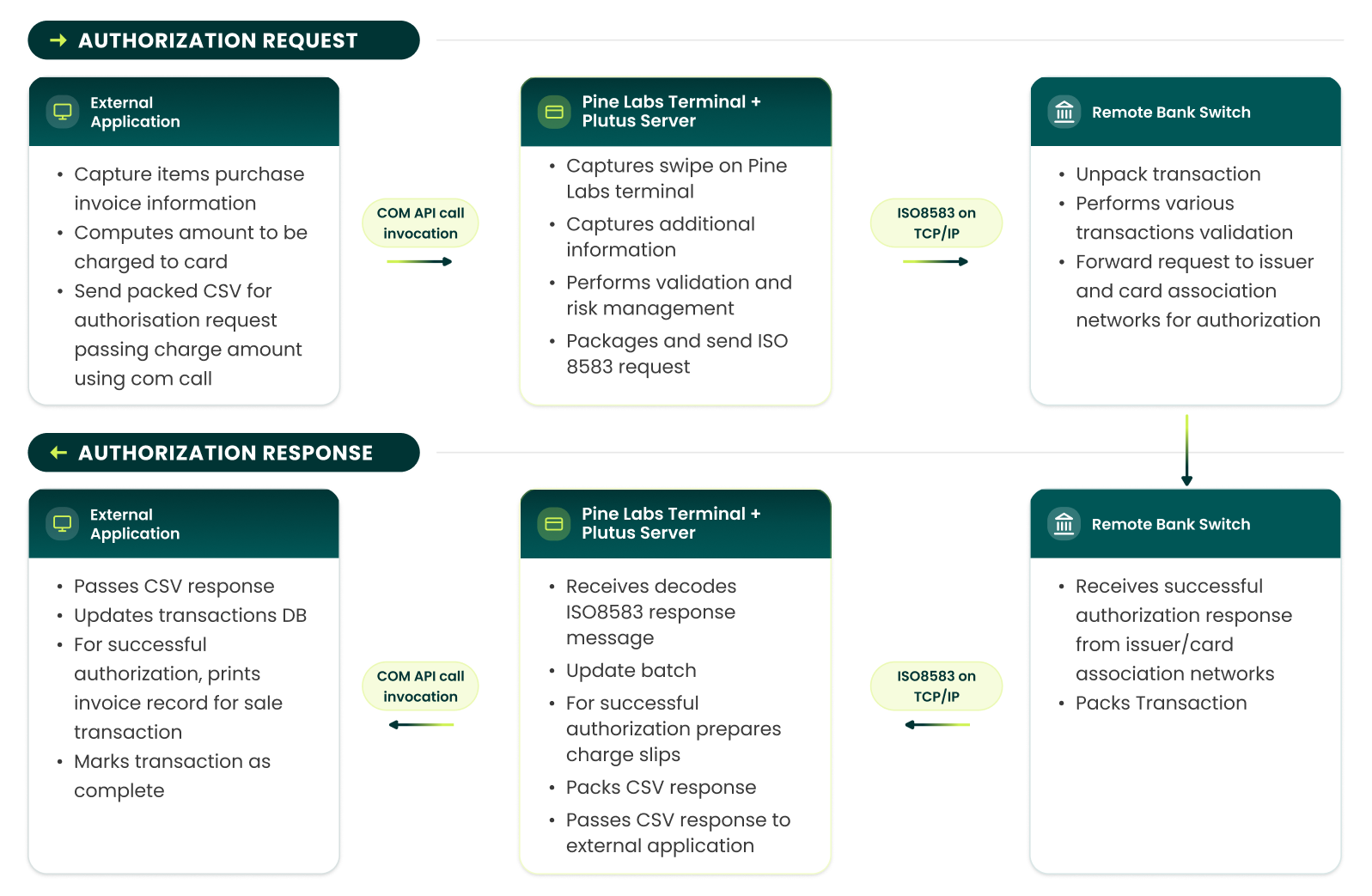
- Verify Requirements
Verify system and integration requirements for Plutus.
- Identify Integration Points
Identify code segments in your application code where Plutus payments need to be integrated. This is typically at a stage in the application's purchase / checkout workflow where amount to be charged to a customer has been computed and customer has opted for credit / debit card as the payment instrument.
(See the section "Identifying Plutus Payments in Billing POS" in the later part of document)
- Database Schema Changes
Identify and implement DB schema changes required (if any) for storing authorization response data from Plutus. Response data fields are specified later in this document.
- Install Developer Kit
Install Plutus Developer Kit on development PC. This will install and register a test bridging COM component that can be used for carrying out development.
- Implement Code Changes
Implement code changes in your application to:
- Dynamically instantiate Plutus bridging COM component
- Invoke authorization request method through Plutus COM API and pass amount to be charged to card
Note: For split-sale transactions, pass only the amount that needs to be charged to credit / debit card by Plutus - On method return, inspect return values from Plutus COM API
- If transaction is declined / unsuccessful, take appropriate action as per your application business process
- If transaction is approved, store response fields in DB for reconciliation and mark transaction as complete
- Test with Test Component
Test application code with Plutus test component. This will return a fixed response and will not launch a live transaction.
- Install Production Application
Install Plutus application and POS peripherals. Plutus installation will replace the test COM component with the actual bridging COM component supplied in Plutus application installer.
- End-to-End Testing
Test integration end-to-end system with Plutus test Host and with Pine Labs Terminal (card swipe and printing).
Note: Post development from merchant side, they need to highlight all validation & check on request/response fields with integration team for verification purpose.
Identifying Plutus Payments in Billing POS
Plutus identifies the type of Plutus Payments (tender) invoked by a transaction type parameter (lTxnType defined later in this document). In order to provide flexibility for the merchants to accept new payments type (e.g. mobile wallets and gift vouchers etc.) your application may already provide/have a mechanism for creation of new tender modes. To integrate with Plutus for processing of such new tender modes, please provide a graphical way to set a flag (isPlutusTender) which will inform your application to invoke Plutus programmatically and corresponding transaction type (lTxnType). Your application should save such flag (isPlutusTender) and transaction type for each Plutus processed tender to invoke Plutus API.
Transaction Integration
For instantiating and invoking Plutus COM API methods, use the IDL and/or TLB file supplied with the Plutus Developer Kit. For more information on technical details of COM API invocation for your programming language, check/review the documentation of your platform. The Plutus bridging COM component can be dynamically created using the following information:
COM Component UID Prog ID PlutusExchange.ExchangeObj CLSID CDB4A134-4920-470B-9A13-00F9C3C6DD76After instantiation of PlutusExchange component, authorization request can be launched by invocation of PL_TriggerTransaction()method in PlutusExchange API. This method call is a synchronous blocking call and your application should wait up to 60 seconds for this call to time-out.
This method call accepts transaction input request parameters in the lpszTransDatain-out parameter. Post method completion, the values of these parameters is updated with the transaction response string.
IDL method signature HRESULT PL_TriggerTransaction([in] LONG lTxnType, [in,out] BSTR* lpszTransData); Parameters Name Description Example in value lTxnType Specifies the type of transaction 4001 lpszTransData Transaction request / response string (for details, see data interchange format below) Return Value Value Meaning 0 Communication between Plutus bridging COM component and Plutus application succeeded. This does not imply that the transaction was successfully authorized - for authorization status, check approval code Non-Zero value in response string (see data interchange formats below) Communication between Plutus bridging COM component and Plutus failed. Transaction can be discarded without inspecting the response string.Data Interchange Formats
For specifying the transaction request type to Plutus application, the lTxnType parameter on PL_TriggerTransaction() method call is used. The value of some such parameters are as defined below:
TRANSACTION TYPES
Parameters
| Sr. No. | Type of Transactions | lTxnType value |
|---|---|---|
| 1 | Sale Transaction | 4001 |
| 2 | Refund Transaction | 4002 |
| 3 | Tip Adjust Transaction | 4015 |
| 4 | Adjust Transaction | 4005 |
| 5 | Void Transaction | 4006 |
| 6 | Pre Auth Transaction | 4007 |
| 7 | Sale Complete Transaction | 4008 |
| 8 | Loyalty Mine redemption | 4201 |
| 9 | mWallet redemption | 4214 |
| 10 | Pine 360 Loyalty Award | 4208 |
| 11 | Pine 360 Loyalty Redeem | 4209 |
| 12 | Pine 360 Loyalty Bal. Enquiry | 4210 |
| 13 | Pine 360 PPC/GV Load | 4202 |
| 14 | Pine 360 PPC/GV Redeem | 4203 |
| 15 | Pine 360 PPC/GV Bal. Enquiry | 4204 |
| 16 | Pine 360 Voucher Redeem | 4215 |
| 17 | Pine 360 GC Load | 4211 |
| 18 | Pine 360 GC Redeem | 4212 |
| 19 | Pine 360 GC Bal Enquiry | 4213 |
| 20 | Fetch Loyalty Number | 4301 |
| 21 | Reward Redemption | 4101 |
| 22 | Reward Void | 4102 |
| 23 | Payback Earn | 4404 |
| 24 | Payback Redemption | 4402 |
| 25 | Payback Void | 4403 |
| 26 | Sale with rebate | 4501 |
| 27 | Sale with cash | 4502 |
| 28 | Cash Only | 4503 |
| 29 | Reprint | 4504 |
| 30 | Settlement | 6001 |
| 31 | WalletPay | 5102 |
| 32 | WalletLoad | 5103 |
| 33 | WalletVoid | 5104 |
| 34 | Sodexo Sale | 5106 |
| 35 | Sodexo Void | 5107 |
| 36 | Brand EMI Transaction | 5002 |
| 37 | Bank EMI Transaction | 5101 |
| 38 | Twid Sale | 5131 |
| 39 | Twid Get Status | 5122 |
| 40 | Twid Void | 5121 |
| 41 | EMI as Single Txn Type for Brand & Bank EMI | 5005 |
| 42 | Sale With/Without Instant Discount | 4603 |
| 43 | QC Redemption | 4205 |
| 44 | AmazonPay Barcode | 5129 |
| 45 | Sale - Cardless Bank EMI (ICICI, HDFC & Federal Bank) | 5003 |
| 46 | Sale - Cardless Brand EMI (ICICI, HDFC & Federal Bank) | 5004 |
| 47 | Void - Cardless Bank & Brand EMI (Federal Bank) | 5031 |
| 48 | Giftiicon - Gift Code Redemption | 4113 |
| 49 | HDFC Flexipay - POS (Pay Later) | 5030 |
| 50 | Magic Pin Sale | 4109 |
| 51 | Magic PIN Void | 4110 |
| 52 | Zest Money - Invoice Sale | 5367 |
| 53 | Zest Money - Product Sale | 5370 |
| 54 | Zest Money - Void | 5369 |
For exchanging request / response data between the Plutus and external application, lpszTransData in-out parameter in PL_TriggerTransaction() method call is used.
These values of this parameter are in comma-separated value (CSV) string format. This string will consist of field values as mentioned in tables below and separated by commas.
REQUEST STRING
| Position in CSV | Field Name | Date Type | Range / Length | Description | Sample Value |
|---|---|---|---|---|---|
| 1 | Billing reference number | String | Length: 0 - 25 | OPTIONAL Transaction reference number from external application. Plutus will only use this value for printing on charge slip | “TX12345678” |
| 2 | Total EFT amount | Long integer | 1 - 99999999 | Amount to be charged to card - expressed as a whole number in lowest currency unit (ie. in paisa) | 999999 |
| 3 | Bank Code | String | Length: 1 - 2 | OPTIONAL The bank code to which transaction will be routed | 01 |
| 4 | Track 1 data / Card Pan Number | String | Length: 1 - 76 | OPTIONAL Track1 data of the card or Card number if manual entry. If empty then Plutus will ask for card input. | |
| 5 | Track 2 data / Expiry date | String | Length: 1 - 37 | OPTIONAL Track2 data of the card or Expiry date if manual entry. If empty then Plutus will ask for card input. Expiry date is in YYMM format. . In case of Pine 360, if Track 1 consists of mobile or GV number, this field will indicate the card entry mode. Mobile Number - 01 Barcode - 02 Manual Entry - 03 | |
| 6 | Invoice Number | Long Integer | Length: 1 - 6 | OPTIONAL If independent transaction, then it is not required. Else in case of dependent transaction, it is the Invoice number of parent transition. | 000012 |
| 7 | Is Swipe entry | String | TRUE or FALSE | By default it is TRUE. | TRUE |
| 8 | Terminal ID | String | Length: 1 - 8 | OPTIONAL Reserved for future use | OPTIONAL Operator |
| 9 | Operator | RFU2 | String | Length: 1-31 | OPTIONAL Reserved for future use |
| 10 | EDC Batch ID | Integer | Length: 6 | OPTIONAL If independent transaction, then it is not required. Else in case of dependent transaction, it is the Batch Id of parent transition. | |
| 11 | EDC ROC | Integer | 101-999 | OPTIONAL If independent transaction, then it is not required. Else in case of dependent transaction, it is the Roc of parent transition. | 201 |
| 12 | Transaction log ID | Long Integer | 1-184467440737 | OPTIONAL If independent transaction, then it is not required. Else in case of dependent transaction, it is the Transaction log of parent transition | 123234 |
| 13 | Reward\Cash amount | Long Integer | 1 - 99999999 | Amount to be paid by reward points or in cash in paise (or in lowest currency) | 999999 |
| 14 | Customer Mobile Number | String | Length: 1 - 100 | Customer mobile number if required to be captured. Can be used for sending SMS for charge slip. If there are more than one value pipe separated format can be used. | 9900000000|8800000000 |
| 15 | Customer email id(s) | String | Length: 1 - 500 | Customer email Id if required to be captured. Can be used for sending SMS for charge slip. If there are more than one value pipe separated format can be used. | abc@xyz.com|efg@xyz.com |
| 16 | Merchant Mobile Number(s) | String | Length: 1 - 100 | Merchant mobile number if required to be captured. Can be used for sending SMS for charge slip. If there are more than one value pipe separated format can be used. | 9900000000|8800000000 |
| 17 | Merchant email id(s) | String | Length: 1 - 500 | Merchant email Id if required to be captured. Can be used for sending SMS for charge slip. If there are more than one value pipe separated format can be used. | abc@xyz.com|efg@xyz.com |
| 18 | Consent to send charge slip on customer mobile number(s) | String | TRUE or FALSE | By default this is FALSE. If this parameter is set as TRUE, it is assumed that the merchant has taken consent from customer for sending charge slip on his/her mobile number(s). | |
| 19 | Consent to send charge slip on customer email id(s) | String | TRUE or FALSE | By default this is FALSE. If this parameter is set as TRUE, it is assumed that the merchant has taken consent from customer for sending charge slip on his/her email id(s). | TRUE |
| 20 | Consent to send charge slip on merchant mobile number(s) | String | TRUE or FALSE | By default this is FALSE. If this parameter is set as TRUE, it is assumed that the merchant gives consent for sending charge slip on his/her mobile number(s). | TRUE |
| 21 | Consent to send charge slip on merchant email id(s) | String | TRUE or FALSE | By default this is FALSE. If this parameter is set as TRUE, it is assumed that the merchant gives consent for sending charge slip on his/her email id(s). | TRUE |
| 22 | Wallet Program ID | Integer | 1-999 | This Id will be assigned by Pine Labs to each wallet program type. While performing any Wallet transaction this field needs to set to identify wallet host. |
Sample Request Strings
For Sale Transaction of amount of Rs 99990.00
TX12345678,9999000,,,,,,,Card Swipe will be accepted by Plutus Application.
For Sale Transaction (Manual Entry): Please note, special permission from acquirer is required for accepting manual entry of cards.
TX12345678,9999000,01,4129057681239198,0905,,FALSE,,,,For Refund Transaction: Please note, special permission from acquirer is required for performing refund transactions.
TX12345678,9999000,01,,,,,,,,For Adjust Transaction:
TX12345678,9999000,01,,,000012,,,,,For Void Transaction:
TX12345678,9999000,01,,,000013,,,,,For Pine 360 Void Transaction:
TX12345678,9999000,51,,,000013,,,,,For Pre Auth Transaction:
TX12345678,9999000,01,,,,,,,For Sale Complete Transaction:
TX12345678,9999000,01,,,000014,,,,,For Loyalty Award Transaction: For Loyalty award on Rs 990.00
TX12345678,99000,,,,,,,,,For Loyalty Redeem Transaction: For Redeeming 99000 points
TX12345678,99000,,,,,,,,,For Loyalty Balance Enquiry Transaction:
TX12345678,,,,,,,,,,For Gift Card Load Transaction: For loading Rs 990.00 on the card
TX12345678,99000,,,,,,,,,For Gift Card Redeem Transaction: For redeeming Rs 990.00 from the card
TX12345678,99000,,,,,,,,,For Gift Card Balance Enquiry Transaction:
TX12345678,,,,,,,,,,For Pine360 Prepaid Card/Gift Voucher Load Transaction: For loading Rs 990.00
TX12345678,99000,,,,,,,,,For Pine360 Prepaid Card/Gift Voucher Redeem Transaction: For redeeming Rs 990.00
TX12345678,99000,,,,,,,,,For Pine360 Prepaid Card/Gift Voucher Balance Enquiry Transaction:
TX12345678,,,,,,,,,,For Fetch Loyalty number Transaction:
TX12345678,,,,,,,,,,For Reward Redemption: Invoice amount of Rs 99990.00
TX12345678,9999000,,,,,,,Card Swipe will be accepted by Plutus Application.
For Reward Void: Invoice amount of Rs 99990.00, EDC
T1/1234567890,100,,,,,Operator,,,,9001,116For Sale with reward Transaction: with sale amount Rs 99990.00 and reward amount Rs. 8888.00
TX12345678,9999000,,,,,,,,,,,,888800Card Swipe will be accepted by Plutus Application.
For Sale with cash Transaction: with sale amount Rs 99990.00 and cash amount Rs. 8888.00
TX12345678,9999000,,,,,,,,,,,,888800Card Swipe will be accepted by Plutus Application.
For settlement: Transaction type for settlement will be 6001. All fields will remain empty
,,,,,,,,,,,Passing this as the request string to PL_TriggerTransaction() method will initiate an authorization request transaction for the particular transaction type. On the charge slip, Plutus will include the following string:
BILL NUM: TX12345678RESPONSE STRING (IN CASE OF INDEPENDENT TRANSCATIONS)
Following is the format of the lpszTransDataout-parameter that can be expected after PL_TriggerTransaction() method completes. Plutus will set these values.
| Position in CSV | Field Name | Data Type | Range / Length | Description | Sample Value |
|---|---|---|---|---|---|
| 1 | Tracking ID | Integer | 1 - 32768 | RFU - used for testing. ID that uniquely identifies a billing application transaction. The tracking ID used by external application to initiate Plutus transaction is passed in the response. This is also an input parameter to PL_TriggerTransaction() method | 1 |
| 2 | Approval Code | String | Length: 1 - 6 | Credit card authorization code, if transaction was approved. Otherwise empty string. Presence of non-zero length approval code string indicates successful authorization of transaction. This logic holds true for Pine 360 transactions as well | 5261AJ |
| 3 | Host Response | String | Length: 0 - 50 | Response string if a response for transaction was received from bank switch. Otherwise, if any error occurs before response is received, this is an empty string. | APPROVED |
| 4 | Card Number | String | Length: 0 - 19 | Card number is valid if card was swiped. Otherwise, empty string. | ************2802 |
| 5 | Expiration Date | String | Length: 0, 4 | Card expiration date, expressed in format YYMM, if valid card was swiped. Otherwise, empty string. Some acquirers mandate Expiry date to be masked, in that case a value of “XXXX” will be returned. | XXXX |
| 6 | Cardholder's Name | String | Length: 0 - 25 | Cardholder's name from card track 1, if valid card was swiped and card holder name present on Track 1. Otherwise, empty string | AMIT MOHAN |
| 7 | Card Type | String | Length: 0 - 12 | Card association name, if valid card was swiped. Otherwise, empty string | VISA |
| 8 | Invoice Number/EDC ROC (in case of Reward Transaction) | Long Integer | 0 - 999999/101 - 999 (in case of Reward Transaction) | EFT transaction invoice number, if transaction authorized. Otherwise, 0/EDC ROC (the same is printed on charge slip) | 78/101 |
| 9 | Batch Number/EDC Batch ID (in case of Reward Transaction) | Integer | Length: 6 | EFT transaction batch number, if transaction authorized. Otherwise, 0/EDC Batch ID (in case of Reward transaction) | |
| 10 | Terminal ID | String | Length: 0, 8 | EFT TID, if transaction authorized. Otherwise, empty string | 30000001 |
| 11 | Loyalty Points Awarded | Long | 0 - 99999999 | RFU - not used. | 0 |
| 12 | Remark | String | Length: 0 - 100 | Description of error, if an error occurs. Otherwise, empty string. An empty string in this field DOES NOT imply successful transaction authorization | Failed to dial modem |
| 13 | Transaction Acquirer Name | String | Length: 0 - 48 | Name of acquirer to which transaction was routed | ICICI BANK |
| 14 | Merchant ID | String | Length: 0 - 15 | EFT ME ID, if transaction authorized. Otherwise, empty string | 000100090015607 |
| 15 | Retrieval Reference Number | String | Length: 0 - 12 | EFT RRN, if transaction authorized. Otherwise, empty string | 000000012843 |
| 16 | Card Entry Mode | Integer | 0 - 32767 | Enumeration of possible values: 0 - Manual entry, 1 - Swipe entry, 2 - Chip card entry, Any other value - card not validated | 1 |
| 17 | Print Cardholder's Name on receipt | Integer | 0 - 32767 | Enumeration of possible values: 0 - Do not print cardholder's name, 1 - Print cardholder's name, Any other value - card not validated. This is used if external application is to print Plutus charge slip. | 0 |
| 18 | Merchant Name | String | Length: 0 - 23 | Merchant name, if transaction authorized. Otherwise, empty string | NOBLE MOTORS |
| 19 | Merchant Address | String | Length: 0 - 23 | Merchant address line, if transaction authorized. Otherwise, empty string | HAJI ALI |
| 20 | Merchant City | String | Length: 0 - 23 | Merchant city line, if transaction authorized. Otherwise, empty string | MUMBAI |
| 21 | Plutus Version | String | Length: 0 - 40 | Plutus version | v1.54 (for ICICI BANK) |
| 22 | Acquiring Bank Code | Integer | Length 0 - 999 | Code for bank used for processing transaction. Enumeration of possible values: 01 - HDFC BANK 02 - ICICI BANK 03 - AMERICAN EXPRESS 04 - CITIBANK 05 - AXIS BANK 06 - SBI 07 - HSBC 09 - CORP BANK 10 - CUB (City Union Bank) 14 - IDBI Bank 17 - LVB (Lakshmi Vilas Bank) 51 - PINE 360 301 - Sodexo 81 - Loyalty Reward 82 - Aimia 85 - SBI Rewards |
|
| 23 | Reward Redeemed Amount | Long Integer | Length 0-10 | Redeemed Amount in Paisa or in lowest | 10000 |
| 24 | Reward Redeemed Points | Double | Length 0-15 | Redeemed Points | 400.00 |
| 25 | Reward Balance Amount | String | Length 0-10 | Balance Amount | 1000000 |
| 26 | Reward Balance Points | Double | Length 0-15 | Balance Point | 40000.00 |
| 27 | Charge slip print data in tag value format (Optional)* | String | Charge slip data in form of tag and value separated with : and new pair separated with | (Only present if charge slip data on merchant is enabled) | ||
| 28 | RFU1/Coupon code/Loyalty Card Number | String | Length 0 - 23 | Card Processing Fee in Rs (decimal) Or Coupon Code. Coupon code is the value which will be coming as a response to voucher redemption. This field will be present in case of voucher redemption. OR Loyalty number fetched if the transaction type is 4301. | 5.50 |
| 29 | Amount processed successfully by Plutus/ Amount Loaded on cards or wallets/amount voided/Amount loaded on cards/wallets | String | Length: 0 - 99 | Amount will always be in paisa or lowest currency. | 100000 |
| 30 | RFU3 | String | Length: 0 - 23 | Reserved for future use | |
| 31 | RFU | String | Specific for merchant Alphanumeric | ||
| 32 | Date of Transaction | String | Length 0 - 8 | Date of the Transaction as per acquiring host. Date to be printed on charge slip. In MMDDYYYY Format. | 02012011 |
| 33 | Time of Transaction | String | Length 0 - 6 | Time of the Transaction as per acquiring host. Time to be printed on charge slip. HHMMSS where HH in 24-hour format. | 210403 |
| 34 | PineLabs Client ID | Integer | Length 0 - 6 | Unique ID assigned to Pine Labs EDC. | 12345 |
| 35 | PineLabs Batch ID | Integer | Length: 6 | Batch ID of Pine Labs EDC | |
| 36 | PineLabs ROC | Integer | 101 -999999 | ROC of Pine Labs EDC | 105 |
Field 31 will contain Batch Summaries of all batches in CSV format mentioned below:
    Batch Name (HDFC), Acquire Code/host type, TID, MID, Credit Count, Credit Amount, Debit Count, Debit Amount|
    Batch Name (AXIS Credit), Acquire Code, TID, Credit Count, Credit Amount, Debit Count, Debit Amount|
    Batch Name (AXIS Debit), Acquire Code, TID, Credit Count, Credit Amount, Debit Count, Debit Amount|
    Batch Name (Loyalty), Acquire Code, TID, Credit Count, Credit Amount, Debit Count, Debit Amount
Tag value pair described in response CSV field 27:
| Tag | Tag Description |
|---|---|
| 10001 | Bank Name |
| 10050 | Address line 1 |
| 10051 | Address line 2 |
| 10100 | DATE |
| 10101 | TIME |
| 10150 | MID |
| 10151 | TID |
| 10200 | BATCH NUM |
| 10201 | INV. NUM |
| 10250 | Transaction type |
| 10300 | Card number masked |
| 10301 | Card entry mode |
| 10350 | EXP DATE |
| 10351 | CARD TYPE |
| 10400 | TXN ID |
| 10401 | APPR CODE |
| 10450 | RRN |
| 10451 | BASE AMT. |
| 10500 | TIP AMT. |
| 10501 | CASH AMT. |
| 10600 | TOTAL AMT. |
| 10601 | RDM POINTS |
| 10650 | RDM AMOUNT |
| 10651 | SIGN |
| 10700 | Customer name |
| 10701 | Issuer declaration |
| 10750 | Reward declaration |
| 10801 | App Version |
| 10851 | Report type string |
| 10900 | Address line 3 |
| 10901 | Report sub type |
| 10951 | Audit report header |
| 11000 | Audit detail report |
| 11001 | Settlement type |
| 11050 | SALE |
| 11051 | TIP |
| 11100 | VOID |
| 11101 | TOTAL |
| 11150 | REFUND |
| 11151 | TOTAL |
| 11200 | NET TOTAL |
Note: More Tags may be added to the table based on requirement. Final table will be provided at the time of integration.
If Plutus sets the value in Field 29 then this amount should be used as the processed amount for tender else use the original amount passed while Plutus API invocation.
Sample Response Strings
Sample response string (with first 22 fields) for an approved transaction:
105,"7261A9","APPROVED"," ************2802","0406","AMITMOHAN","VISA",11,2,"30000001",1,"PROCESSED","Acquiring Bank 1","000100090015607"," 624615343002",1,1," HPCL Area 18"," Kamala Mills"," Noida","1.51 ICICI BANK",02Sample response string for Reward Redemption transaction:
TX12345678,"7261A9","TRANSACTION SUCCESSFUL"," ************2802","0406","RamSingh","",78,502,"30000001",0,"PROCESSED","LOYALTY REWARD","000100090015607"," 624615343002",1,1," HPCL Area 18"," Kamla Mills"," Noida","v.01.00.00",81,"10000","400.00","1000000","40000.00","","","","","","02012011","210403",12345,9002,105Instant Discount - Response CSV:
"","00","APPROVED","************2802","XXXX","CITI T%34 C 2$","MASTERCARD",86,33,"78784454",0,"PROCESSED","HDFC BANK"," ","000000000020",1,1,"LOVE COMMUNICATION","JANA PURI","NEW DELHI DEL","Plutus v1.49.3 MT HDFC",00,"00","","","","","101|100000|95000|5000|HDFC BANK","","","","08182015","184423",12345,9002,105Instant EMI - Response CSV:
"","00","APPROVED","************2802","XXXX","CITI T%34 C 2$","MASTERCARD",89,33,"78784454",0,"PROCESSED","HDFC BANK"," ","000000000020",1,1,"LOVE COMMUNICATION","JANA PURI","NEW DELHI DEL","Plutus v1.49.3 MT HDFC",00,"00","","","","","102|3|HDFC BANK|100000|33946|11000","","","","08182015","184939",12345,9002,105RESPONSE STRING (IN CASE OF DEPENDENT TRANSACTIONS)
In case of dependent transaction, lpszTransData parameter will be a simple error string in case of known errors or blank in case of unknown errors. On successful transaction, the return string is "APPROVED". The billing application should check for return "APPROVED" string for successful transactions.
In case of dependent transaction, lpszTransData parameter will be a simple error string in case of known errors or blank in case of unknown errors. On successful transaction, the return string is “APPROVED”. The billing application should check for return “APPROVED” string for successful transactions.
Sample response string for Reward Redemption transaction:
TX12345678,“7261A9”,”TRANSACTION SUCCESSFUL”,” ************2802”,”0406”,”RamSingh”,””,78,502,”30000001”,0,”PROCESSED”, ”LOYALTY
    REWARD”, ”000100090015607”,” 624615343002”,1, 1,” HPCL Area 18”,” Kamla Mills”,” Noida”,”v.01.00.00”,81,"10000","400.00","1000000","40000.00","","","","","","02012011","210403"
Sample response string for Sale with reward/cash:
TX12345678,“7261A9”,”TRANSACTION SUCCESSFUL”,” ************2802”,”0406”,”RamSingh”,””,78,502,”30000001”,0,”PROCESSED”, ”LOYALTY REWARD”, ”000100090015607”,” 624615343002”,1, 1,” HPCL Area 18”,” Kamla Mills”,” Noida”,”v.01.00.00”,81,"10000","400.00","1000000","40000.00","10000:1||10001:ICICI|10050:Pinemerchant store|10051:Rohini Sec 16|10100:2015/07/22|10101:11-27-23|10150:988888777777776|10151:98989898|10200:000010|10201:000099|10250:Sale with Reward|10251:Membership reward|10300: ************2802|10301:Swipe|10350:**/**|10351:VISA|10400:998831231|10401 :000000|10450:001212124433|10451:Rs.10000.00|10500:Rs. 100.00|10501:Rs. 120000.00|10600:130100.00|10601:32|10650:Rs. 8.00|10651:SIGN----------------------|10700:Ravi|10701:I AGREE TO PAY AS PER CARD ISSUER AGREEMENT|10751:****MERCHANT COPY****|10800:THANK YOU!|10801:pLUTUS V2.56 AXIS BANK|","","","","","02012011","210403"
Sample response for settlement:
,,,,,,,,,,,,,,,,,,,,,,,,,, 10000:1|10001:ICICI|10050:Pine merchant store|10851:Settlement Report|10051:Rohini Sec 12|10900:Bangalore|10100:07/01/2015|10101:12-12-23|10150:996545454541851|10151:65854178|10200:000010|10901:Details Report|10951:INVOICE NUMBER TRANSACTION TYPE AUTH CODE CARD NUMBER CARD TYPE AMOUNT|11000:10 SALE 000000 ************2802 VISA RS.1000.11|11001:SETTLEMENT COMPLETE|11050:3 RS902.97|11051:0 RS.0.00|11100:0 RS.0.00|11101: RS902.97|11150:0 RS.0.00|11151: RS.0.00|11200:RS.902.97,,,, ICICI,1,11159874,1,2542.00,0,0.00,,
Code Sample COM API
Given below are sample code snippets in C++ and VB for instantiating Plutus COM component and invoking COM API method.
Programming language: Visual C++ 7.0 (Unmanaged)
Application programming libraries: ATL/MFC
This is a sample VC++ code snippet which instantiates the Plutus exchange COM component and invokes the method to start a Plutus credit/debit online Sale transaction.
Visual C++
// Import the Plutus Exchange type library #import "C:\Plutus\Plutus\Plutus Exchange\release\Plutus Exchange.tlb" using namespace PlutusExchangeLib; // This method is invoked when 'Pay By Card' button is clicked void CPineECRDlg::OnPayByCard() { CString total, tracking_id; m_memoNumCtl.GetWindowText(tracking_id); // Get text in memo number control long lTrackingID = strtoul(tracking_id, 0, 10); m_totalAmtCtl.GetWindowText(total); // Get text in amount control ULONG totalAmt = strtoul(total, 0, 10); total.Format("%d", totalAmt*100L); // Compute amount in lowest currency unit if(totalAmt > 0) { IExchangeObjPtr pExchangeObj(__uuidof(ExchangeObj)); // Instantiate Plutus exchange COM object if(pExchangeObj == NULL) { m_responseCtl.SetWindowText("Failed to instantiate COM object"); return; } CComBSTR bstrXML(100, total); HRESULT hRes = S_FALSE; try { // Try launching card payment through Plutus hRes = pExchangeObj->PL_TriggerTransaction(lTrackingID, &bstrXML); } catch (...) { m_responseCtl.SetWindowText("Exception occurred in communication to Plutus application. Please retry"); return; } if(hRes == S_OK) { USES_CONVERSION; ::Beep(500, 100); m_responseCtl.SetWindowText(OLE2T(bstrXML)); // Now parse the response string and do custom magic } else { m_responseCtl.SetWindowText("Failed to process transaction. Please retry"); } } }
Programming language: Visual Basic 6.0 (Unmanaged)
Sample VB code for invoking Plutus from VB-based ECR application:
Visual Basic
' This is called when "Pay by card" is pressed in ECR application Private Sub Command1_Click() Dim strIO As String Dim lTrackingID As Long ' Add PlutusExchange v1.0 Type Library (TLB) as reference to the project Dim plutObj As New PlutusExchangeLib.ExchangeObj lTrackingID = 6 ' For testing, enter the scenario number as given in interchange spec doc strIO = "T123,156" ' This is input to Plutus -- base amount in paisa for Rs. 1.56 and ECR bill number: T123 ' Bill number is only used for printing on Plutus charge slip plutObj.PL_TriggerTransaction lTrackingID, strIO MsgBox strIO, vbOKOnly, "Plutus Response String" ' Parse this string to extract Plutus response. Only indication of successful transaction authorization is a valid auth code returned in response End Sub
Gift Voucher Activation
For Gift Voucher activation, an additional button must be provided by the billing application on the billing window. The flow is as follows:
- Cashier opens billing window.
- An additional button is available for Gift Voucher activation.
- Cashier selects the Gift Voucher activation button for GV sales.
- Billing Application invokes
PL_TriggerTransactionAPI withlTxnTypevalue as 4203. - Plutus prompts cashier to scan gift voucher number.
- Cashier selects load button on Plutus screen.
- Plutus activates voucher and informs Billing Application of success status and value of voucher activated in field 29 of response packet.
- Billing application bills for GV article code (Now cancel button on billing should be deactivated).
Integration With Plutus Over TCP/IP Socket
In this mode, the external billing application integrates with Plutus over TCP/IP socket. CSV exchange is used to launch a Plutus transaction authorization request and for exchanging information between the external application and Plutus. After transaction completion, response is sent to the external application as CSV over socket. For successfully authorized transactions, this response includes transaction approval code and card details. These details can be stored by the external application to link the EFT payment transaction with the billing sale transaction.
The following operations in Plutus can be launched either through the CSV over TCP/IP sockets (integrated mode) or through Plutus (standalone mode):
- Sale (purchase) transaction request (Independent transaction)
- Void (cancel) transaction request (Dependent transaction)
- Refund transaction request (Independent transaction)
- Adjust transaction request (Dependent transaction)
- Tip Adjust transaction request (Dependent transaction)
- Pre-Auth transaction request (Independent transaction)
- Sale Complete transaction request (Dependent transaction)
- All Pine 360 transactions
The operation Print Dump can only be launched in integration mode. This transaction type involves sending of print-dump in the request CSV over TCP/IP socket to be printed by EDC.
Transaction Workflow
The following diagram describes the process workflow for sale transactions in integrated mode.
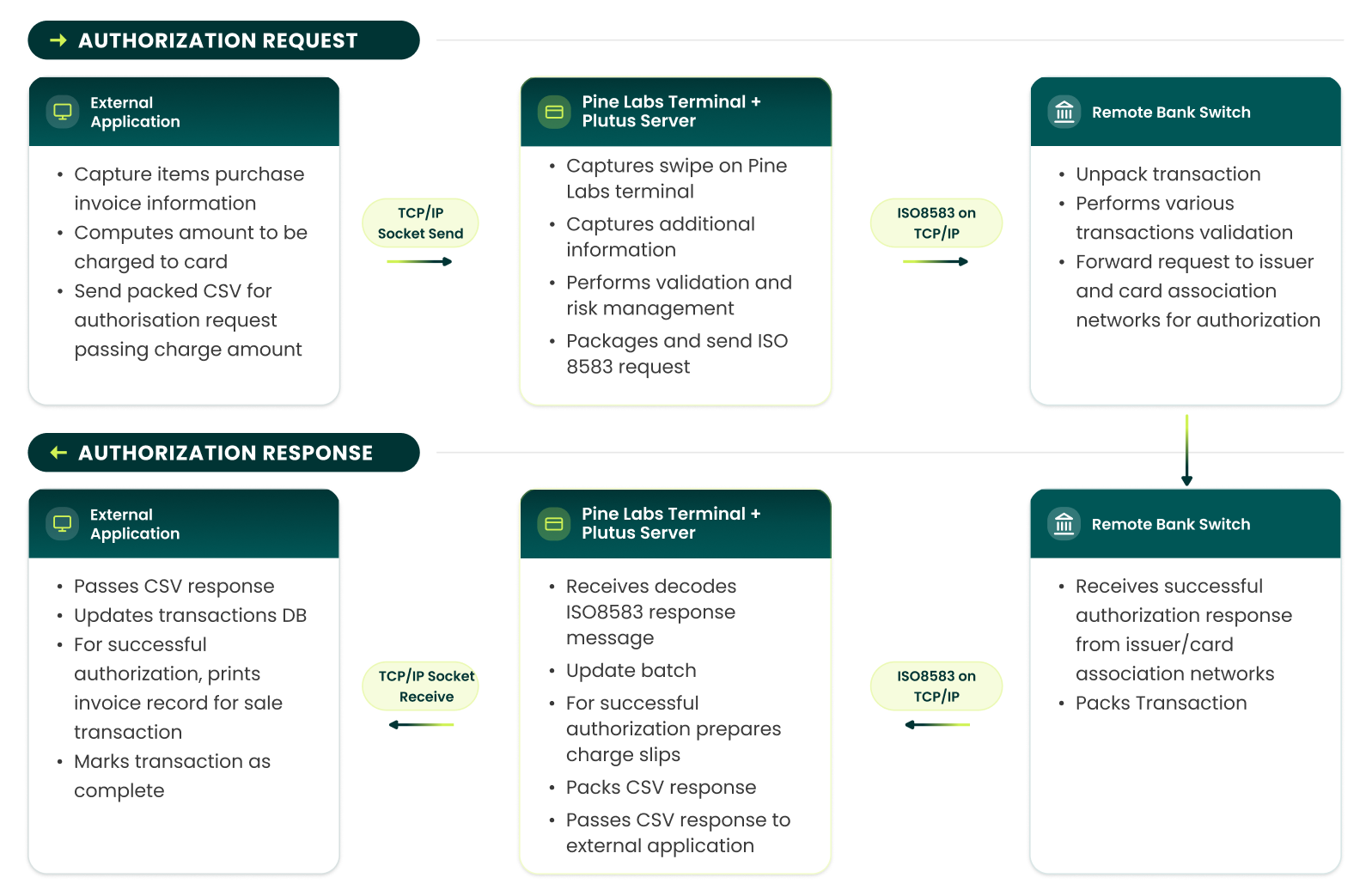
The TCP/IP socket calls are synchronous, blocking for the external application.
Integration Development Process
Typical steps to integrate Plutus application with your application:
- Verify system and integration requirements for Plutus.
- Identify code segments in your application where Plutus payments need to be integrated (typically at checkout where amount is computed and customer opts for card payment).
- Identify and implement DB schema changes required (if any) for storing authorization response data from Plutus.
- Install PADController application on your development PC.
-
Implement code changes in your application to:
- Create and connect a TCP/IP socket to PADController (listening on port 8082).
- Invoke authorization request by sending CSV over socket and pass amount to be charged to card.
Note: For split-sale transactions, only pass the amount to be charged to credit/debit card to Plutus. - Wait for response over socket, inspect returned CSV.
- If transaction is declined/unsuccessful, take appropriate action as per your business process.
- If transaction is approved, store response fields in DB for reconciliation and mark transaction as complete.
- Test application code with Plutus.
Data Interchange Format
For specifying the transaction request type to Plutus application, the lTxnType value in the packed CSV is used. The values of the parameters are as defined below:
| Sr. No. | Type of Transactions | lTxnType value |
|---|---|---|
| 1 | Sale Transaction | 4001 |
| 2 | Refund Transaction | 4002 |
| 3 | Tip Adjust Transaction | 4015 |
| 4 | Adjust Transaction | 4005 |
| 5 | Void Transaction | 4006 |
| 6 | Pre Auth Transaction | 4007 |
| 7 | Sale Complete Transaction | 4008 |
| 8 | Loyalty Mine redemption | 4201 |
| 9 | mWallet redemption | 4214 |
| 10 | Pine 360 Loyalty Award | 4208 |
| 11 | Pine 360 Loyalty Redeem | 4209 |
| 12 | Pine 360 Loyalty Bal. Enquiry | 4210 |
| 13 | Pine 360 PPC/GV Load | 4202 |
| 14 | Pine 360 PPC/GV Redeem | 4203 |
| 15 | Pine 360 PPC/GV Bal. Enquiry | 4204 |
| 16 | Pine 360 Voucher Redeem | 4215 |
| 17 | Pine 360 GC Load | 4211 |
| 18 | Pine 360 GC Redeem | 4212 |
| 19 | Pine 360 GC Bal Enquiry | 4213 |
| 20 | Fetch Loyalty Number | 4301 |
| 21 | Reward Redemption | 4101 |
| 22 | Reward Void | 4102 |
| 23 | Payback Earn | 4404 |
| 24 | Payback Redemption | 4402 |
| 25 | Sale with rebate | 4501 |
| 26 | Sale with cash | 4502 |
| 27 | Cash Only | 4503 |
| 28 | Reprint | 4504 |
| 29 | Settlement | 6001 |
| 30 | WalletPay | 5102 |
| 31 | WalletLoad | 5103 |
| 32 | WalletVoid | 5104 |
| 33 | Sodexo Sale | 5106 |
| 34 | Sodexo Void | 5107 |
For exchanging request/response data between Plutus and external application, CSV is used. This string will consist of field values, as given in tables below, separated by commas.
Request String
The external application will set these values in the request CSV. (Refer to the original document for the full table of fields and their descriptions.)
| Position in CSV | Field Name | Date Type | Range / Length | Description | Sample Value |
|---|---|---|---|---|---|
| 1 | lTxnType | Long Integer | 4001-4216 | Transaction request type to Plutus application. Please refer to the table above | 4001 |
| 2 | Billing Reference Number | String | Length: 0 - 25 | OPTIONAL. Transaction reference number from external application. Plutus will only use this value for printing on charge slip. | TX12345678 |
| 3 | Total EFT Amount | Long Integer | Length: 1 - 99999999 | Amount to be charged to card - expressed as a whole number in lowest currency unit (i.e. in paisa) | 999999 |
| 4 | Bank Code | String | Length: 1 - 2 | OPTIONAL. The bank code to which transaction will be routed. Optional in case of sale transaction if Automatic Acquirer Selection is chosen | 01 |
| 5 | Track 1 data / Card Pan Number / Barcode / Mobile Number | String | Length: 1 - 76 | OPTIONAL. Track1 data of the card or Card Number/Barcode number if manual entry. If empty, PADController will ask for card number input. For Pine 360, this field can accommodate mobile number or barcode of Gift voucher. | |
| 6 | Track 2 data / Expiry date / Card Mode | String | Length: 1 - 37 | OPTIONAL. Track2 data of the card or Expiry date if manual entry. If empty, then PADController will ask for card input. Expiry date is in YYMM format. In case of Pine 360, if Track 1 consists of mobile or GV number, this field will indicate the card entry mode. Mobile Number - 01, Barcode - 02, Manual Entry - 03 | |
| 7 | Invoice number | Long Integer | Length: 1 - 6 | OPTIONAL. If independent transaction, then it is not required. Else in case of dependent transaction, it is the Invoice number of parent transition. | 000012 |
| 8 | Is Swipe entry | String | TRUE/FALSE | By default, it is TRUE | TRUE |
| 9 | Terminal ID | String | Length: 1 - 8 | OPTIONAL. Reserved for future use | |
| 10 | Operator | String | Length: 1-31 | OPTIONAL | |
| 11 | RFU2 | String | OPTIONAL. Reserved for future use | ||
| 12 | EDC Batch ID | Integer | Length: 6 | OPTIONAL. If independent transaction, then it is not required. Else in case of dependent transaction, it is the Batch Id of parent transition. | |
| 13 | EDC ROC | Integer | 101-999 | OPTIONAL. If independent transaction, then it is not required. Else in case of dependent transaction, it is the Roc Id of parent transition. | 201 |
| 14 | Transaction log ID | Long Integer | 1-184467440737 | OPTIONAL. If independent transaction, then it is not required. Else in case of dependent transaction, it is the Transaction log of parent transition. | 123234 |
| 15 | Reward\Cash | Long Integer | 1 - 99999999 | Amount to be paid by reward points or in cash in paise (or in lowest currency) | 999999 |
| 16 | Customer Mobile Number | String | Length: 1 - 100 | Customer mobile number if required to be captured. Can be used for sending SMS for charge slip. If there are more than one value, pipe separated format can be used. | 9900000000|8800000000 |
| 17 | Customer email id(s) | String | Length: 1 - 500 | Customer email Id if required to be captured. Can be used for sending SMS for charge slip. If there are more than one value, pipe separated format can be used. | abc@xyz.com|efg@xyz.com |
| 18 | Merchant Mobile Number(s) | String | Length: 1 - 100 | Merchant mobile number if required to be captured. Can be used for sending SMS for charge slip. If there are more than one value, pipe separated format can be used. | 9900000000|8800000000 |
| 19 | Merchant email id(s) | String | Length: 1 - 500 | Merchant email Id if required to be captured. Can be used for sending SMS for charge slip. If there are more than one value, pipe separated format can be used. | abc@xyz.com|efg@xyz.com |
| 20 | Consent to send charge slip on customer mobile number(s) | String | TRUE or FALSE | By default, this is FALSE. If this parameter is set as TRUE, it is assumed that the merchant has taken consent from customer for sending charge slip on his/her mobile number(s). | TRUE |
| 21 | Consent to send charge slip on customer email id(s) | String | TRUE or FALSE | By default, this is FALSE. If this parameter is set as TRUE, it is assumed that the merchant has taken consent from customer for sending charge slip on his/her email id(s). | TRUE |
| 22 | Consent to send charge slip on merchant mobile number(s) | String | TRUE or FALSE | By default, this is FALSE. If this parameter is set as TRUE, it is assumed that the merchant gives consent for sending charge slip on his/her mobile number(s). | TRUE |
| 23 | Consent to send charge slip on merchant email id(s) | String | TRUE or FALSE | By default, this is FALSE. If this parameter is set as TRUE, it is assumed that the merchant gives consent for sending charge slip on his/her email id(s). | TRUE |
PRINT DUMP PARAMETER DESCRIPTION
| Parameter | Description | Permitted Values |
|---|---|---|
| Param 1 | Is this an image/text/ | 0:text 1:image 2:barcode |
| Param 2 | barcode | Is Bold or Normal True(if bold)/False(if normal) |
| Param 3 | Is Centered or Left Aligned | True (if center aligned)/False(if left aligned) |
| Param 4 | Line number | Line Number(integer value) |
| Param 5 | Value to be printed. Not present if blank line to be printed. | Text value to be printed[max length 23]/Name of image (e.g. 1.bmp) |
Sample Request String:
For Sale Transaction: amount of Rs 99990.00
4001,TX12345678,9999000,,,,,,,Card Swipe will be accepted by Plutus Application.
For Sale Transaction (Manual Entry):
Please note, special permission from acquirer is required for accepting manual entry of cards.
4001,TX12345678,9999000,01,4129057681239198,0905,,FALSE,,,,
For Refund Transaction (Swipe Entry):
Please note, special permission from acquirer is required for accepting manual entry of cards.
TX12345678,9999000,01,,,,,,,,
For Adjust Transaction:
4005,TX12345678,9999000,01,,,000012,,,,,
Sample Request Strings
For Void Transaction:
4006,TX12345678,9999000,01,,,000013,,,,,For Pine 360 Void Transaction:
4006,TX12345678,9999000,51,,,000013,,,,,For Pre Auth Transaction (Swipe Entry):
4007,TX12345678,9999000,,,,,,,,,For Sale Complete Transaction:
4008,TX12345678,9999000,01,,,000014,,,,,For Loyalty Award Transaction: For Loyalty award on Rs 990.00
4208,TX12345678,99000,,,,,,,,,For Loyalty Redeem Transaction: For Redeeming 99000 points
4209,TX12345678,99000,,,,,,,,,For Loyalty Balance Enquiry Transaction:
4210,TX12345678,,,,,,,,,,For Gift Card Load Transaction: For loading Rs 990.00 on the card
4211,TX12345678,99000,,,,,,,,,For Gift Card Redeem Transaction: For redeeming Rs 990.00 from the card
4212,TX12345678,99000,,,,,,,,,For Gift Card Balance Enquiry Transaction:
4213,TX12345678,,,,,,,,,,For Pine360 Prepaid Card/Gift Voucher Load Transaction: For loading Rs 990.00
4202,TX12345678,99000,,,,,,,,,For Pine360 Prepaid Card/Gift Voucher Redeem Transaction: For redeeming Rs 990.00
4203,TX12345678,99000,,,,,,,,,For Pine360 Prepaid Card/Gift Voucher Balance Enquiry Transaction:
4204,TX12345678,,,,,,,,,,For Gift Card Redeem Transaction: For redeeming Rs 990.00 from the mobile, where mobile number is captured in billing application
4212,TX12345678,99000,,9899999999,01,,,,,,,For Gift Card Redeem Transaction: For redeeming Rs 990.00 through Barcode, where Barcode number is captured in billing application
4212,TX12345678,99000,,6747444848423409876,02,,,,,,,For Fetch Loyalty Card Transaction:
4301,TX12345678,,,,,,,,,,For Reward Redemption: Invoice amount of Rs 99990.00
4101,TX12345678,9999000,,,,,,,,Card Swipe will be accepted by Plutus Application.
For Reward Void: Invoice amount of Rs 99990.00, EDC
4102,T1/1234567890,100,,,,,Operator,,,,9001,116For Sale with reward Transaction: with sale amount Rs 99990.00 and reward amount Rs. 8888.00
4501,TX12345678,9999000,,,,,,,,,,,,888800Card Swipe will be accepted by Plutus Application.
For Sale with cash Transaction: with sale amount Rs 99990.00 and cash amount Rs. 8888.00
4502,TX12345678,9999000,,,,,,,,,,,,888800Card Swipe will be accepted by Plutus Application.
For settlement: Transaction type for settlement will be 6001. All fields will remain empty
6001,,,,,,,,,,,Sending this over socket to PADController on port 8082 will initiate an authorization request transaction for the particular transaction type.
Response String (Independent Transaction)
The CSV received from Plutus will contain the response fields. (Refer to the original document for the full table of fields and their descriptions.)
Billing reference number,Approval Code,Host Response,Card Number,Expiration Date,Cardholder's Name,Card Type,Invoice Number/EDC ROC,Batch Number/EDC Batch ID,Terminal ID,Loyalty Points Awarded,Remark,Transaction Acquirer Name,Merchant ID,Retrieval Reference Number,Card Entry Mode,Print Cardholder's Name on receipt,Merchant Name,Merchant Address,Merchant City,Plutus Version,...
Sample Response String:
105,"7261A9","APPROVED"," ************2802","0406","AMITMOHAN","VISA",11,2,"30000001",1,"PROCESSED","Acquiring Bank 1","000100090015607"," 624615343002",1,1," HPCL Area 18"," Kamala Mills"," Noida","1.51 ICICI BANK",02
Sample response string for Reward Redemption transaction:
TX12345678,"7261A9","TRANSACTION SUCCESSFUL"," ************2802","0406","RamSingh","",78,502,"30000001",0,"PROCESSED","LOYALTY REWARD","000100090015607"," 624615343002",1,1," HPCL Area 18"," Kamla Mills"," Noida","v.01.00.00",81,"10000","400.00","1000000","40000.00","","","","","","02012011","210403",12345,9002,105
Instant Discount - Response CSV:
"","00","APPROVED","************2802","XXXX","CITI T%34 C 2$","MASTERCARD",86,33,"78784454",0,"PROCESSED","HDFC BANK"," ","000000000020",1,1,"LOVE COMMUNICATION","JANA PURI","NEW DELHI DEL","Plutus v1.49.3 MT HDFC",00,"00","","","","","101|100000|95000|5000|HDFC BANK","","","","08182015","184423",12345,9002,105
Instant EMI - Response CSV:
"","00","APPROVED","************2802","XXXX","CITI T%34 C 2$","MASTERCARD",89,33,"78784454",0,"PROCESSED","HDFC BANK"," ","000000000020",1,1,"LOVE COMMUNICATION","JANA PURI","NEW DELHI DEL","Plutus v1.49.3 MT HDFC",00,"00","","","","","102|3|HDFC BANK|100000|33946|11000","","","","08182015","184939",12345,9002,105
Response String (Dependent Transaction)
In case of dependent transaction, lpszTransData parameter will be a simple error string in case of known errors or blank in case of unknown errors. On successful transaction, the return string is APPROVED. The billing application should check for return APPROVED string for successful transactions.
Sample response string for Reward Redemption transaction:
TX12345678,"7261A9","TRANSACTION SUCCESSFUL"," ************2802","0406","RamSingh","",78,502,"30000001",0,"PROCESSED","LOYALTY REWARD","000100090015607"," 624615343002",1,1," HPCL Area 18"," Kamla Mills"," Noida","v.01.00.00",81,"10000","400.00","1000000","40000.00","","","","","","02012011","210403"
Sample response string for Sale with reward/cash:
TX12345678,"7261A9","TRANSACTION SUCCESSFUL"," ************2802","0406","RamSingh","",78,502,"30000001",0,"PROCESSED","LOYALTY REWARD","000100090015607","624615343002",1,1," HPCL Area 18"," Kamla Mills"," Noida","v.01.00.00",81,"10000","400.00","1000000","40000.00","10000:1||10001:ICICI|10050:Pine merchant store|10051:Rohini Sec 16|10100:2015/07/22|10101:11-27-23|10150:988888777777776|10151:98989898|10200:000010|10201:000099|10250:Sale with Reward|10251:Membership reward|10300: ************2802|10301:Swipe|10350:**/**|10351:VISA|10400:998831231|10401:000000|10450:001212124433|10451:Rs. 10000.00|10500:Rs. 100.00|10501:Rs. 120000.00|10600:130100.00|10601:32|10650:Rs. 8.00|10651:SIGN----------------------|10700:Ravi|10701:I AGREE TO PAY AS PER CARD ISSUER AGREEMENT|10751:****MERCHANT COPY****|10800:THANK YOU!|10801:pLUTUS V2.56 AXIS BANK|","","","","","02012011","210403"
Sample response for settlement:
,,,,,,,,,,,,,,,,,,,,,,,,,, 10000:1|10001:ICICI|10050:Pine merchant store|10851:Settlement Report|10051:Rohini Sec 12|10900:Bangalore|10100:07/01/2015|10101:12-12-23|10150:996545454541851|10151:65854178|10200:000010|10901:Details Report|10951:INVOICE NUMBER TRANSACTION TYPE AUTH CODE CARD NUMBER CARD TYPE AMOUNT|11000:10 SALE 000000 ************2802 VISA RS.1000.11|11001:SETTLEMENT COMPLETE|11050:3 RS902.97|11051:0 RS.0.00|11100:0 RS.0.00|11101: RS902.97|11150:0 RS.0.00|11151: RS.0.00|11200: RS.902.97,,,, ICICI,1,11159874,1,2542.00,0,0.00,,
Packet Structure For Data Transmission Over Socket
REQUEST PACKET STRUCTURE
| Byte Number | Type | Content | Description |
|---|---|---|---|
| 1 - 2 | BYTE | Source ID | Identification Number for client (e.g. 0x1000) |
| 3 - 4 | BYTE | Function Code | 0x0997 |
| 5 - 6 | BYTE | Data Length | Excluding ETX. E.g. 0x0032 for a data length of 50 bytes |
| 7 - N | ASCII Data | 4001,TX1234567890,215400,,,,,,, | CSV request data |
| N + 1 | BYTE | ETX | 0xFF (End of packet) |
Sample On-wire Request Packet:
| Field | Value | Description |
|---|---|---|
| Hexa Byte Stream | 10 00 09 97 00 21 34 30 30 31 2c 54 58 31 32 33 34 35 36 37 38 39 30 2c 32 31 35 34 30 30 2c 2c 2c 2c 2c 2c 2c 2c 2c ff | Raw bytes sent over the wire |
| ASCII Characters | .....!4001,TX1234567890,215400,,,,,,,,,. | ASCII representation of the packet content |
RESPONSE PACKET STRUCTURE
| Byte Number | Type | Content | Description |
|---|---|---|---|
| 1 - 2 | BYTE | Source ID | Identification Number for client (e.g. 0x1000) |
| 3 - 4 | BYTE | Function Code | 0x0997 |
| 5 - 6 | BYTE | Error Code | 0x0001 - valid response, 0x0000 - invalid response |
| 7 - 8 | BYTE | Data Length | excluding ETX E.g. 0x0032 for a data length of 50 bytes |
| 9 - N | ASCII | Data | T1/1234567890,"000059","APPROVED","401152******15 69","XXXX","AXIS BANK GIFT CARD","VISA",370,203,"78569456",0,"PROCESSED","HDFC BANK","","000020",1,1,"PINE LABS PVT.LTD.","Testing Server","NOIDA - INDIA","Plutus v1.49.1 MT HDFC BANK",01,00,"","","",,"","","","","08012012","150118" |
| N + 1 | BYTE | ETX | 0xFF (End of packet) |
Sample On-wire Response Packet:
| Hexa Byte Stream | ASCII Characters |
|---|---|
| 99 99 19 97 00 0101 1e 54 58 31 32 33 34 35 36 37 38 39 30 2c 2230 30 30 30 36 30 22 2c 22 41 50 50 52 4f 56 4544 22 2c 22 34 30 31 31 35 32 2a 2a 2a 2a 2a 2a31 35 36 39 22 2c 22 58 58 58 58 22 2c 22 41 5849 53 20 42 41 4e 4b 20 47 49 46 54 20 43 41 5244 22 2c 22 56 49 53 41 22 2c 33 37 31 2c 32 3033 2c 22 37 38 35 36 39 34 35 36 22 2c 30 2c 2250 52 4f 43 45 53 53 45 44 22 2c 22 48 44 46 4320 42 41 4e 4b 22 2c 22 22 2c 22 20 20 20 20 2020 30 30 30 30 32 30 22 2c 31 2c 31 2c 22 50 494e 45 20 4c 41 42 53 20 50 56 54 2e 4c 54 44 2e22 2c 22 54 65 73 74 69 6e 67 20 53 65 72 76 6572 22 2c 22 4e 4f 49 44 41 20 2d 20 49 4e 44 4941 22 2c 22 50 6c 75 74 75 73 20 76 31 2e 34 392e 31 20 4d 54 20 48 44 46 43 20 42 41 4e 4b 222c 30 31 2c 30 30 2c 22 22 2c 22 22 2c 22 22 2c2c 22 22 2c 22 22 2c 22 22 2c 22 22 2c 22 30 3830 31 32 30 31 32 22 2c 22 31 35 31 30 35 30 22ff | ........ TX123456 7890,"00 0060","A PPROVED" ,"************2802 69","XXX X","AXIS BANK GI FT CARD" ,"VISA", 371,203, "7856945 6",0,"PR OCESSED" ,"HDFC B ANK","", " 0 00020",1 ,1,"PINE LABS PV T.LTD.", "Testing Server","NOIDA - INDIA" ,"Plutus v1.49.1 MT HDFC BANK",0 1,00,"","","",," ","","", "","0801 2012","151050". |
HELPER DLL FOR TCP/IP
In addition to external billing application integrating with Plutus over TCP/IP socket, billing application can also do it using a normal DLL. This DLL in turn handles interactions with Plutus over TCP/IP socket.
Functions exposed by this DLL are:
bool DoTransaction(IN_PARAM chTxnType, IN_PARAM chBillingRefNo, IN_PARAM chAmount, IN_PARAM chBankCode, IN_PARAM chInvNum, IN_PARAM chTID, OUT_PARAM chAppCode, OUT_PARAM chHostResponse, OUT_PARAM chInvoiceNumber, OUT_PARAM chAcqBankCode, OUT_PARAM chAcqName, OUT_PARAM chCardNumber, OUT_PARAM chCardType, OUT_PARAM chErrDesc)
bool DoPlutusSale(IN_PARAM chBillingRefNo, IN_PARAM chAmount, OUT_PARAM chAppCode, OUT_PARAM chHostResponse, OUT_PARAM chInvoiceNumber, OUT_PARAM chAcqBankCode, OUT_PARAM chAcqName, OUT_PARAM chCardNumber, OUT_PARAM chCardType, OUT_PARAM chErrDesc)
These methods use IN_PARAM arguments and provide response in OUT_PARAM parameters. Please refer Data Interchange Formats section for detailed explanation of input and output arguments.
CODE SAMPLES TCP/IP SOCKET API
Given below are the sample code snippets in Java for creating a wire transaction byte stream from the CSV string.
// Java: Create wire transaction byte stream from CSV string for Plutus TCP/IP integration
private byte[] getTransmissionPacketForCentral(String csvData) {
    int iOffset = 0;
    byte[] msgBytes = csvData.getBytes();
    int iCSVLen = msgBytes.length;
    int finalMsgLen = iCSVLen + 7; // 2 bytes source, 2 bytes function code, 2 bytes length, 1 byte termination
    byte[] msgBytesExtra = new byte[finalMsgLen];

    // Source ID - 2 bytes
    msgBytesExtra[iOffset++] = 0x10;
    msgBytesExtra[iOffset++] = 0x00;

    // Function code or MTI - 2 bytes
    msgBytesExtra[iOffset++] = 0x09;
    msgBytesExtra[iOffset++] = (byte) 0x97;

    // Data length - 2 bytes (big endian)
    msgBytesExtra[iOffset++] = (byte) ((iCSVLen >> 8) & 0xFF);
    msgBytesExtra[iOffset++] = (byte) (iCSVLen & 0xFF);

    // Copy CSV data
    System.arraycopy(msgBytes, 0, msgBytesExtra, iOffset, msgBytes.length);
    iOffset += msgBytes.length;

    // Termination byte
    msgBytesExtra[iOffset] = (byte) 0xFF;

    System.out.println(byteArrayToHexString(msgBytesExtra));
    return msgBytesExtra;
}

public static String byteArrayToHexString(byte[] in) {
    if (in == null || in.length == 0) return null;
    String[] pseudo = {"0", "1", "2", "3", "4", "5", "6", "7", "8", "9", "A", "B", "C", "D", "E", "F"};
    StringBuilder out = new StringBuilder(in.length * 2);
    for (byte b : in) {
            out.append(pseudo[(b >> 4) & 0x0F]);
            out.append(pseudo[b & 0x0F]);
    }
    return out.toString();
}
JAVA SUPPORT FOR PLUTUS
Java support has been added to enable Plutus integration in cross-platform computing environment.
In addition to external billing application integrating with Plutus over TCP/IP socket, billing application can also do it using a JAR file. This JAR file in turn handles interactions with Plutus over TCP/IP socket.
For details of Integration over TCP/IP please refer to Integration with Plutus.
Authorization request can be launched by invocation of PL_TriggerTransaction() method of JAR. This method call is a synchronous blocking call – your application should wait up to 120 seconds for this call to time-out.
This method call accepts transaction input request parameters in the csvMessage in-out parameter. Post method completion, getCSV() method of CSVMessage can be used to get the value of transaction response string.
Moreover, Auxiliary methods are provided for simpler and speedy integration. These are:
PL_SALE_TXN, PL_VOID_TXN, PL_REFUND_TXN, PL_TIPADJUST_TXN, PL_PREAUTH_TXN and PL_SALECOMPLETE_TXN
Method signature:
int PL_TriggerTransaction([in] long lTransactionType, [in,out] CSVMessage svMessage);
Here CSVMessage is the class having two methods to set and get CSV String.
public void setCSV([in] String sCSV);
public String getCSV();
| Parameter Name | Description | Example value |
|---|---|---|
| lTransactionType | Specifies the type of transaction | 4001 |
| csvMessage | CSVMessage Object containing Transaction request / response string (for details, see data interchange formats below) | csvMessage |
| Return Value Name | Meaning |
|---|---|
| 0 | Communication between PlutusTransport JAR and Plutus application succeeded. This does not imply that the transaction was successfully authorized – for authorization status, check approval code value in response string (see data interchange formats below) |
| Non-Zero | Communication between PlutusTransport JAR and Plutus failed. Transaction can be discarded without inspecting the response string. |
Method signature:
public int PL_SALE_TXN(String strBRN, long lAmount, CSVMessage csvMessage);
| Parameter Name | Description | Example value |
|---|---|---|
| strBRN | Specifies the Billing reference number | 4001 |
| lAmount | Amount in paisa or in lowest currency | 2000 |
| csvMessage | CSVMessage Object containing Transaction response string | csvMessage |
Post completion of transaction, response is in the form of CSV. For successfully authorized transactions, this response includes transaction approval code and card details. These details can be stored by the external application to link the EFT payment transaction with the billing sale transaction.
Following operations in Plutus can be launched by invocation methods of PlutusTransport JAR (integrated mode) or through the Plutus (standalone mode):
- Sale (purchase) transaction request (Independent transaction)
- Void (cancel) transaction request (Dependent transaction)
- Refund transaction request (Independent transaction)
- Adjust transaction request (Dependent transaction)
- Tip Adjust transaction request (Dependent transaction)
- Pre-Auth transaction request (Independent transaction)
- Sale Complete transaction request (Dependent transaction)
The operation Print Dump can only be launched in integration mode. This transaction type involves sending of print-dump in the request CSV for printing by EDC.
The above transactions can also be triggered directly in Manual Swipe mode by passing Billing Reference Number and Amount for independent transactions like Sale, Refund and Pre-Auth and Billing Reference Number, Amount, Invoice Number and Bank code for dependent transaction like Void, Tip Adjust, Sale Complete using methods given below.
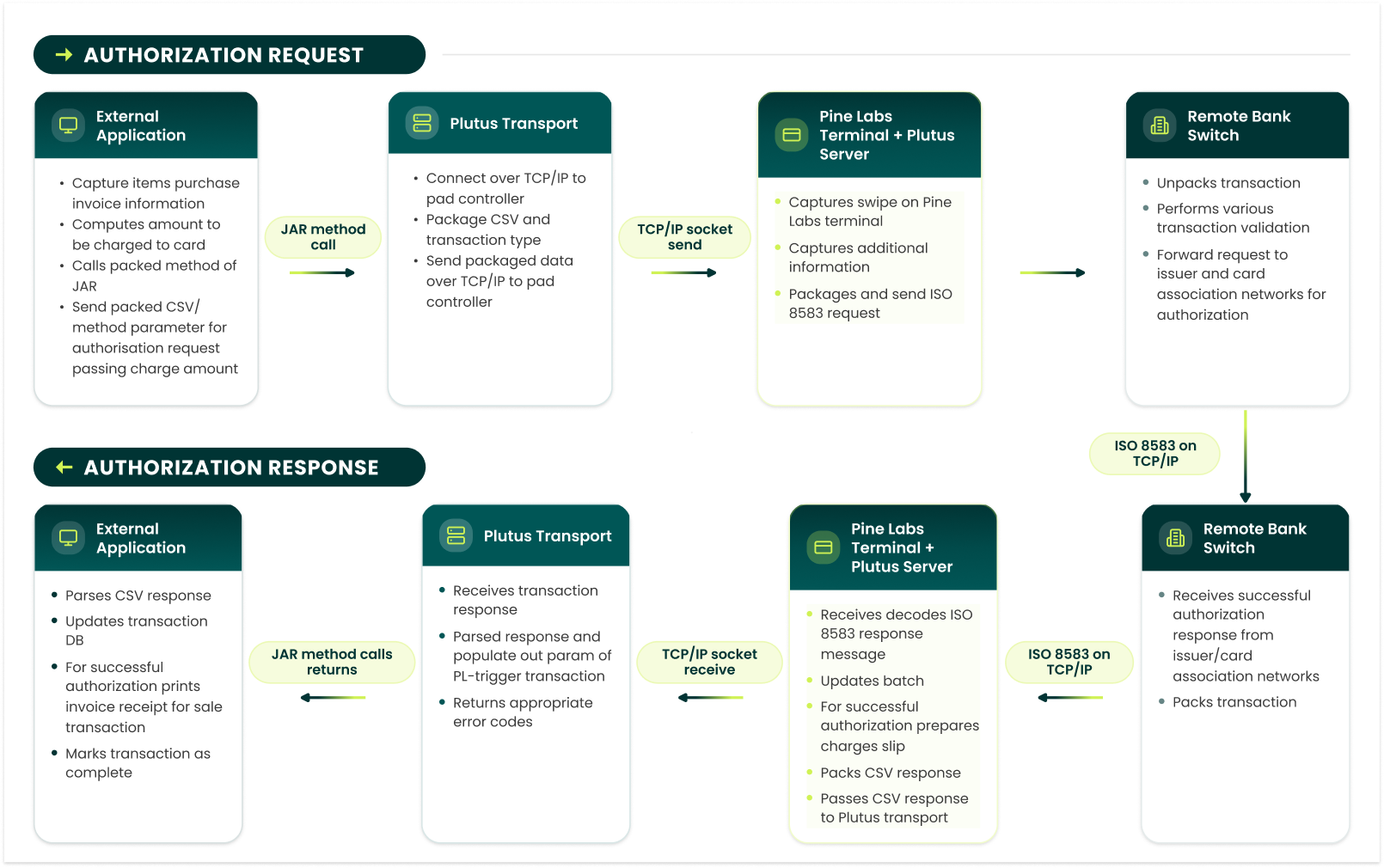
Following diagram describes the process workflow followed for sale transactions in integrated mode. The PlutusTransport’s method calls are synchronous, blocking for the external application.
INTEGRATION DEVELOPMENT PROCESS
This will be same as Integration Development Process for integration with Plutus (as explained above) except change of step 5 which is described as follows:
- Set up to use PlutusTransport JAR.
- Invoke authorization request method by calling required method and pass amount to be charged to card
Note: For split-sale transactions, only pass the amount to be charged to credit / debit card to Plutus - Wait for method call to return, check returned error code, if successful, inspect returned CSV.
- If transaction is declined / unsuccessful, take appropriate action as per your application business process
- If transaction is approved, store response fields in DB for reconciliation and mark transaction as complete
DATA INTERCHANGE FORMAT
This will be same as Data Interchange Format described above.
JAVA CODE SAMPLE
Given below are sample code snippets in Java for instantiating and invoking PlutusTransport JAR methods.
Programming language: Java
Calling PL_TriggerTransaction
    /** This is a sample Java code snippet which sets CSV String of CSVMessage object and passes
     * it along with transaction type to PlutusTransport’s PL_TriggerTransaction method.
     * The response CSV is returned back in csvMessage object. */
    public void doSaleTransactionByTriggerTransaction() {
            Thread thread = new Thread() {
                    public void run() {
                            // Transaction type for SALE
                            long iTransactionType = 4001;
                            // sample CSV String for SALE
                            String strCSV = "1234,10000,01,,,5678,TRUE,,,,";
                            // instantiate CSVMessage object and set CSV String in it.
                            CSVMessage csvMessage = new CSVMessage();
                            csvMessage.setCSV(strCSV);
                            // instantiate PlutusTransport object
                            PlutusTransport plutusTransport = new PlutusTransport();
                            // call to method PL_TriggerTransaction with Transaction type and CSVMessage object
                            // iResponse have response code
                            int iResponse = plutusTransport.PL_TriggerTransaction(iTransactionType, csvMessage);
                            // strCSVResponse have response string
                            String strCSVResponse = csvMessage.getCSV();
                    }
            };
            thread.start();
    }
Calling PL_SALE_TXN method:
    /** This is a sample Java code snippet which sends required Billing Reference Number and Amount
     * to the SALE Transaction and passes it to PlutusTransport’s PL_SALE_TXN method. The response
     * CSV is returned back in csvMessage object.
     */
    public void doSaleTransactionBySaleTransaction() {
            Thread thread = new Thread() {
                    public void run() {
                            // Transaction type for SALE
                            long iTransactionType = 4001;
                            // Sample Billing Reference Number for SALE Transaction
                            String strBRN = "1989";
                            // Sample Amount in paisa for SALE Transaction
                            long lAmount = 2500;
                            // instantiate CSVMessage object and set CSV String in it.
                            CSVMessage csvMessage = new CSVMessage();
                            csvMessage.setCSV("");
                            // instantiate PlutusTransport object
                            PlutusTransport plutusTransport = new PlutusTransport();
                            // call to method PL_SALE_TXN with Billing Reference Number, Amount and CSVMessage object
                            // iResponse have response code
                            int iResponse = plutusTransport.PL_SALE_TXN(strBRN, lAmount, csvMessage);
                            // strCSVResponse have response string
                            String strCSVResponse = csvMessage.getCSV();
                    }
            };
            thread.start();
    }
Reward Transaction Support
Reward Transaction Integration to be supported on Plutus.
Redemption:
- Billing App to send Total Invoice Amount and transaction Type (4101).
- Plutus Terminal to get Card Swipe and to ask for Amount to redeem based on available points and amount.
Sample Request CSV:
- COM CSV:
TX12345678,9999000,,,,,,, - TCP CSV:
4101,TX12345678,9999000,,,,,,,
- Customer to confirm the amount to redeem.
- On confirmation of redemption, response CSV to be sent back to Billing App.
Sample Response CSV:
TX12345678,"7261A9","TRANSACTION SUCCESSFUL","************2802","0406","RamSingh","",78,502,"30000001",0,"PROCESSED","LOYALTY REWARD","000100090015607","624615343002",1,1,"HPCL Area 18","Kamla Mills","Noida","v.01.00.00",81,"10000","400.00","1000000","40000.00","","","","","","02012011","210403"Void:
- Billing App will send Batch ID, ROC, Amount and transaction Type (4102) in Request CSV, for Transaction which has to be voided.
Sample Request CSV:
- COM CSV:
TX12345678,9999000,,,,,,,9002,201 - TCP CSV:
4102,TX12345678,9999000,01,,,,,,,9002,201
- On Successful void of transaction, response CSV will be sent back to Billing App.
Sample Response CSV:
TX12345678,"7261A9","TRANSACTION SUCCESSFUL","************2802","0406","RamSingh","",78,502,"30000001",0,"PROCESSED","LOYALTY REWARD","000100090015607","624615343002",1,1,"HPCL Area 18","Kamla Mills","Noida","v.01.00.00",81,"10000","400.00","1000000","40000.00","","","","","","02012011","210403"Support For Payback Transaction
Payback Transaction Integration to be supported on Plutus.
Redemption:
- Billing App to send principle value (Card Number or mobile number) and corresponding principle classifier (1 or 3) and transaction Type (4402).
- Plutus Terminal to get Card Swipe or Mobile number (in case principle value is not provided) and to ask for Points to redeem based on available points.
- Response CSV to be sent back to Billing App.
Sample Request CSV:
- COM CSV:
TX12345678,,,,,,, - TCP CSV:
4402,TX12345678,,,9900112233,3,,,,
Sample Response CSV:
TX12345678,"7261A9","APPROVED","************2802","XXXX","RamSingh","",101,9001,"30000001",0,"PROCESSED","PAYBACK","000100090015607","624615343002",1,1,"HPCL Area 18","Kamla Mills","Noida","v.01.00.00",91," ","40000","","50000","90000","9401150099532409","","","","02012011","210403"Void:
- Billing App will send Batch ID, ROC, Refund Points and transaction Type (4403) in Request CSV for Transaction which has to be voided.
- On Successful void of transaction, response CSV will be sent back to Billing App.
Sample Request CSV:
- COM CSV:
TX12345678,1000,,,,,,,9002,201 - TCP CSV:
4403,TX12345678,1000,,,,,,,,9002,201
Sample Response CSV:
APPROVEDPrepaid Changes in Payback
There will be a change in request CSV to incorporate IS_PREPAID flag and threshold amount field. 10th (RFU1) and 11th (RFU2) field in request CSV are reserved for IS_PREPAID flag and Threshold amount for Prepaid point redemption. If RFU1 = 1, then we will pass new Prepaid related fields.
Sample Request CSV:
4402,TX12345678,12,,8084162025,3,,,,1,10000,,,,,,Where 10th field is a prepaid flag. And 11th field is a threshold amount for pre-paid.
Sample Response CSV:
TX12345678,"10381","APPROVED","************7707","XXXX","","PAYBACK","106","9133","64200395","0","APPROVED","PAYBACK","000000090000235","0|10381","1","0","new store2709","hhhhhh","Delhi","v.01.00.00",91,"","0|12","","66135|99761","66234|100000","9401150158677707","","","","12212018","182858"Below is the list of fields added in response CSV separated by pipe symbol if prepaid flag 1 (fields are added at the right side of pipe):
- Field 15 –
0|10381: 0-CoalitionOrderId, 10381-PrepaidOrderId - Field 24 –
0|12: 0-CoaliationPointBlocked, 12-PrepaidPointsBlocked - Field 26 –
66135|99761: 66135-Available coalition Balance, 99761-Available Prepaid Balance - Field 27 –
66234|100000: 66234-Total coalition Balance, 100000-Total Prepaid Balance
Note:
- Void and void reversal is not supported.
- Minimum amount to be redeem is 1 from prepaid and coalition.
- Balance enquiry can be performed only for coalition.
Integration Support For Add-On Transaction
The request CSV will be the same as it is used in case of normal sale transaction as the any Addon program is qualified in normal sale only. Integrated CSV transaction is applicable for Add-on programs.
In any case integrated mode transaction response CSV is to be modified to accommodate information regarding Add-on programs. RFU1 (field 28) field of response CSV will contain information in piped formation.
Example response CSV for Instant Discount and Instant EMI:
"T1/1234567890","000000","APPROVED","************4514","XXXX","AXIS T%34 C 2$","VISA",81,11,"abc12345",0,"PROCESSED","AXIS BANK","888888888888888","000000000020",1,1,"PIN@POSWITH AXIS","AMIT KUMAR","HAPUR","Plutus v2.56 AXIS BANK",05,"00","","","","","101|25000|20000|5000|AXIS BANK|;102|3|AXIS BANK|588000|199933|12000","","","","04072015","174420";character is used to distinguish between different programs if multiple program types are present on POS.|character will separate between different parameters of applied add-on program.- First field will be the Program type followed by other information specific to the program.
Example program types:
- 101 – Instant Discount
- 102 – Instant EMI
- 103 – Nx Reward
- 104 – Targeted Promotion
- 112 – Visit Based Offer
- 113 – Add-on Convenience Fee
The Information to be passed in response CSV:
- Instant EMI:
- Program Type
- EMI Tenure
- Issuer Bank
- Loan Principal Amount
- EMI Amount
- Cashback
- Instant Discount:
- Program Type
- Input Amount
- Authorization Amount
- Discount Amount
- Issuer Name
Integration Support For Visit Based Offer
The request CSV will be the same as it is used in case of normal sale transaction as any Add-on program is qualified in normal sale only. Integrated CSV transaction is applicable for Visit Based Offer programs.
Sample Response CSV:
"T1/1234567890","00","APPROVED","************5476","XXXX","HDFC T%34 C 2$","VISA",225,11,"88119015",0,"PROCESSED","HDFC BANK"," ","000000000020",1,1,"LOVE COMMUNICATION","JANA PURI","NEW DELHI DEL ","Plutus v1.49.3 MT HDFC BANK",01,"00","","","","","112|400000|395000|5000|HDFC|100.00","","","","05282015","192034";character is used to distinguish between different programs if multiple program types are present on POS.|character will separate between different parameters of applied add-on program.
First field will be the Program type followed by other information specific to the program.
Example: 112 – Visits Based Offer
Information to be passed in response CSV for Visits Based Offer:
- Program Type
- Entered Amount
- Auth Amount
- Discount/Cashback
- Issuer Bank
- Reward Point
Third Party Wallet Integration
In integrated mode, wallet payments transactions can be launched directly from external billing / retail applications – avoiding the need for dual amount input. Also, the transaction response details are passed to the external application. Transaction completion can be used to automatically link the EFT payment transaction with the billing sale transaction for reconciliation.
DATA INTERCHANGE FORMAT
For specifying the transaction request type to Plutus application, the lTxnType in parameter on PL_TriggerTransaction() method call is used. The value of some such parameters are as defined below:
| Type of Transaction | lTxnType |
|---|---|
| WalletPay | 5102 |
For exchanging request / response data between the Plutus and external application, lpszTransData in-out parameter in PL_TriggerTransaction() method call is used.
These values of this parameter are in comma-separated value (CSV) string format. This string will consist of field values as mentioned in tables below and separated by commas.
REQUEST STRING
Following is the format of the lpszTransData in-parameter expected by PL_TriggerTransaction() method. The external application will set these values. Position in CSV Field Name Date Type Range / Length Description Sample
| Position in CSV | Field Name | Data Type / Range / Length | Description | Sample Value |
|---|---|---|---|---|
| 1 | Billing reference number | String Length: 0 – 25 |
OPTIONAL Transaction reference number from external application. Plutus will only use this value for printing on charge slip. | TX12345678 |
| 2 | Total EFT amount | Long integer 1 – 99999999 |
Amount to be charged to card – expressed as a whole number in lowest currency unit (i.e. in paisa) | 999999 |
| 3 | Wallet Program ID | Integer 1-999 |
This Id will be assigned by Pine Labs to each wallet program type. While performing any Wallet transaction this field needs to set to identify wallet host. For Jio Money this value will be 101. | 101 |
| 4 | Wallet Identifier Data (card/mobile/barcode) | String Length: 1 – 76 |
Optional: Mobile/Barcode/Card Number. If not set, terminal will prompt to capture these values. For Jio Money, Barcode needs to be captured at Billing POS and sent in this field. | |
| 5 | Type of Wallet Input Identifier | String Length: 1 – 37 |
Type of Wallet identifier contained in Field 4. Mobile Number – 01 Barcode – 02 Swipe – 03 |
01 |
| 6 | Invoice number | Long integer Length: 1 – 6 |
Not Applicable | 000012 |
| 7 | Is Swipe entry | String TRUE or FALSE |
By default, it is TRUE. | TRUE |
| 8 | Terminal ID | String Length: 1 – 8 |
Not Applicable | |
| 9 | Operator | String Length: 1 – 31 |
OPTIONAL Operator | |
| 10 | RFU2 | String | OPTIONAL Reserved for future use |
RESPONSE STRING (IN CASE OF INDEPENDENT TRANSACTIONS)
Following is the format of the lpszTransData out-parameter that can be expected after PL_TriggerTransaction() method completes. Plutus will set these values.
| Position in CSV | Field Name | Data Type / Range / Length | Description | Sample Value |
|---|---|---|---|---|
| 1 | Tracking ID | Integer 1 – 32768 |
RFU – used for testing. ID that uniquely identifies a billing application transaction. The tracking ID used by external application to initiate Plutus transaction is passed in the response. This is also an input parameter to PL_TriggerTransaction() method. | 1 |
| 2 | Approval Code | String Length: 0 – 6 |
Credit card authorization code, if transaction was approved. Otherwise empty string. | 5261AJ |
| 3 | Host Response | String Length: 0 – 50 |
Response string if a response for transaction was received from bank switch. Otherwise, if any error occurs before response is received, this is an empty string. | APPROVED |
| 4 | Card Number | String Length: 0 – 19 |
Card number is valid if card was swiped. Otherwise, empty string. | ************2802 |
| 5 | Expiration Date | String Length: 0, 4 |
Card expiration date, expressed in format YYMM, if valid card was swiped. Otherwise, empty string. Some acquirers mandate Expiry date to be masked, in that case a value of “XXXX” will be returned. | XXXX |
| 6 | Cardholder’s Name | String Length: 0 – 25 |
Cardholder’s name from card track 1, if valid card was swiped and card holder name present on Track 1. Otherwise, empty string. | AMIT MOHAN |
| 7 | Card Type | String Length: 0 – 12 |
Card association name, if valid card was swiped. Otherwise, empty string. | WALLET |
| 8 | Invoice Number/EDC ROC (in case of Reward Transaction) | Long Integer 0 – 999999/101 – 999 (in case of Reward Transaction) |
EFT transaction invoice number, if transaction authorized. Otherwise, 0/EDC ROC (the same is printed on charge slip). | 78/101 |
| 9 | Batch Number/EDC Batch ID (in case of Reward Transaction) | Integer Length: 6 |
EFT transaction batch number, if transaction authorized. Otherwise, 0/EDC Batch ID (in case of Reward transaction). | |
| 10 | Terminal ID | String Length: 0, 8 |
EFT TID, if transaction authorized. Otherwise, empty string. | 30000001 |
| 11 | Loyalty Points Awarded | Long Integer 0 – 99999999 |
RFU – not used. | 0 |
| 12 | Remark | String Length: 0 – 100 |
Description of error, if an error occurs. Otherwise, empty string. An empty string in this field DOES NOT imply successful transaction authorization. | Failed to dial modem |
| 13 | Transaction Acquirer Name | String Length: 0 – 48 |
Name of acquirer to which transaction was routed. | JIO MONEY |
| 14 | Merchant ID | String Length: 0 – 15 |
EFT ME ID, if transaction authorized. Otherwise, empty string. | 000100090015607 |
| 15 | Retrieval Reference Number | String Length: 0 – 12 |
EFT RRN, if transaction authorized. Otherwise, empty string. | 000000012843 |
| 16 | Card Entry Mode | Integer 0 – 32767 |
Enumeration of possible values: 0 – Manual/barcode entry 1 – Swipe entry 2 – Chip card entry Any other value – card not validated |
1 |
| 17 | Print Cardholder’s Name on receipt | Integer 0 – 32767 |
Not Applicable | 0 |
| 18 | Merchant Name | String Length: 0 – 23 |
Merchant name, if transaction authorized. Otherwise, empty string. | NOBLE MOTORS |
| 19 | Merchant Address | String Length: 0 – 23 |
Merchant address line, if transaction authorized. Otherwise, empty string. | HAJI ALI |
| 20 | Merchant City | String Length: 0 – 23 |
Merchant city line, if transaction authorized. Otherwise, empty string. | MUMBAI |
| 21 | Plutus Version | String Length: 0 – 40 |
Plutus version | v1.0.0 |
| 22 | Wallet Code | Integer 0 – 999 |
Wallet Code for which transaction was processed. For Jio Money value will be 101. | 101 |
| 23 | Reward Redeemed Amount | Long Integer Length 0-10 |
Not Applicable | 10000 |
| 24 | Reward Redeemed Points | Double Length 0-15 |
Not Applicable | 400.00 |
| 25 | Reward Balance Amount | String Length 0-10 |
Not Applicable | 1000000 |
| 26 | Reward Balance Point | Double Length 0-15 |
Not Applicable | 40000.00 |
| 27 | Charge slip print data in tag value Format (Optional) | String | Not Applicable | |
| 28 | RFU1/Coupon code/Loyalty Card Number | String Length: 0 - 23 |
Not Applicable | |
| 29 | Amount processed successfully by Plutus/ Amount Loaded on cards or wallets/amount voided/Amount loaded on cards/wallets | String Length: 0 – 99 |
Amount will always be in paisa or lowest currency. | 100000 |
| 30 | RFU3 | String Length: 0 – 23 |
Reserved for future use | |
| 31 | RFU4 | String | Not Applicable | |
| 32 | Date of Transaction | String Length: 0/8 |
Date of the Transaction as per acquiring host. Date to be printed on charge slip. In MMDDYYYY Format. | 02012011 |
| 33 | Time of Transaction | String Length: 0/6 |
Time of the Transaction as per acquiring host. Time to be printed on charge slip. HHMMSS where HH in 24 hour format. | 210403 |
Sample request string:
For transaction of amount of Rs 1.00
-
CASE 1: If billing application just triggers the transaction and without wallet type / wallet input identifier/wallet ID data
TX12345678,100,,,,,,
Note: wallet program type, wallet input identifier and wallet ID data will be captured on terminal. -
CASE 2: If wallet program type is present in csv string
TX12345678,100,101,
Jio Money program type id = 101
Freecharge program type id = 103
Note: in this case wallet input identifier and wallet ID data will be captured on terminal -
CASE 3: if Type of Wallet Identifier is present in
TX12345678,100,101,,03
Note: In this case we have information that this is a transaction for Jio Money wallet and entry is swipe, hence terminal will prompt for swipe.
Sample Response String:
"123","048668","APPROVED","************7669","9807","CUSTOMER/JIO MONEY","WALLET","108","9022","10001140","","","JIO MONEY","100001000000098","014897000526","1","0","RLENOVOStore","Sector 62","NOIDA","v1.0.0","101","","","","","","","100","","","11052015","193848"PhonePe Wallet & With GST QR Integration
In integrated mode, PhonePe transactions can be launched directly from external billing/retail applications – avoiding the need for dual amount input. Also, the transaction response details are passed to the external application. Transaction completion can be used to automatically link the EFT payment transaction with the billing sale transaction for reconciliation.
TRANSACTION TYPES
| Sr. No. | Type of Transactions | lTxnType value |
|---|---|---|
| 1 | Sale Charge | 5102 |
| 2 | Void | 5104 |
| 3 | Get Status | 5112 |
REQUEST STRING
Following is the format of the lpszTransData in-parameter expected by PL_TriggerTransaction() method. The external application will set these values.
| Position in CSV | Field Name | Data Type | Range / Length | Description | Sample Value |
|---|---|---|---|---|---|
| 1 | lTxnType | Long Integer | 4 | Transaction request type to Plutus Application. Please refer to the table above | 5102 |
| 2 | Billing Reference Number | String | 0 – 25 | OPTIONAL. Transaction reference number from external application. Plutus will use this value for only printing on charge slip only. Mandatory – for GST QR Txn | TX12345678 |
| 3 | Total EFT amount | Long Integer | 1 – 99999999 | Amount to be charged to card – expressed as a whole number in lowest currency unit (i.e. in paisa) | 999999 |
| 4 | Wallet program ID | Integer | 1-999 | This Id will be assigned by Pine Labs to each wallet program type. While performing any wallet transaction this field needs to set to identify wallet host. PhonePe - 105, UPI AXIS - 107 | 105 |
| 5 | Wallet Identifier Data | String | 1-76 | OPTIONAL (Mobile number, if not set terminal will prompt to capture the value) | |
| 6 | Type of Wallet input Identifier | String | 1 – 37 | OPTIONAL. NA for PhonePe | |
| 7 | Invoice number | Long integer | 1 – 6 | OPTIONAL. If independent transaction, then it is not required. Else in case of dependent transaction, it is the invoice number of parent transaction | |
| 8 | Is Swipe entry | String | TRUE or FALSE | By default it is TRUE. NA for PhonePe | TRUE |
| 9 | Terminal ID | String | 1 – 8 | OPTIONAL RFU. NA for PhonePe | |
| 10 | RFU1 | String | OPTIONAL RFU. NA for PhonePe | ||
| 11 | RFU2 | String | OPTIONAL RFU. NA for PhonePe | ||
| 12 | EDC Batch ID | Integer | 6 | OPTIONAL. If independent transaction, then it is not required. Else in case of dependent transaction, it is the batch id of parent transaction | |
| 13 | EDC ROC | Integer | 101-999 | OPTIONAL. If independent transaction, then it is not required. Else in case of dependent transaction, it is the ROC of parent transaction | 201 |
| 29 | InvoiceDate | GMT format | This field is used to capture the bill invoice date. | 2019-06-11T13:21:50+05:30 | |
| 30 | GstIn | String | The merchant populate GSTIN value under this tag. | 09AABCU9603R112 | |
| 31 | GstBrkUp | String | It will contain the break-up of GST amount. GST:amount|CGST:amount|SGST:amount|IGST:amount|CESS:amount|GSTIncentive:amount|GSTPCT:percentage | GST:16.90|CGST:08.45|SGST:08.45 |
Note: Upgraded PAD controller version to be used to support field 29, 30 & 31 for additional GST details. Also need to use latest EDC build.
SALE CHARGE REQUEST
Sample request strings:
-
CASE 1: If billing application just triggers the transaction without wallet program id / wallet identifier data
Note: Wallet program type, wallet identifier (only for PhonePe if paymode is Mobile only or Mobile and QR both) will be captured on terminal.5102,TX12345678,100,,,,,, -
CASE 2: If wallet program id is present in csv string
PhonePe program type id = 1055102,TX12345678,100,105,
Note: in this case, wallet identifier will be captured on terminal only for PhonePe if pay mode is Mobile only or Mobile and QR both.
Sample Response String: There will be 2 cases:
-
CASE 1: Sale charge request is initiated, and sale completion is pending. The case occurs for
- PhonePe Async mode, which is two-step process Sale charge request followed by Get Status request.
- PhonePe Sync mode when Charge Completion is failed due to any reason.
"1245","","TRANSACTION INITIATED, CHECK GET STATUS!","******6400"," ","","WALLET","231","9102","ABCD123466","","","PHONE PE","M2306160483220675579140","","","0","varunstore","jaipur","ADILABAD","v1.0.0","105","","", "","","","","2500","","","04112017","161835" -
CASE 2: Sale charge is complete through callback URL in one step (PhonePe sync mode).
"1245","005436","SUCCESS","******6400"," ","","WALLET","231","9102","ABCD123466","","","PHONE PE","M2306160483220675579140","","","0","varunstore","jaipur","ADILABAD","v1.0.0","105","","", "","","","","2500","","","04112017","161835"
VOID OF SALE CHARGE
-
CASE 1: If billing application just triggers the void with only Transaction type and amount
5104,TX12345678,100,,,,,, -
CASE 2: If billing application provides batch ID and ROC along with amount and transaction type
Note: In this case the transaction will proceed for void and no terminal capture is required.5104,1245,100,,,,,,,,,9023,119,,,,,,,,,,
Sample Response String:
"1245","005436","SUCCESS","******6400"," ","","","260","9102","ABCD123466","","","PHONE PE","M2306160483220675579140","","","0","varunstore","jaipur","ADILABAD","v1.0.0","105","","", "","","","","3900","","","04132017","143003"GET STATUS OF SALE CHARGE
-
CASE 1: If billing application just triggers the get status with only Transaction type and amount
5112,TX12345678,100,,,,,,
Note: In this case, there will be a menu selection prompted on terminal with values: Get Last transaction and Get Any transaction. 2 cases will be present- Case A: User selects Get Last transaction. In this case, no further terminal interaction is required and get status is done
- Case B: User selects Get Any transaction. In this case, Batch ID and ROC will be captured on the terminal.
-
CASE 2: If billing application provides batch ID and ROC along with amount and transaction type
5112,1245,100,,,,,,,,,9023,119,,,,,,,,,,
Note: In this case the transaction will proceed for get status and no terminal capture is required.
Sample Response String:
"1245","005436","APPROVED","******6400"," ","","WALLET","259","9102","ABCD123466","","","PHONE PE","M2306160483220675579140","","","0","varunstore","jaipur","ADILABAD","v1.0.0","105","","", "","","","","3900","","","04132017","143003"Sodexo Integration
In integrated mode, Sodexo payment transactions can be launched directly from external billing/retail applications – avoiding the need for dual amount input. Also, the transaction response details are passed to the external application. Transaction completion can be used to automatically link the EFT payment transaction with the billing sale transaction for reconciliation.
TRANSACTION TYPES
| Sr. No. | Type of Transactions | lTxnType value |
|---|---|---|
| 1 | Sodexo Sale | 5106 |
| 2 | Sodexo Void | 5107 |
REQUEST STRING
Sending this over socket to PADController on port 8082 will initiate an authorization request transaction for the particular transaction type.
Sample Sodexo Request string (with first 22 fields) for an approved transaction:
5106,T000150100000332,7385,,,,,,,,,,,,,,,,,RESPONSE STRING (IN CASE OF INDEPENDENT TRANSACTIONS)
| Position in CSV | Field Name | Data Type | Range / Length | Description | Sample Value |
|---|---|---|---|---|---|
| 1 | Billing Reference Number | String | 0-25 | OPTIONAL: Transaction reference number from external application | TX12345678 |
| 2 | Approval Code | String | 0–6 | Credit card authorization code, if transaction was approved. Otherwise empty string. Presence of non-zero length approval code string indicates successful authorization of transaction. This logic holds true for Pine 360 transaction as well. | 5261AJ |
| 3 | Host Response | String | 0–50 | Response string if a response for transaction was received from bank switch. Otherwise, if any error occurs before response is received, this is an empty string. | APPROVED |
| 4 | Card Number | String | 0–19 | Card number is valid if card was swiped. Otherwise, empty string. | ************2802 |
| 5 | Expiration Date | String | 0, 4 | Card expiration date, expressed in format YYMM, if valid card was swiped. Otherwise, empty string. Some acquirers mandate Expiry date to be masked, in that case a value of “XXXX” will be returned. | XXXX |
| 6 | Cardholder’s Name | String | 0–25 | Cardholder’s name from card track 1, if valid card was swiped and card holder name present on Track 1. Otherwise, empty string | AMIT MOHAN |
| 7 | Card Type | String | 0–25 | Card association name, if valid card was swiped. Otherwise, empty string | VISA |
| 8 | Invoice Number/EDC ROC (in case of Reward Transaction) | Long Integer | 0–999999/101–999 | EFT transaction invoice number, if transaction authorized. Otherwise, 0/EDC ROC (the same is printed on charge slip) | 78/101 |
| 9 | Batch Number/EDC Batch ID (in case of Reward Transaction) | Integer | 6 | EFT transaction batch number, if transaction authorized. Otherwise, 0/EDC Batch ID (in case of Reward transaction) | |
| 10 | Terminal ID | String | 0, 8 | EFT TID, if transaction authorized. Otherwise, empty string | 30000001 |
| 11 | Loyalty Points Awarded | Long Integer | 0-99999999 | RFU-not used | |
| 12 | Remark | String | 0–100 | Description of error, if an error occurs. Otherwise, empty string. An empty string in this field DOES NOT imply successful transaction authorization | Failed to dial modem |
| 13 | Transaction Acquirer name | String | 0–48 | Name of acquirer to which transaction was routed | SODEXO |
| 14 | Merchant ID | String | 0–15 | EFT ME ID, if transaction authorized. Otherwise, empty string | 000100090015607 |
| 15 | Retrieval Reference Number | String | 0–12 | EFT RRN, if transaction authorized. Otherwise, empty string | 000000012843 |
| 16 | Card Entry Mode | Integer | 0–32767 | Enumeration of possible values: 0 – Manual entry, 1 – Swipe entry, 2 – Chip card entry, Any other value – card not validated | 1 |
| 17 | Print Cardholder’s Name on receipt | Integer | 0–32767 | Enumeration of possible values: 0 – Do not print cardholder’s name, 1 – Print cardholder’s name, Any other value – card not validated. This is used if external application is to print Plutus charge slip. | 1 |
| 18 | Merchant Name | String | 0–23 | Merchant name, if transaction authorized. Otherwise, empty string | NOBLE MOTORS |
| 19 | Merchant Address | String | 0–23 | Merchant address, if transaction authorized. Otherwise, empty string | HAJI ALI |
| 20 | Merchant City | String | 0–23 | Merchant city, if transaction authorized. Otherwise, empty string | MUMBAI |
| 21 | Plutus Version | String | 0–40 | v.01.00.00 (for SODEXO) | |
| 22 | Acquiring Bank Code | Integer | 0–999 | Code for bank used for processing transaction. 301 - Sodexo | 301 |
| 32 | Date of Transaction | String | 0/8 | Date of the Transaction as per acquiring host. Date to be printed on charge slip. In MMDDYYYY Format. | 02012011 |
| 33 | Time of Transaction | String | 0/6 | Time of the Transaction as per acquiring host. Time to be printed on charge slip. HHMMSS where HH in 24 hour format. | 210403 |
Sample Sodexo Sale Request String:
5106,T000150100000332,100,,,,,,,,,,,,,,,,,Sample Sodexo Sale Response String:
"T000150100000332","126936","APPROVED","************0065","XXXX"," ","","101","9127","70000116","0","APPROVED","SODEXO","2341","160111000069","1","1","TestStoreVinit","mayur vihar 3","MEERUT","v.01.00.00","301","","","","","","","","","","07012016","111218"RESPONSE STRING (IN CASE OF DEPENDENT TRANSACTIONS)
Sample Sodexo void Request CSV:
5107,T000150100000334,3060,,,,,,,,,9001,101,,,,,,Sample Sodexo Void Response:
"T000150100000334","120008","APPROVED","************0065","XXXX"," ","","105","9127","70000116","0","APPROVED","SODEXO","2341","160111000071","1","1","TestStoreVinit","mayur vihar 3","MEERUT","v.01.00.00","301","","","","","","","","","","07012016","112930"Integration for Partial Pay By Point
Through this feature, during a Sale transaction (Txn type 4001), if the card is identified as one of the Loyalty Cards supported by Pine Labs, the cardholder can be asked if they want to redeem Loyalty points and pay partial/full bill amount through loyalty points.The reward details are captured in respective fields as per the integration document.
- Field-22 (Acquiring bank code):
- 81 - Loyalty Reward
- 82 - Aimia
- 83 - Amex Reward
- Field-23: Reward Redeemed Amount
- Field-24: Reward Redeemed Point
Sample Request and Response CSV
Request CSV:
4001,TX12345678,9000,,,,,,,Response CSV: Partial pay by point (Sale + Reward) For Amex
"T1/1234567890","00","APPROVED","374245*****0001","XXXX","AMEX TESTCARD","AMEX 003",316,23,"55000030",0,"PROCESSED","AMERICAN EXPRESS","9795818996 ","000000000020",2,1,"PINE LABS PVT.LTD.","Testing Server","NOIDA - INDIA","Plutus v2.0 AMEX ",03,"250000","10000.00","0","0.00","","","","","","08042016","150433"Response CSV: Partial pay by point (Sale + Reward) For Loyalty Reward
"123","123456","APPROVED","************5858","XXXX","NIKESH KUMAR /","VISA-PIN",83,23,"PL000013",0,"PROCESSED","SBI BANK","PL0000000000013","000000047040",1,1,"NOIDA(NCR)","PineLabs Pvt Ltd","Sector-62","Plutus v10.1.1 SBI",06,"75056","3002.24","0","0.01","","","","","","08042016","151131"Response CSV: Full Redeem (Reward Only) For Amex Reward
"T1/1234567890","188371","APPROVED","***********0001","","AMEX TESTCARD ","","102","9501","50000252","","TXN APPROVED BY AMEX HOST","REWARDS","9820359248","","","1","teststore02","Pine Labs Unitech Infospace","NOIDA","v.01.00.00",83,"50000","2000","","","","","","","","08042016","142822"Response CSV: Full Redeem (Reward Only) For Loyalty Reward
"123","00022560","APPROVED","************5858","","NIKESH KUMAR ","","110","9891","99000001","","TXN APPROVED BY HOST","REWARDS","1638","","","1","Nikesh Test new","Pinelabs Pvt Ltd","NOIDA","v.01.00.00",81,"50000","2000.00","75056","3002.25","","","","","","08042016","150809"Void of Partial Pay By Point
In case of partial pay by point transaction of both sale and reward, request and response will be same as normal void (Txn type 4006).
Request CSV for Void Transaction:
4006,TX12345678,9999000,01,,,000013,,,,,Response string will be "APPROVED" for successful transaction.
The void of Full Redeem (only reward) transaction can be performed through Txn types 4006 (Normal sale-void) and 4102 (Reward-Void).
Request CSV for Txn type (4006):
4006,TX12345678,500,83,,,212,,,,,9525,212,,Request CSV for Txn type (4102):
4102,TX12345678,5,,,,,,,,,9145,104,,,,,Void Response CSV for Full Redeem (only Reward):
"5678","000000","APPROVED","374245*****0001","","","","110","9597","50000128","","TXN APPROVED BY AMEX HOST","REWARDS","9820359248","","","1","Abhishek store1","Rohini","Delhi","v.01.00.00",83,"500","20","","","","","","","","08052016","102343"UPI/BHARAT QR Integration
In integrated mode, UPI/BHARAT QR transactions can be launched directly from external billing / retail applications – avoiding the need for dual amount input. Also, the transaction response details are passed to the external application. Transaction completion can be used to automatically link the EFT payment transaction with the billing transaction for reconciliation.
TRANSACTION TYPES
| Sr. No. | Type of Transactions | lTxnType Value |
|---|---|---|
| 1 | UPI Sale Request | 5120 |
| 2 | Void | 5121 |
| 3 | Get Status | 5122 |
| 4 | Bharat QR Sale request | 5123 |
REQUEST STRING
Following is the format of the request CSV. The external application will set these values.
| Position in CSV | Field Name | Data Type | Range / Length | Description | Sample Value |
|---|---|---|---|---|---|
| 1 | lTxnType | Long Integer | Length: 4 | Transaction request type to Plutus application. Please refer to the table above. Values: 5120,5121,5122,5123 | 5120 |
| 2 | Billing Reference Number | String | 0 – 25 | OPTIONAL. Transaction reference number from external application. Plutus will use this value for only printing on charge slip only. | TX12345678 |
| 3 | Total EFT Amount | Long Integer | 1 – 99999999 | Amount to be charged to card – expressed as a whole number in lowest currency unit (i.e. in paisa) | 999999 |
| 5 | UPI/BHARAT QR Identifier Data | String | Length: 1 – 76 | OPTIONAL | |
| 6 | Type of UPI/BHARAT QR input Identifier | String | Length: 1 – 37 | OPTIONAL NA |
|
| 7 | Invoice Number | Long Integer | Length: 1 – 6 | OPTIONAL. If independent transaction, then it is not required. Else in case of dependent transaction, it is the invoice number of parent transaction | |
| 8 | Is Swipe entry | String | TRUE or FALSE | By default, it is TRUE. NA for UPI/BHARAT QR Transactions | TRUE |
| 9 | Terminal ID | String | Length: 1 – 8 | OPTIONAL RFU. NA for UPI/BHARAT QR Transactions | |
| 10 | RFU1 | String | OPTIONAL RFU. NA for UPI/BHARAT QR Transactions | ||
| 11 | RFU2 | String | OPTIONAL RFU. NA for UPI/BHARAT QR Transactions | ||
| 12 | EDC Batch ID | Integer | Length: 6 | OPTIONAL. If independent transaction, then it is not required. Else in case of dependent transaction, it is the batch id of parent transaction | |
| 13 | EDC ROC ID | Integer | 101-999 | OPTIONAL. If independent transaction, then it is not required. Else in case of dependent transaction, it is the ROC of parent transaction | 201 |
UPI SALE WITH GST DETAILS (ADDITIONAL PARAMETERS)
Additional Parameters for UPI Sale with GST Details
The following additional parameters are used for UPI Sale transactions with GST details:
| Position in CSV | Field Name | Data Type | Description | Sample Value |
|---|---|---|---|---|
| 1 | Billing Reference Number / Invoice Number (existing field) | String | This field is used to capture the bill/invoice number. | TXN123456 |
| 29 | InvoiceDate | GMT format | This field is used to capture the bill invoice date. | 2019-06-11T13:21:50+05:30 |
| 30 | GstIn | String | The merchant populates GSTIN value under this tag. | 09AABCU9603R112 |
| 31 | GstBrkUp | String |
It will contain the break-up of GST amount. Format: GST:amount | CGST:amount | SGST:amount | IGST:amount | CESS:amount | GSTIncentive:amount | GSTPCT:percentage |
CGST:08.45|SGST:08.45 |
Note: Upgraded PAD controller version to be used to support field 29, 30 & 31 for additional GST details.
REQUEST String
Example CSV Request for UPI Sale (with GST):
5120,TXN123456,100,,,,,,,,,,,,,,,,,,,,,,,,,,,2019-06-11T13:21:50+05:30,09AABCU9603R112,CGST:08.45|SGST:08.45,RESPONSE STRING (IN CASE OF INDEPENDENT TRANSACTIONS)
Following is the format of the CSV received. Plutus will set these values.
| Position in CSV | Field Name | Data Type / Range / Length | Description | Sample Value |
|---|---|---|---|---|
| 1 | Billing Ref ID | String Length: 0–25 |
OPTIONAL: Transaction reference number from external application | TX12345678 |
| 2 | Approval Code | String Length: 0–6 |
Authorization code, if transaction was approved. Otherwise empty string. | 5261AJ |
| 3 | Host Response | String Length: 0–50 |
Response string if a response for transaction was received from host. Otherwise, if any error occurs before response is received, this is an empty string. | APPROVED |
| 4 | Card Number | String Length: 0–19 |
Card number is valid if card was swiped. Otherwise, empty string. | ************2802 |
| 5 | Expiration Date | String Length: 0, 4 |
Card expiration date, expressed in format YYMM, if valid card was swiped. Otherwise, empty string. Some acquirers mandate Expiry date to be masked, in that case a value of “XXXX” will be returned. | XXXX |
| 6 | Cardholder’s Name | String Length: 0–25 |
Cardholder’s name from card track 1, if valid card was swiped and card holder name present on Track 1. Otherwise, empty string. | AMIT MOHAN |
| 7 | Card Type | String Length: 0–12 |
Card association name, if valid card was swiped. Otherwise, empty string. | UPI |
| 8 | Invoice Number/EDC | Long Integer 0–999999/101–999 (in case of Reward transaction) |
EFT transaction invoice number, if transaction authorized. Otherwise, 0/EDC ROC (the same is printed on charge slip). | 78/101 |
| 9 | Batch Number/EDC Batch ID | Integer Length: 6 |
EFT transaction batch number, if transaction authorized. Otherwise, 0/EDC Batch ID (in case of Reward transaction). | |
| 10 | Terminal ID | String Length: 0, 8 |
EFT TID, if transaction authorized. Otherwise, empty string. | 30000001 |
| 11 | Loyalty Points Awarded | Long Integer 0–99999999 |
RFU – not used. | 0 |
| 12 | Remark | String Length: 0–100 |
Description of error, if an error occurs. Otherwise, empty string. An empty string in this field DOES NOT imply successful transaction authorization. | Failed to dial modem |
| 13 | Transaction Acquirer Name | String Length: 0–48 |
Name of host to which transaction was routed. | AXIS UPI |
| 14 | Merchant ID | String Length: 0–15 |
EFT ME ID, if transaction authorized. Otherwise, empty string. | 000100090015607 |
| 15 | Retrieval Reference Number | String Length: 0–12 |
EFT RRN, if transaction authorized. Otherwise, empty string. | 000000012843 |
| 16 | Card Entry Mode | Integer 0–32767 |
NA for UPI/BHARAT QR | NA |
| 17 | Print Cardholder’s Name on receipt | Integer 0–32767 |
Not Applicable | NA |
| 18 | Merchant Name | String Length: 0–23 |
Merchant name, if transaction authorized. Otherwise, empty string. | NOBLE MOTORS |
| 19 | Merchant Address | String Length: 0–23 |
Merchant address line, if transaction authorized. Otherwise, empty string. | HAJI ALI |
| 20 | Merchant City | String Length: 0–23 |
Merchant city line, if transaction authorized. Otherwise, empty string. | MUMBAI |
| 21 | Plutus Version | String Length: 0–40 |
Plutus version | v1.0.0 |
| 22 | UPI/Bharat QR | Integer 0–999 |
UPI/Bharat QR program type for which transaction was processed. HDFC BHARAT QR-1, HDFC UPI-2, AXIS UPI-3 |
1 |
| 23 | Reward Redeemed Amount | Long Integer Length: 0–10 |
Not Applicable | NA |
| 24 | Reward Redeemed Point | Double Length: 0–15 |
Not Applicable | NA |
| 25 | Reward Balance Amount | Long Integer Length: 0–10 |
Not Applicable | NA |
| 26 | Reward Balance Points | Double Length: 0–15 |
Not Applicable | NA |
| 27 | Charge slip print data in tag value format (Optional)* | String 0–32767 |
Not Applicable | Not Applicable |
| 28 | RFU1/Coupon code/Loyalty Card Number | String Length: 0–23 |
Not Applicable | Not Applicable |
| 29 | Amount processed successfully by Plutus/Amount Loaded on cards or wallets/amount voided/Amount loaded on cards/wallets | String Length: 0–99 |
Amount will always be in paisa or lowest currency. | 100000 |
| 30 | RFU3 | String Length: 0–23 |
Reserved for future use | Reserved for future use |
| 31 | RFU4 | String Length: 0–40 |
Not Applicable | Not Applicable |
| 32 | Date of Transaction | String Length: 0/8 |
Date of the Transaction as per acquiring host. Date to be printed on charge slip. In MMDDYYYY Format. | 02012011 |
| 33 | Time of Transaction | String Length: 0/6 |
Time of the Transaction as per acquiring host. Time to be printed on charge slip. HHMMSS where HH in 24 hour format. | 210403 |
| 34 | Plutus Transaction Id | Long Integer Length: 0–19 |
Transaction Id Generated by PL | 30000000100001 |
| 35 | RFU5 | String Length: 0–40 |
Reserved for future use | |
| 36 | RFU6 | String Length: 0–40 |
Reserved for future use | |
| 37 | RFU7 | String Length: 0–40 |
Reserved for future use | |
| 38 | OrigBillDetails | String 0–100 |
EDCBatchId + "|" + OrigEDCRoc + "|" + OrigBillingRefNumber | 9001101PL981445456 |
UPI/BHARAT QR SALE CHARGE REQUEST
Sample Request Strings:
-
CASE 1: If billing application just triggers the transaction without UPI/BHARAT QR program id
UPI Sale Request:5120,TX12345678,100,,,,,,,
BHARAT QR Sale request:5123,TX12345678,100,,,,,,, -
CASE 2: UPI/BHARAT QR program id is present in csv string
UPI Sale Request:5120,TX12345678,100,2,,,,,,,
BHARAT QR Sale request:5123,TX12345678,100,1,,,,,,,
| ACQUIRER_HOST_ID | ACQUIRER_HOST_NAME |
|---|---|
| 1 | HDFC BHARAT QR |
| 2 | HDFC UPI |
| 3 | AXIS UPI |
| 4 | ICICI UPI |
| 5 | AXIS BHARAT QR |
| 6 | HSBC UPI |
| 7 | AMEX BHARAT QR |
| 8 | ICICI BHARAT QR |
| 9 | IDFC UPI |
| 10 | PayTM |
| 11 | AIRTEL BANK |
| 12 | Airtel UPI |
| 21 | TWID |
| 22 | Citi UPI |
| 51 | GOOGLE PAY |
Sample Response String: There will be 2 cases:
-
Case 1: Sale charge request is initiated, and sale completion is pending.
"1245","","TRANSACTION INITIATED, CHECK GET STATUS","******6400"," ","","UPI","231","9102","ABCD123466","","","UPI AXIS","M2306160483220675579140","","","0","varunstore","jaipur","ADILABAD","v1.0.0","3","","","","","","","2500","","","04112017","161835" -
Case 2: Sale charge is complete through callback URL in one step
"1245","002195","SUCCESS",""," ","","UPI","231","9102","ABCD123466","","","UPI AXIS","M2306160483220675579140","","","0","varunstore","jaipur","ADILABAD","v1.0.0","3","","","","","","","2500","","","04112017","161835"
VOID UPI/BHARAT QR SALE CHARGE
-
Case 1: If billing application just triggers the void with only Transaction type and amount
5121,TX12345678,100,,,,,,, -
Case 2: If billing application provides batch ID and ROC along with amount and transaction type
5121,1245,100,,,,,,,,,9023,119,,,,,,,,,,
Note: In this case the transaction will proceed for void and no terminal capture is required.
Sample Response String:
"1245","005432","SUCCESS","******6400"," ","","","260","9102","ABCD123466","","","AXIS UPI","M2306160483220675579140","","","0","varunstore","jaipur","ADILABAD","v1.0.0","3","","","","","","","3900","","","04132017","143003"GET STATUS OF UPI/BHARAT QR SALE CHARGE
-
Case 1: If billing application just triggers the get status with only Transaction type and amount
5122,TX12345678,100,,,,,,,
Note: In this case, there will be a menu selection prompted on terminal with values: Get Last transaction and Get Any transaction. 2 cases will be present
Case A: User selects Get Last transaction. In this case, no further terminal interaction is required and get status is done
Case B: User selects Get Any transaction. In this case, Batch ID and ROC will be captured on the terminal. -
Case 2: If billing application provides batch ID and ROC along with amount and transaction type
5122,1245,100,,,,,,,,,9023,119,,,,,,,,,,
Note: In this case the transaction will proceed to get status and no terminal input is required.
Sample Response String:
"1234","002214","Success","","","","UPI","130","9854","70000002","0","Success","AXIS UPI","PINELABS","","","0","Abhishek store1","Rohini","Delhi","v1.0.0","3","","","","","","","567","","","05092017","131947"Paytm Integration
Paytm transactions can be launched directly from external billing / retail applications – avoiding the need for dual amount input. Also, the transaction response details are passed to the external application.
TRANSACTION TYPES
| Sr. No. | Type of Transactions | lTxnType Value |
|---|---|---|
| 1 | Paytm Sale | 5125 |
| 2 | Get Status | 5122 |
CASE 1: Paytm sale request (Transaction done on call back URL)
Request CSV:
5125,T000940100000002,3900,,,,,,,,Response CSV:
"T000940100000002","000020","APPROVED","","","","PayTm","187","9290","89562314","0","APPROVED","PayTM QR","casreu55137050570131","1011RQ8LJPMUNMF","","0","PAYMENT SK","Kali Paltan Mandir Cantt Meerut Uttar ","MEERUT","v1.0.0","10","","","","","","","3900","","","07272018","181907"CASE 2: Paytm sale request using QR code (if the payment successful on app and time out occurs on EDC machine)
Request CSV:
5125,T000940100000019,7800,,,,,,,,,Response CSV:
"T000940100000019","","TRANSACTION INITIATED CHECK GET STATUS","","","","PayTm","102","9236","89562314","0","TRANSACTION INITIATED CHECK GET STATUS","PayTM QR","casreu55137050570131","","","0","JulyRelease2017","noida","NOIDA","v1.0.0","10","","","","","","","7800","","","08022018","135212"Sample Response String for Get Status:
"","000044","APPROVED","","","","PayTm","103","9236","89562314","0","APPROVED","PayTM QR","casreu55137050570131","101XDD7BJQD1HUM","","0","JulyRelease2017","noida","NOIDA","v1.0.0","10","","","","","","","7800","","","08022018","135743"Airtel Bank Integration
The requirement is to enable Airtel Payment Bank Integration through PineLabs solution. Customer will enter their mobile number and receive an OTP from the bank. Customer will enter the OTP on the terminal and transaction will be completed after successful response received from the Host.
TRANSACTION TYPES
| Sr. No. | Type of Transactions | lTxnType Value |
|---|---|---|
| 1 | Airtel Sale | 5127 |
Sample Request CSV:
5127,T000940100000019,5000,,,,,,,,,Sample Response CSV of a Successful Airtel Bank transaction:
"123","000054","APPROVED","","","","Airtel Bank","106","9023","85003","0","APPROVED","AIRTEL BANK","180704","478270","","0","Tata Starbucks Store","Pine Labs Pvt Ltd Noida","Delhi","v1.0.0","11","","","","","","","100","","","09062018","151123"Sample Response CSV of a Failed Airtel Bank transaction:
"123","","AIRTEL BANK OTP VERIFICATION FAILED","","","","Airtel Bank","105","9023","85003","0","AIRTEL BANK OTP VERIFICATION FAILED","AIRTEL BANK","180704","","","0","Tata Starbucks Store","Pine Labs Pvt Ltd Noida","Delhi","v1.0.0","11","","","","","","","100","","","09062018","150952"Google Pay Integration (As an Issuer)
In the integrated mode, Google Pay transactions can be initiated directly from external billing / retail applications – avoiding the need for dual amount input. Also the transaction response details are passed to the external application. Transaction completion can be used to automatically link the EFT payment transaction with the billing transaction for reconciliation.
TRANSACTION TYPES
| Sr. No. | Type of Transactions | lTxnType Value |
|---|---|---|
| 1 | Google Pay Sale | 5126 |
| 2 | Void | 5121 |
| 3 | Get Status | 5122 |
Sale Transaction
Request CSV for Google Pay:
5126,293,100,,9582001423,01,,,,Response CSV for Google Pay:
"293","000263","APPROVED","nikesh09hcl@okhdfcbank","","","GOOGLE PAY","142","9601","30007181","0","APPROVED","AXIS UPI","PINELAPROD0071047","826312121822","","0","JulyRelease2017","noida","NOIDA","v1.0.0","3","","","","","","","100","","","09202018","123248","30007581000263","100","25353","","9601|142|293"Void Transactions
Request CSV for Google Pay:
5121,293,100,,,,,,,,,9601,142,,Response CSV for Google Pay Void:
"293","000264","APPROVED","nikesh09hcl@okhdfcbank","","","GOOGLE PAY","145","9601","30007181","0","APPROVED","AXIS UPI","PINELAPROD0071047","826312121822","","0","JulyRelease2017","noida","NOIDA","v1.0.0","3","","","","","","","100","","","09202018","123659","30007581000264","100","5121","","9601|142|293"GET STATUS OF UPI SALE CHARGE
CASE 1: If billing application just triggers the get status with only Transaction type and amount
5122,TX12345678,100,,,,,,,,
Note: In this case, there will be a menu selection prompted on terminal with values: Get Last transaction and Get Any transaction. 2 cases will be present
Case A: User selects Get Last transaction. In this case, no further terminal interaction is required and get status is done
Case B: User selects Get Any transaction. In this case, Batch ID and ROC will be captured on the terminal.
CASE 2: If billing application provides batch ID and ROC along with amount and transaction type
5122,1245,100,,,,,,,,,9023,119,,,,,,,,,,Note: In this case the transaction will proceed to get status and no terminal input is required.
Sample Response String:
"1234","002214","Success","","","","UPI","130","9854","70000002","0","Success","AXIS UPI","PINELABS","","","0","Abhishek store1","Rohini","Delhi","v1.0.0","3","","","","","","","567","","","05092017","131947"PayPal QR Integration
In integrated mode, PAYPAL QR transactions can be launched directly from external billing / retail applications –avoiding the need for dual amount input. Also, the transaction response details are passed to the external application. Transaction completion can be used to automatically link the EFT payment transaction with the billing transaction for reconciliation.
TRANSACTION TYPES
| Sr. No. | Type of Transactions | lTxnType Value |
|---|---|---|
| 1 | PayPal Sale | 5554 |
| 2 | Get Status | 5122 |
Sample request strings:
CASE 1: If billing application just triggers the transaction without PAYPAL QR program id
5554,TX12345678,100,,,,,,,,Sample Response String: There will be 2 cases:
CASE 1: Sale charge request is initiated, and sale completion is pending.
"TX12345678","","TRANSACTION INITIATED CHECK GET STATUS","","","","","101","9038","16000001","0","TRANSACTION INITIATED CHECK GET STATUS","PayPal","","","","0","LUXMI SALES CORPORATION MOGA PUNJAB","Chakki Wali Gali Near Bus Stand","MOGA","v1.0.0","16","","","","","","","100","","","05132019","145801"CASE 2: Sale charge is complete through callback URL in one step
"TX12345678","500064","APPROVED","","","","","108","9038","16000001","0","APPROVED","PayPal","","W218592K268780T","","0","LUXMI SALES CORPORATION MOGA PUNJAB","Chakki Wali Gali Near Bus Stand","MOGA","v1.0.0","16","","","","","","","100","","","05132019","152852"GET STATUS OF PAYPAL QR SALE CHARGE
CASE 1: If billing application just triggers the get status with only Transaction type and amount
5122,TX12345678,100,,,,,,,,Note: In this case status of only Last transaction will be given by above CSV. No terminal input is required
CASE 2: If billing application provides batch ID and ROC along with amount and transaction type
5122,1245,100,,,,,,,,,9296,107,,,,,,,,,,Note: In this case the transaction will proceed to get status and no terminal input is required.
Sample Response String:
"1245","500065","APPROVED","","","","PayPal","111","9038","16000001","0","APPROVED","PayPal","","B16414AK632243T","","0","LUXMI SALES CORPORATION MOGA PUNJAB","Chakki Wali Gali Near Bus Stand","MOGA","v1.0.0","16","","","","","","","100","","","05132019","154544"COD Transaction Type For Integration Mode
TRANSACTION TYPES
| Sr. No. | Type of Transactions | lTxnType Value |
|---|---|---|
| 1 | COD Sale (Cash) | 4507 |
| 2 | COD Void (Cash) | 4508 |
Request CSV:
- COD Sale:
4507,test123,12000,51215,,,,,,,,,, - COD Void:
4508,Test123,12000,,,,,,,,,9327,131
Response CSV:
- COD Sale:
test123,131,APPROVED,,,,,131,9327,116493,,,,,,,,,,,,,,,,,,,,,,08072019,111257,131,12000,4507 - COD VOID:
Test123,132,APPROVED,,,,,132,9327,116493,,,,,,,,,,,,,,,,,,,,,,08072019,111848,132,12000,4508
Amazon Pay Integration
In integrated mode, Amazon Pay transactions can be launched directly from external billing / retail applications – avoiding the need for dual amount input. Also, the transaction response details are passed to the external application. Transaction completion can be used to automatically link the EFT payment transaction with the billing transaction for reconciliation.
TRANSACTION TYPES
| Sr. No. | Type of Transactions | lTxnType Value |
|---|---|---|
| 1 | Amazon Pay Request | 5129 |
| 2 | Get Status | 5122 |
Request CSV Fields
| Position in CSV | Field name | Data type | Range / Length | Description | Sample value |
|---|---|---|---|---|---|
| 1 | Billing Reference Number | String | Length: 0 – 25 | OPTIONAL Transaction reference number from external application. Plutus will only use this value for printing on charge slip | TX1234578 |
| 2 | Total EFT Amount | Long Integer | Length: 1 - 99999999 | Amount to be charged to card – expressed as whole number in lowest currency unit (i.e.in paise) | 999999 |
| 3 | Wallet Program ID | Integer | Length: 1 – 999 | This ID will be assigned by Pine labs to each wallet program type. While performing any Wallet Transaction this field needs to set to identify wallet host. For Jio Money, value will be 101. | 101 |
| 4 | Wallet Identifier Data (Card/Mobile/Barcode) | String | Length: 1 – 76 | Optional: Mobile/Barcode/Card Number. If not set terminal will prompt to capture these values. For Jio Money, Barcode needs to be captured at billing POS & sent in this field. | |
| 5 | Type of Wallet Input Identifier | String | Length: 1 - 37 | Type of Wallet identifier contained in Field 4. Mobile Number – 01 Barcode – 02 Swipe - 03 | 01 |
| 6 | Invoice Number | Long Integer | Length: 1 – 6 | Not Applicable | 000012 |
| 7 | Is Swipe Entry | String | TRUE or FALSE | By default, is True. | True |
| 8 | Terminal ID | String | Length: 1 - 8 | Not Applicable | |
| 9 | Operator | String | Length: 1 – 31 | OPTIONAL - Operator | |
| 10 | RFU 2 | String | OPTIONAL Reserved for future use |
Sample request strings:
-
CASE 1: If billing application just triggers the transaction without Amazon Pay program id
Amazon Pay request:5129,TX123,2100,,9455160742,01,,,,,,,
Sample Response String: There will be 2 cases:
-
CASE 1: Sale charge request is initiated, and sale completion is pending.
Response CSV:
"TX123","","TRANSACTION INITIATED CHECK GET STATUS","","","","","117","9034","17000063","0","TRANSACTION INITIATED CHECK GET STATUS","AmazonPay","A313HYWQMSX6CT","","","0","Jafri_Store_New_3","Jafri_Store_New_3","NOIDA","v1.0.0","17","","","","","","","100","","","11222019","125505","17000063000508","100","5129","","9034|117|TX123" -
CASE 2: Sale charge is complete through callback URL in one step
Response CSV:
"TX123","000088","APPROVED","","","","","108","9373","","0","APPROVED","AmazonPay","A2XMNOQAN8MC64","6198876-2720619","","0","Aqib Store2","NCR","Delhi","v1.0.0","17","","","","","","","2100","","","07092019","125725","17000001000088","","","","9373|108|TX123"
GET STATUS OF Amazon Pay SALE CHARGE
-
CASE 1: If billing application just triggers the get status with only Transaction type and amount
5122,TX12345678,100,,,,,,,
Note: In this case status of only Last transaction will be given by above CSV. No terminal input is required -
CASE 2: If billing application provides batch ID and ROC along with amount and transaction type
5122,1245,100,,,,,,,,,9296,108,,,,,,,,,,
Note: In this case the transaction will proceed to get status and no terminal input is required.
Sample Response String:
"TX123","","DUPLICATE BILL","","","","","108","9373","","0","DUPLICATE BILL","AmazonPay","A2XMNOQAN8MC64","3283095-3209453","","0","Aqib Store2","NCR","Delhi","v1.0.0","17","","","","","","","12100","","","07092019","125105","17000001000087","","","","9373|104|"EMI Integration – As Single Transaction Type
Request String
5005,123,3000000,,,,,,,,,,,,,,,,,,,,,,,,Response String for Brand EMI
"123","123456","APPROVED","************4976","XXXX","TEST ME FOURTYNINE","VISA",134,24,"24444444",0,"PROCESSED","SBI BANK","02PLA0000008530","000000047040",2,1,"SAPNA FASHION","SAPNA FASHION","THANE ","Plutus v10.1.1 SBI",06,"","","","","","105|6|BOB Debit|28896000|5000240|1104000","","","","12162020","193437"Response String for Bank EMI
"123","00","APPROVED","************4976","XXXX","TEST ME FOURTYNINE","MAESTRO",446,51,"56567568",0,"PROCESSED","HDFC BANK"," ","000000000020",2,1,"LOVE COMMUNICATION","JANA PURI","NEW DELHI DEL ","Plutus v1.49.3 MT HDFC BANK",01,"","","","","","106|12|BOB Debit|2999426|267900|0|4752|6466|244|SAMSUNG MONITOR|45347845|LCD|9764579|","","","","12222020","145346"Bank EMI Integration
Request String
5101,TX12345678,100000,,,,,,,,,,Response String
"TX12345678","00","APPROVED","************9857","XXXX","SANDEEP KUMAR /","MASTERCARD",32,0,"98938493",0,"PROCESSED","ICICI BANK"," ","000000000020",2,1,"LOVE COMMUNICATION","JANAKPURI","NEW DELHI DEL ","Plutus v2.12 MT",02,"","","","","","105|3|HDFC BANK|100000|33890|0","","","","09172020","112627","2681531","100000","5101","CARD_CHIP"Response CSV Field Descriptions
| Position | Field Name | Data Type / Range / Length | Description | Sample Value |
|---|---|---|---|---|
| 1 | Tracking ID | Integer (1–32768) | Unique ID for billing application transaction (input/output) | 1 |
| 2 | Approval Code | String (1–6) | Credit card authorization code if approved, else empty | 5261AJ |
| 3 | Host Response | String (0–50) | Response from bank switch, else empty | APPROVED |
| 4 | Card Number | String (0–19) | Masked card number if swiped, else empty | ************2802 |
| 5 | Expiration Date | String (0,4) | YYMM format or "XXXX" if masked | XXXX |
| 6 | Cardholder’s Name | String (0–25) | Name from card track 1 if present | AMIT MOHAN |
| 7 | Card Type | String (0–12) | Card association name | VISA |
| 8 | Invoice Number/EDC ROC | Long Integer (0–999999/101–999) | Invoice number or EDC ROC | 78/101 |
| 9 | Batch Number/EDC Batch ID | Integer (Length: 6) | Batch number or EDC Batch ID | |
| 10 | Terminal ID | String (0,8) | EFT TID if authorized | 30000001 |
| 11 | Loyalty Points Awarded | Long (0–99999999) | RFU – not used | 0 |
| 12 | Remark | String (0–100) | Error description if any, else empty | Failed to dial modem |
| 13 | Transaction Acquirer Name | String (0–48) | Acquirer name | ICICI BANK |
| 14 | Merchant ID | String (0–15) | EFT ME ID if authorized | 000100090015607 |
| 15 | Retrieval Reference Number | String (0–12) | EFT RRN if authorized | 000000012843 |
| 16 | Card Entry Mode | Integer (0–32767) | 0: Manual, 1: Swipe, 2: Chip, else not validated | 1 |
| 17 | Print Cardholder’s Name on receipt | Integer (0–32767) | 0: Do not print, 1: Print, else not validated | 0 |
| 18 | Merchant Name | String (0–23) | Merchant name if authorized | NOBLE MOTORS |
| 19 | Merchant Address | String (0–23) | Merchant address if authorized | HAJI ALI |
| 20 | Merchant City | String (0–23) | Merchant city if authorized | MUMBAI |
| 21 | Plutus Version | String (0–40) | Plutus version | v1.54 (for ICICI BANK) |
| 22 | Acquiring Bank Code | Integer (0–999) |
Code for bank used for processing transaction. 01 – HDFC BANK, 02 – ICICI BANK, 03 – AMERICAN EXPRESS, 04 – CITIBANK, 05 – AXIS BANK, 06 – SBI, 07 – HSBC, 09 – CORP BANK, 10 – CUB, 14 – IDBI Bank, 17 – LVB, 51 – PINE 360, 301 – Sodexo, 81 – Loyalty Reward, 82 – Aimia, 85 – SBI Rewards |
02 |
| 23 | Reward Redeemed Amount | Long Integer (0–10) | Redeemed Amount in Paisa or lowest | 10000 |
| 24 | Reward Redeemed Points | Double (0–15) | Redeemed Points | 400.00 |
| 25 | Reward Balance Amount | String (0–10) | Balance Amount | 1000000 |
| 26 | Reward Balance Points | Double (0–15) | Balance Point | 40000.00 |
| 27 | Charge slip print data in tag value format (Optional) | String | Tag:value| pairs (if enabled) | |
| 28 | EMI Parameter | String (0–23) | Bank EMI 105, Brand. Pipe separated: Brand Type, Tenure ID, Issuer Bank, Base Amount, EMI amount | 105|3|HDFC BANK|100000|33890|0 |
| 29 | Amount processed successfully by Plutus | String (0–99) | Amount in paisa or lowest currency | 100000 |
| 30 | RFU3 | String (0–23) | Reserved for future use | |
| 31 | Settlement Summary (Optional) | String | Settlement summary | |
| 32 | Date of Transaction | String (0–8) | Date as per acquiring host (MMDDYYYY) | 02012011 |
| 33 | Time of Transaction | String (0–6) | Time as per acquiring host (HHMMSS, 24h) | 210403 |
| 34 | PineLabs Client ID | Integer (0–6) | Unique ID assigned to Pine Labs EDC | 12345 |
| 35 | PineLabs Batch ID | Integer (Length: 6) | Batch ID of Pine Labs EDC | |
| 36 | PineLabs ROC | Integer (101–999999) | ROC of Pine Labs EDC | 105 |
Brand EMI Integration
Request String
5002,TX12345678,100000,,,,,,,,,,,999113881|7|463|106|753|3|233|29489583|9900336400|,,,
- Mandatory Parameters Details:
- 5002 - Brand EMI transaction type provided by Pine Labs
- TX12345678 - Billing reference Number sent by Billing system
- 100000 - Amount in paisa
- EMI Related Parameters:
- 999113881 - Pine Labs Product code
- 7 - Brand OEM ID provided by Pine Labs
- 463 - Pine Labs Rule Id
- 106 - Pine Labs Rule Type ID
- 753 - Pine Labs Scheme Code
- 3 - Tenure
- 233 - Pine Labs Issuer ID
- 29489583 - IMEI number/SERIAL NO
- 9900336400 - Mobile number
- Above EMI related fields can be passed from merchant billing system. Most of the parameters are optional; if billing system does not pass these parameters, then EDC will invoke a screen to enter or select details manually.
- Fields like Rule ID, Rule Type ID, Scheme Code and Issuer ID are NA for merchants who do not have Scheme information.
Response String
TX12345678","000000","APPROVED","************8079","XXXX","1220001611900305 /","MASTERCARD",2,1,"52145625",0,"PROCESSED","AXIS BANK","037011001791708","000000000020",2,1,"RWAMRITSAR","RWAMRITSAR","AMRITSAR","Plutus v2.55 AXIS BANK",05,"","","","","","106|3|HDFC BANK|1000000|337787|0|1037|1612|7|Apple iPhone|999113876|MT9E2HN/A|568282|9911072148","","","","01102020","134418"
| Position in CSV | Field Name | Data Type | Range / Length | Description | Sample Value |
|---|---|---|---|---|---|
| 1 | Tracking ID | Integer | 1 – 32768 | RFU – used for testing. ID that uniquely identifies a billing application transaction. The tracking ID used by external application to initiate Plutus transaction is passed in the response. This is also an input parameter to PL_TriggerTransaction() method | 1 |
| 2 | Approval Code | String | 1 – 6 | Credit card authorization code, if transaction was approved. Otherwise empty string. Presence of non-zero length approval code string indicates successful authorization of transaction. This logic holds true for Pine 360 transactions as well | 5261AJ |
| 3 | Host Response | String | 0 – 50 | Response string if a response for transaction was received from bank switch. Otherwise, if any error occurs before response is received, this is an empty string. | APPROVED |
| 4 | Card Number | String | 0 – 19 | Card number is valid if card was swiped. Otherwise, empty string. | ************2802 |
| 5 | Expiration Date | String | 0, 4 | Card expiration date, expressed in format YYMM, if valid card was swiped. Otherwise, empty string. Some acquirers mandate Expiry date to be masked, in that case a value of “XXXX” will be returned. | XXXX |
| 6 | Cardholder’s Name | String | 0 – 25 | Cardholder’s name from card track 1, if valid card was swiped and card holder name present on Track 1. Otherwise, empty string | AMIT MOHAN |
| 7 | Card Type | String | 0 – 12 | Card association name, if valid card was swiped. Otherwise, empty string | VISA |
| 8 | Invoice Number/EDC ROC (in case of Reward Transaction) | Long Integer | 0 – 999999/101 – 999 (in case of Reward Transaction) | EFT transaction invoice number, if transaction authorized. Otherwise, 0/EDC ROC (the same is printed on charge slip) | 78/101 |
| 9 | Batch Number/EDC Batch ID (in case of Reward Transaction) | Integer | Length: 6 | EFT transaction batch number, if transaction authorized. Otherwise, 0/EDC Batch ID (in case of Reward transaction) | |
| 10 | Terminal ID | String | 0, 8 | EFT TID, if transaction authorized. Otherwise, empty string | 30000001 |
| 11 | Loyalty Points Awarded | Long | 0 – 99999999 | RFU – not used. | 0 |
| 12 | Remark | String | 0 – 100 | Description of error, if an error occurs. Otherwise, empty string. An empty string in this field DOES NOT imply successful transaction authorization | Failed to dial modem |
| 13 | Transaction Acquirer Name | String | 0 – 48 | Name of acquirer to which transaction was routed | ICICI BANK |
| 14 | Merchant ID | String | 0 – 15 | EFT ME ID, if transaction authorized. Otherwise, empty string | 000100090015607 |
| 15 | Retrieval Reference Number | String | 0 – 12 | EFT RRN, if transaction authorized. Otherwise, empty string | 000000012843 |
| 16 | Card Entry Mode | Integer | 0 – 32767 | Enumeration of possible values: 0 – Manual entry, 1 – Swipe entry, 2 – Chip card entry, Any other value – card not validated | 1 |
| 17 | Print Cardholder’s Name on receipt | Integer | 0 – 32767 | Enumeration of possible values: 0 – Do not print cardholder’s name, 1 – Print cardholder’s name, Any other value – card not validated. This is used if external application is to print Plutus charge slip. | 0 |
| 18 | Merchant Name | String | 0 – 23 | Merchant name, if transaction authorized. Otherwise, empty string | NOBLE MOTORS |
| 19 | Merchant Address | String | 0 – 23 | Merchant address line, if transaction authorized. Otherwise, empty string | HAJI ALI |
| 20 | Merchant City | String | 0 – 23 | Merchant city line, if transaction authorized. Otherwise, empty string | MUMBAI |
| 21 | Plutus Version | String | 0 – 40 | Plutus version | v1.54 (for ICICI BANK) |
| 22 | Acquiring Bank Code | Integer | 0 - 999 |
Code for bank used for processing transaction. Enumeration of possible values: 01 – HDFC BANK 02 – ICICI BANK 03 – AMERICAN EXPRESS 04 – CITIBANK 05 – AXIS BANK 06 – SBI 07 – HSBC 09 – CORP BANK 10 – CUB (City Union Bank) 14 – IDBI Bank 17 – LVB (Lakshmi Vilas Bank) 51 – PINE 360 301 – Sodexo 81 – Loyalty Reward 82 – Aimia 85 – SBI Rewards |
301 |
| 23 | Reward Redeemed Amount | Long Integer | 0-10 | Redeemed Amount in Paisa or in lowest | 10000 |
| 24 | Reward Redeemed Points | Double | 0-15 | Redeemed Points | 400.00 |
| 25 | Reward Balance Amount | String | 0-10 | Balance Amount | 1000000 |
| 26 | Reward Balance Points | Double | 0-15 | Balance Point | 40000.00 |
| 27 | Charge slip print data in tag value format (Optional)* | String | Charge slip data in form of tag and value separated with : and new pair separated with | (Only present if charge slip data on merchant is enabled) | ||
| 28 | EMI Parameter | String | 0 – 23 |
Brand EMI 106. These fields are pipe separated. Brand Type, Tenure ID, Issuer Bank, Base Amount, EMI amount, Additional cashback, Rule ID, Scheme ID, OEM ID, OEM Name, Pine Product code, SKU code, IMEI no, Mobile No |
106|3|HDFC BANK|1000000|337787|0|1037|1612|7|Apple iPhone|999113876|MT9E2HN/A|568282|9911072148 |
| 29 | Amount processed successfully by Plutus/ Amount Loaded on cards or wallets/amount voided/Amount loaded on cards/wallets | String | 0 – 99 | Amount will always be in paisa or lowest currency. | 100000 |
| 30 | RFU3 | String | 0 – 23 | Reserved for future use | |
| 31 | Settlement Summary (Optional)** | String | Settlement summary | ||
| 32 | Date of Transaction | String | 0 - 8 | Date of the Transaction as per acquiring host. Date to be printed on charge slip. In MMDDYYYY Format. | 02012011 |
| 33 | Time of Transaction | String | 0 - 6 | Time of the Transaction as per acquiring host. Time to be printed on charge slip. HHMMSS where HH in 24-hour format. | 210403 |
| 34 | PineLabs Client ID | Integer | 0 - 6 | Unique ID assigned to Pine Labs EDC. | 12345 |
| 35 | PineLabs Batch ID | Integer | 6 | Batch ID of Pine Labs EDC | |
| 36 | PineLabs ROC | Integer | 101 -999999 | ROC of Pine Labs EDC | 105 |
Paper POS Integration
In Integration mode, PAPER POS charge slip can be launched directly from external billing / retail applications – avoiding the need for multiple time selection of transaction charge slip printing. Also, the transaction response details are passed to the external application. Transaction charge slip completion can be used to automatically link the EFT payment transaction with the billing application transaction.
Transaction Types
| Sr. No. | Type of Transactions | lTxnType Value |
|---|---|---|
| 1 | Paper POS Print | 5568 |
| 2 | Paper POS RePrint | 5569 |
Parameters Used in Paper POS
- Txn Hat – Paper Pos Print/Reprint Transaction Hat
- Billing Reference Number – Merchant Invoice number
- Amount – Transaction Amount
- Host Type – Unused
- Entry Mode Data : PaperPos ID
- Entry Mode : 5 (Last Y Mins Txns), 6 (Last N Txns)
Request String
CASE 1: If billing application just triggers the request without PAPER POS id
5568,TXN123,100,,,,,,Note: In this case, there will be a menu selection prompted on terminal with values: Last Y Minutes Txns/Last N Minutes txns. 2 cases will be present:
- Case A: User selects Last Y minutes transaction. Only required Transaction selection should be done under option.
- Case B: User selects Last N Number transaction. Only required Transaction selection should be done under option.
CASE 2: PAPER POS id is present in csv string
5568,TXN123,100,,728583,5,,,| Entry Mode Id | Description |
|---|---|
| 5 | PRINT/REPRINT [Last Y Minutes txns] |
| 6 | PRINT/REPRINT [Last N Number txns] |
CSV Field Description
| Position in CSV | Field name | Data type | Range /Length | Description | Sample value |
|---|---|---|---|---|---|
| 1 | lTxnType | Long Integer | Length: 4 | Transaction request type to Plutus application | 5568 |
| 2 | Billing Reference Number | String | 0 – 25 | Transaction reference number from external application | TX12345678 |
| 3 | Total EFT Amount | Long Integer | 1 – 99999999 | Amount to be charged to card (in paisa) | 999999 |
| 5 | Client ID | Integer | 1 – 76 | Paper POS ID | 728583 |
| 6 | Entry Mode | Integer | 1 – 4 | 5 or 6 | 5 |
Response String
There will be 3 cases:
- CASE 1: Paper Pos Print charge slip with entry mode 5 response successful.
"txn123","000005","APPROVED","9560312525@ybl","","","UPI","126","9075","41303201","0","APPROVED","","HDFC000000174318","005832684752","","0","PRABHAT","Pinelabs","NOIDA","v1.0.0","19","","","","","","","100","","","02272020","163815" - CASE 2: Paper Pos Print charge slip with entry mode 6 response successful.
"txn002","000004","APPROVED","8602579721@ybl","","","UPI","114","9075","41303201","0","APPROVED","","HDFC000000174318","005822103166","","0","PRABHAT","Pinelabs","NOIDA","v1.0.0","19","","","","","","","100","","","02272020" - CASE 3: Paper Pos Print charge slip response when “TXN NOT FOUND”.
txn002","","TXN NOT FOUND","","","","UPI","107","9075","","0","TXN NOT FOUND","","","","","0","PRABHAT","Pinelabs","NOIDA","v1.0.0","19","","","","","","","100","","","02272020","115242"
Response CSV Field Description
| Position | Field Name | Data Type | Range /Length | Description | Sample value |
|---|---|---|---|---|---|
| 1 | Billing Ref ID | String | 0 – 25 | Transaction reference number from external application | TX12345678 |
| 2 | Approval Code | String | 0 – 6 | Authorization code, if transaction was approved | 5261AJ |
| 3 | Host Response | String | 0 – 50 | Response string from host | APPROVED |
| 4 | Customer VPA/Card No | String | 0 – 19 | Card number or VPA | ************2802 |
| 5 | Expiration Date | String | 0, 4 | Card expiration date (YYMM or XXXX) | XXXX |
| 6 | Cardholder’s Name | String | 0 –25 | Cardholder’s name | AMIT MOHAN |
| 7 | Card Type | String | 0 –12 | Card association name | UPI |
| 8 | Invoice Number/EDC | Long Integer | 0 – 999999/101– 999 | Invoice number or EDC ROC | 78/101 |
| 9 | Batch Number/EDC Batch ID | Integer | 6 | Batch number or EDC Batch ID | |
| 10 | Terminal ID | String | 0, 8 | EFT TID | 30000001 |
| 11 | Loyalty Points Awarded | Long Integer | 0 –99999999 | RFU – not used | 0 |
| 12 | Remark | String | 0 –100 | Error description | Failed to dial modem |
| 13 | Transaction Acquirer Name | String | 0 –48 | Host name | AXIS UPI |
| 14 | Merchant ID | String | 0 –15 | Merchant ID | 000100090015607 |
| 15 | Retrieval Reference Number | String | 0 –12 | RRN | 000000012843 |
| 16 | Card Entry Mode | Integer | 0 – 32767 | NA for UPI/BHARAT QR | NA |
| 17 | Print Cardholder’s Name on receipt | Integer | 0 – 32767 | Not Applicable | NA |
| 18 | Merchant Name | String | 0 –23 | Merchant name | NOBLE MOTORS |
| 19 | Merchant Address | String | 0 –23 | Merchant address | HAJI ALI |
| 20 | Merchant City | String | 0 –23 | Merchant city | MUMBAI |
| 21 | Plutus Version | String | 0 –40 | Plutus version | v1.0.0 |
| 22 | UPI/Bharat QR | Integer | 0 – 999 | UPI/Bharat QR program type | 1 |
| 23 | Reward Redeemed Amount | Long Integer | 0-10 | Not Applicable | NA |
| 24 | Reward Redeemed Point | Double | 0-15 | Not Applicable | NA |
| 25 | Reward Balance Amount | Long Integer | 0 –10 | Not Applicable | NA |
| 26 | Reward Balance Points | Double | 0 –15 | Not Applicable | NA |
| 27 | Charge slip print data in tag value format (Optional) | String | 0 – 32767 | Not Applicable | Not Applicable |
| 28 | RFU1/Coupon code/Loyalty Card Number | String | 0 –23 | Not Applicable | Not Applicable |
| 29 | Amount processed successfully by Plutus | String | 0 –99 | Amount in paisa | 100000 |
| 30 | RFU3 | String | 0 –23 | Reserved for future use | |
| 31 | RFU4 | String | 0 –40 | Not Applicable | |
| 32 | Date of Transaction | String | 0/8 | Date (MMDDYYYY) | 02012011 |
| 33 | Time of Transaction | String | 0/6 | Time (HHMMSS) | 210403 |
| 34 | Plutus Transaction Id | Long Integer | 0-19 | Transaction Id Generated by PL | 30000000100001 |
| 35 | Processed Amount | Integer | 0-40 | Reserved for future use | |
| 36 | Integrated Txn Type | Integer | 0-40 | Reserved for future use | |
| 37 | RFU7 | String | 0-40 | Reserved for future use |
TWID Integration
In integrated mode, Twid transactions can be launched directly from external billing / retail applications – avoiding the need for dual amount input. Also, the transaction response details are passed to the external application. Transaction completion can be used to automatically link the EFT payment transaction with the billing transaction for reconciliation.
Transaction Types
| Sr. No. | Type of Transactions | lTxnType Value |
|---|---|---|
| 1 | Twid Sale | 5131 |
| 2 | Get Status | 5122 |
| 3 | Void | 5121 |
Sample Requests and Responses
CASE 1: Twid sale request (Transaction done on call back URL)
5131,TX123,100,,8853941659,01,,,,,,,"TX123","000124","APPROVED","","","","","102","9116","210000016","0","APPROVED","twid","14790","36916","","0","Harpreet store","tttttt87iuyo","SRIDUNGARGARH","v1.0.0","21","","","","","","","100","","","07072020","192551","210000016000124","","","","9116|102|TX123"CASE 2: Twid sale request (if the payment successful on app and time out occurs on EDC machine)
5131,TX123,100,,8853941659,01,,,,,,,"TX123","","TRANSACTION INITIATED CHECK GET STATUS","","","","","105","9116","210000016","0","TRANSACTION INITIATED CHECK GET STATUS","twid","14790","","","0","Harpreet store","tttttt87iuyo","SRIDUNGARGARH","v1.0.0","21","","","","","","","100","","","07072020","203630","210000016000127","","","","9116|105|TX123"Sample Response String for Get Status:
5122,1245,100,,,,,,,,,9023,119,,,,,,,,,,"1245","000128","APPROVED","","","","","114","9116","210000016","0","APPROVED","twid","14790","36919","","0","Harpreet store","tttttt87iuyo","SRIDUNGARGARH","v1.0.0","21","","","","","","","100","","","07072020","210014","210000016000128","","","","9116|113|TX123"CASE 3: Twid Void request
5121,TX123,100,,,,,,,,,9108,106,,,,,,,,,,"TX123","000129","APPROVED","","","","","115","9116","210000016","0","APPROVED","twid","14790","36919","","0","Harpreet store","tttttt87iuyo","SRIDUNGARGARH","v1.0.0","21","","","","","","","100","","","07072020","210251","210000016000129","","","","9116|114|TX123"Sale With/Without Instant Discount
Earlier, when we take payment with the card which is not eligible for instant discount then the device displayed the message as “Instant discount not applicable. Initiate Normal Sale” and the transaction was not completed. So, new transaction type has been included to complete the Sale transaction irrespective of whether instant discount is applicable or not.
Request String
4603,Test123,300000,,,,,,,,,,,,,101,,,,,,Response String – When Discount Applicable
"Test123","00","APPROVED","************4976","XXXX","TEST ME FOURTYNINE","MAESTRO",79,16,"56567568",0,"PROCESSED","HDFC BANK"," ","000000000020",2,1,"LOVE COMMUNICATION","JANA PURI","NEW DELHI DEL ","Plutus v1.49.3 MT HDFC BANK",01,"","","","","","101|300000|260000|40000|ICICI Debit","","","","09092020","142904"Response String – When Discount Not Applicable
"Test123","00","APPROVED","************4636","XXXX","UDAY CHOPRA /","MAESTRO",88,16,"56567568",0,"PROCESSED","HDFC BANK"," ","000000000020",2,1,"LOVE COMMUNICATION","JANA PURI","NEW DELHI DEL ","Plutus v1.49.3 MT HDFC BANK",01,"","","","","","","","","","09092020","160916"Qwikcilver Redemption
This transaction has been included to accept QC Gift Card on Pine Labs terminal.
Request String
4205,TXN12345,10000,,,,,,,,,,,,,,,,,,,,,,,,,Response String – With Card No.
"TXN12345","23644330","APPROVED","************2918","","","","1","92","5038189","","Success","PINE 360","689","000005942311","","1","","","","Plutus v1.0.0 PINE 360",51,"","","","","","","","23644330","","09042020","131344"Response String – With Card Swipe
"TXN12345","23641377","APPROVED","9999999999932918","","************2918","","1","91","5038189","","Success","PINE 360","689","000005942304","","1","","","","Plutus v1.0.0 PINE 360",51,"","","","","","52|;9999999999932918=000099909684355?|","","23641377","","09042020","120201"AmazonPay Barcode
AmazonPay has extended offer Bar-Code based payment mode to merchants in addition to the existing mobile number/QR Flow.
Integrated Transaction Flow
- Merchant Billing App can use their Scanner to scan the Bar Code and send the Bar Code value along with the amount to PL terminal.
- Merchant Billing App send the amount only and PL terminal is used to scan the Bar Code.
- Merchant Billing App send the amount only and PL terminal is used to take the 16-digit Input for the Bar Code
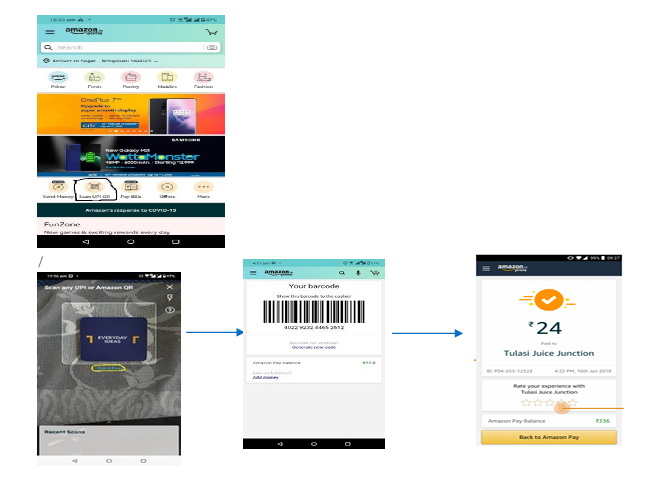
Request String – 16 Digit Code
5129,TX123,60,,4011621861603583,2,,,,,,,Request String – Bar Code
5129,TX123,60,,,2,,,,,,,Response String
"TX123","000505","APPROVED","","","","","112","9363","17000016","0","APPROVED","AmazonPay","A2GI92ROAM509H","7937454-7234578","","0","Utkarsh Merchant 1 Store 1","Indirapuram","GHAZIABAD","v1.0.0","17","","","","","","","60","","","09092020","105841","19000077000505","","","","9363|112|TX123"Sale - Cardless Bank & Brand EMI (ICICI, HDFC & Federal Bank)
A set of privileged customers can avail Cardless EMI on pre-approved bases by Bank. Cashier will have an option to choose Cardless EMI option and select the issuer to have Bank and Brand EMI facilities. With the help of Mobile Number validation and other product details post tenure selection, Bank will confirm for eligibility check by validating OTP and PAN with Success response.
Request String – Cardless Bank EMI
5003,Test123,1200000,,,,,,,,,,Response String - Cardless Bank EMI
"Test123","00","SUCCESS","*****00027","","","","",9076,292721,"","SUCCESS","Cardless EMI by ICICI Bank",1065,"00","","","PAYMENT SK","Kali Paltan Mandir Cantt Meerut Uttar Pradesh","","",307,"","","","","","105|6|ICICI CARDLESS|1200000|205282|0","","000001200000","","201102","172733","00292721009076000121","1200000","",""Request String – Cardless Brand EMI
5004,Test123,1200000,,,,,,,,,,Response String - Cardless Brand EMI
"Test123","00","SUCCESS","*****00013","","","","",9076,292721,"","SUCCESS","Cardless EMI by ICICI Bank",1065,"00","","","PAYMENT SK","Kali Paltan Mandir Cantt Meerut Uttar Pradesh","","",307,"","","","","","106|3|ICICI CARDLESS|1199000|405676|1000|278523|296566|75|Samsung Mob|154382|SM-G935FTKDINS|8785|6000000013","","000001200000","","201102","140705","00292721009076000108","1200000","",""Void - Cardless Bank & Brand EMI (Federal Bank)
This section supports for Void Cardless Bank & Brand EMI for Federal Bank only.
Request String - Without Batch ID & ROC
5031,TXN1226,240000,,,,,,,,,,Request String - With Batch ID & ROC
5031,TXN1226,240000,,,,,,,,,9224,187,,,,,,,,,,Response String - Cardless Brand EMI
"TXN1226","0","Success","************2802","","","","",189,9224,292717,"","Success","Cardless EMI by FEDERAL Bank",40605,"00","","","krishstore1","noida","noida2","",309,"","","","","","","","000000240000","","210716","141848","00292717009224000187","240000","",""Giftiicon – Gift Code Redemption
Giftiicon is an Instant social gifting application based out of Korea. They have integrated with Pine Labs to enable their users to redeem gift coupons on POS terminals. New transaction type has been added in both standalone and integration (currently Wired) mode to support this feature. If the invoice amount is more than the Voucher amount, a banking Sale transaction will be performed for the rest of the amount.
Request String - Without Barcode
4113,TXN12552,10000,,,,,,,,,,,,,,,,,,,,,,,,,Request String - With Barcode
4113,TXN12552,10000,,,,,,,Y7N8-5YES-UMAR,02,,,,,,,,,,,,,,,,,Field 9th and 10th are used for Barcode ID and Barcode Type (02) [considering Txn Type at 0th position].
Response String - Only with Giftiicon
"TXN12552","HE6SXQ","APPROVED"," ************2802"," ","","WALLET","107","9072","23042021","","","GIFTIICON","11251","GC_Q6YX67HE6SXQ","","0","Merchant_AKS","test test","BANGALORE","v1.0.0","110","8900","","","","","QRYS-TPW8-U0AB|Q6YX67HE6SXQ|GC_Q6YX67HE6SXQ","5000","","","07122021","130345"Response String - Giftiicon + Bank Sale
"TXN12552","123456","APPROVED","************2802","XXXX","AMAN KANT SHUKLA /","VISA",87,17,"PR049091",0,"PROCESSED","RBL BANK","02PLA0000008530","000000047040",2,1,"SAPNA FASHION","SAPNA FASHION","THANE ","Plutus v10.1.1 RBL",26,"8900","0","0","0","",S2K1-L3QT-ZYSJ|1SZKNBD2KAUT|GC_1SZKNBD2KAUT,15000,"","","07122021","130006"HDFC Flexipay – POS (Pay Later)
HDFC Flexipay POS is a new payment mode under Pine Labs BNPL offering in which customers will get options to choose 15,30,60 and 90 days tenure. HDFC bank’s Debit card customer can avail this facility and pay the amount with interest based on their convenient tenure. In this feature, HDFC Flexipay offers 15 days No Cost Interest to their customers.
Request String
5030,TXN123,100000,,,,,,,,,,Response String
"TXN123","00","APPROVED","************2802","XXXX","NITIN PODDAR /","MAESTRO",329,54,"24324325",0,"PROCESSED","HDFC BANK"," ","000000000020",2,1,"LOVE COMMUNICATION","JANA PURI","NEW DELHI DEL ","Plutus v1.49.3 MT HDFC BANK",01,"","","","","","119|15|HDFC Debit|99668|100000|332","","","","06302021","185035"Magic PIN
Magic PIN Is a company that rewards customer for sharing the shopping details via charge slip and enrolling through card on their platform. The same rewards can be redeemed at the merchants. The merchant in return pays a marketing fee for on the total invoice amount. Magic PIN is now looking to enable POS redemption through Pine labs.
Request String
Magic PIN Sale:
4109,Test4321,1200,,,,,,,,,Magic PIN Void:
4110,Test4321,1200,,,,,,,,,Response String
"Test4321","00","APPROVED","************0110","XXXX","ABHISHEK TENGURIA /","VISA",113,28,"ICICI041",0,"PROCESSED","ICICI BANK"," ","000000000020",2,1,"LOVE COMMUNICATION","JANAKPURI","NEW DELHI DEL ","Plutus v2.12 MT ICICI BANK",02,"120","1.20","49365","493.65","","","","","","03102022","125350"Zest Money
This section will define the request/response packet under integrated mode.
New transaction Type to handle in Integration Mode:
- Invoice Sale (5367)
- Product Sale (5370)
- Void (5369)
Request String
5367,TXN1234,500000,,,,,,,
5370,TXN1234,500000,,,,,,,
5369,TXN1234,500000,,,,,,,,,,,147,,,,,,,
For Product Sale, OEM for entity needs to be configured using PCUI. New CSV Request/Response are created for new transaction type.
Response String
Bank EMI (Invoice Sale)
TXN1234,00,APPROVED,******7890,,,,147,9008,292386,,INVOICE SALE,ZESTMONEY,7263,,Entry Mode : 3,,Utkarsh Merchant 1 Store 1,Indirapuram,GHAZIABAD,NBFCV1Details(50795|104500|10months|52426|5000.00|1660.28|242.50),APPROVED,01252022,123555,500000Brand EMI (Product Sale)
TXN1234,00,APPROVED,******7890,,,,177,9008,292386,,PRODUCT SALE,ZESTMONEY,7263,,Entry Mode : 3,,Utkarsh Merchant 1 Store 1,Indirapuram,GHAZIABAD,NBFCV1Details(20007|180000|3 months|171691|5000.00|353.00|0.00),APPROVED,01272022,131052,500000Glossary of Terms
| Abbreviation | Description |
|---|---|
| EDC | Electronic Draft Capture |
| EFT | Electronic Fund Transfer |
| CVV | Card Verification Value |
| COM | Component Object Model |
| MSR | Magnetic Stripe Reader |
| ICC | Integrated Circuit Chip |
| TLB | Type Library |
| IDL | Interface Definition Language |
| RRN | Retrieval Reference Number |